

What is Claude Squad?
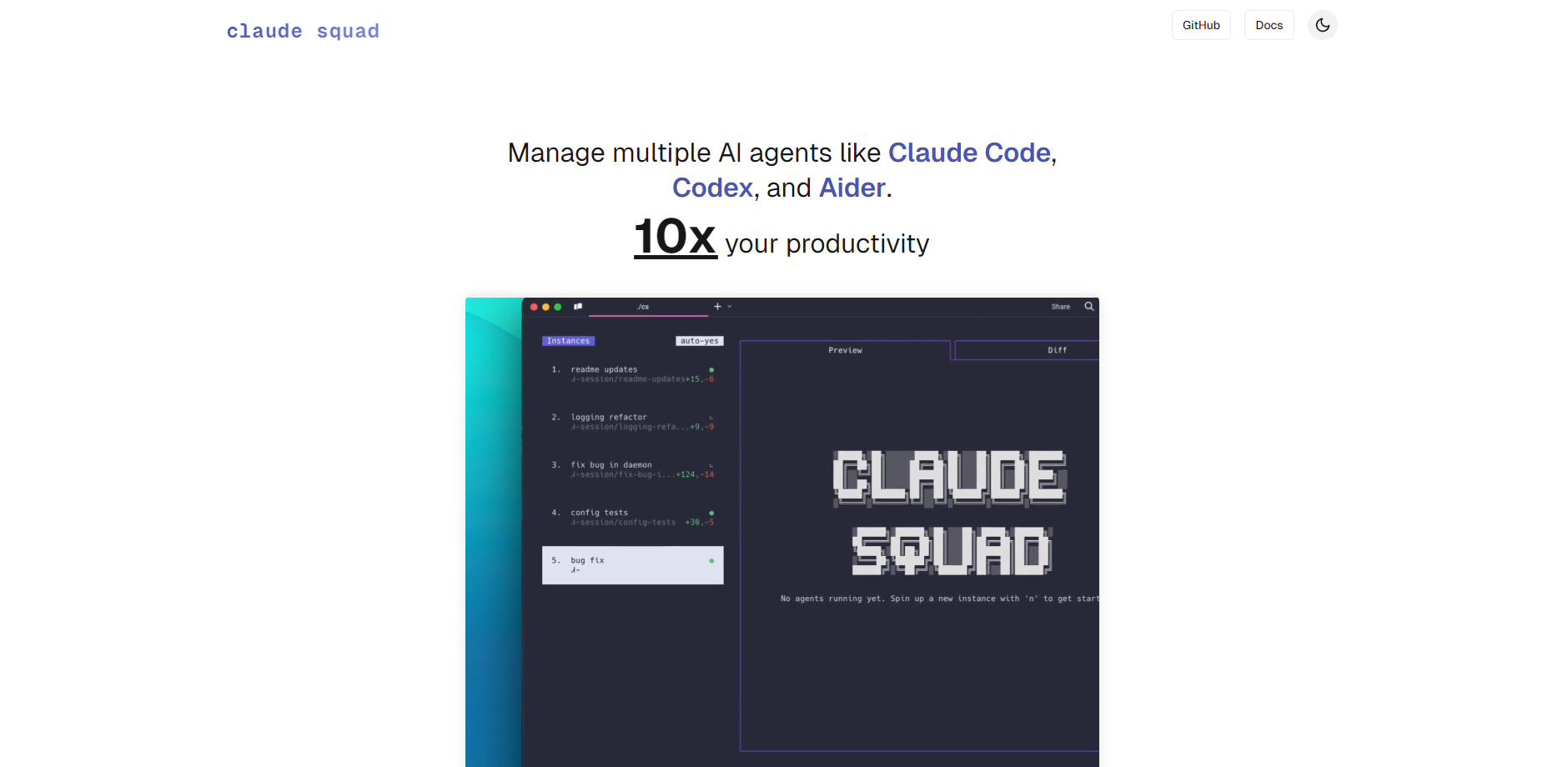
Claude Squad is a powerful terminal application designed for developers who utilize multiple AI coding agents (such as Claude Code, Aider, Codex, and Gemini). It addresses the challenge of managing complex, parallel development tasks by consolidating all agent sessions and isolated code workspaces into one unified interface, enabling you to efficiently run, monitor, and isolate several coding projects simultaneously without conflicts.
Key Features
⚡ Parallel Task Execution
Run multiple agents concurrently in the background, allowing you to delegate complex tasks without tying up your primary workflow. For maximizing hands-off productivity, you can enable the experimental autoyes (or yolo) mode, which automatically accepts prompts generated by agents like Claude Code or Aider, streamlining routine or low-risk tasks.
🌳 Isolated Git Workspaces
Every new agent session automatically initializes its own isolated git worktree. This foundational design ensures that each task operates on a dedicated branch and an independent codebase instance, completely eliminating conflicts between simultaneous agent activities and guaranteeing a clean separation of concerns.
🖥️ Unified Terminal Interface (TUI)
Manage all active agent instances and tasks from a single, intuitive terminal window. Leveraging tmux for session isolation, the TUI provides simple keyboard shortcuts for session creation, navigation, quick status checks, and the ability to attach or detach from any running agent instance instantly.
🔍 Pre-Commit Change Review
Maintain total control over code quality and integrity. Before applying any agent-generated changes to your main codebase, easily review the file differences in the dedicated diff tab. You can then commit the changes, push the branch to GitHub, or pause/resume the session directly from the menu.
Use Cases
Simultaneous Project Management
Initiate one agent to focus on a large, complex feature implementation (e.g., using a powerful model like Claude Code) while simultaneously launching a second, lightweight agent in the background to handle an urgent bug fix or a routine dependency update. You monitor both processes without needing multiple terminal windows or worrying about staging area conflicts.
Agent Comparison and Model Testing
Quickly spin up two separate instances—one running Codex and another running a local model like Gemini—to tackle the exact same complex refactoring task. Compare their proposed code changes and approaches side-by-side using the built-in diff view before committing the superior solution, allowing you to benchmark and optimize your AI toolkit.
Non-Blocking Workflow Automation
Delegate routine tasks, such as generating documentation stubs, writing boilerplate code, or optimizing test coverage, to an agent running in autoyes mode. The agent handles the necessary prompts and changes in its isolated environment, allowing you to focus on high-priority, creative development without constant interruption.
Why Choose Claude Squad?
Claude Squad transforms the way you interact with AI coding assistants by providing a stable, high-efficiency architecture specifically built for concurrent development.
The core advantage lies in architectural stability: unlike manually juggling multiple terminal windows and worrying about mixed-up staging areas, Claude Squad leverages two critical technologies:
Isolation via
tmux: Ensures reliable, persistent terminal sessions for each agent, so tasks continue running even if you detach.Isolation via
git worktrees: Guarantees absolute code isolation for every task, meaning when you run five agents, you are running five independent, clean working environments, resulting in predictable and conflict-free concurrent development.
This technical foundation moves you from sequential, interruption-based AI assistance to a robust, parallel, and managed workflow.
Conclusion
Claude Squad is the definitive terminal solution for developers seeking efficiency, isolation, and total control over their AI-assisted coding environment. It transforms the way you interact with AI assistants, moving from sequential execution to managed, parallel workflows.
Explore the power of parallel development today by installing cs.
More information on Claude Squad
Launched
Pricing Model
Free
Starting Price
Global Rank
Follow
Month Visit
<5k
Tech used
Claude Squad was manually vetted by our editorial team and was first featured on 2025-10-18.
Claude Squad Alternatives
Load more Alternatives-
-
-

-

Claude Code is an agentic coding tool that lives in your terminal, understands your codebase, and helps you code faster by executing routine tasks, explaining complex code, and handling git workflows - all through natural language commands.
-