

Click outside to close
What is AudioDenoise?
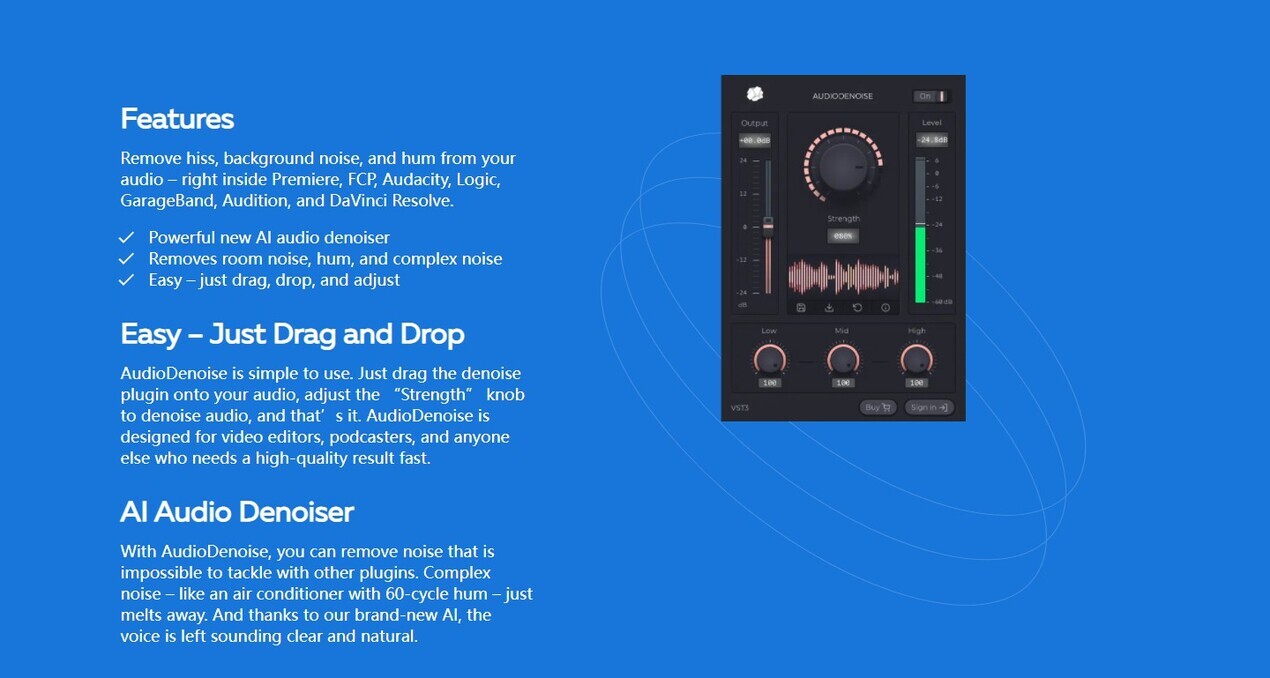
AudioDenoise is an AI-powered plugin that removes hiss, background noise, and hum from audio files. Compatible with popular editing software like Premiere Pro, Audition, Final Cut Pro, and more, it offers a simple drag-and-drop interface for easy use. With its advanced AI technology, AudioDenoise can tackle complex noise issues like air conditioner hum while preserving the natural quality of voices.
Key Features:
1. Powerful Noise Removal: AudioDenoise effectively eliminates room noise, hums, and other types of complex noise that are difficult to address with other plugins.
2. Easy-to-Use Interface: Simply drag the denoise plugin onto your audio file and adjust the "Strength" knob to remove unwanted noise.
3. Wide Compatibility: Works seamlessly with various video and audio editing applications such as Premiere Pro, Audition, Avid Media Composer, ProTools, Final Cut Pro (FCP), GarageBand Logic,and DaVinci Resolve.
Use Cases:
- Video Editors: Enhance the audio quality of videos by removing background noises or hums during post-production.
- Podcasters: Clean up podcast recordings by eliminating unwanted noises for a professional sound.
- Content Creators: Improve the overall audio quality in vlogs or online tutorials by reducing distracting background sounds.
How to Use:
1. Install AudioDenoise on your preferred editing software (Premiere Pro/Audition/FCP/etc.)
2. Open your project and import the audio file you want to denoise.
3. Locate the AudioDenoise plugin in your effects panel or library.
4. Drag and drop AudioDenoise onto your audio clip in the timeline.
5. Adjust the "Strength" knob until you achieve optimal noise reduction without compromising voice clarity.
6. Preview the result by toggling AudioDenoise on/off to compare before and after effects.
7.Export or save your denoised audio file.
Conclusion:
AudioDenoise is a powerful AI-driven plugin that simplifies the process of removing unwanted noise from audio files. Its compatibility with popular editing software and user-friendly interface make it accessible to both beginners and professionals. By effectively reducing background noises, hums, and complex noise issues, AudioDenoise enhances the overall quality of videos, podcasts, and other content creations. Experience the difference in audio clarity with AudioDenoise's advanced technology.
More information on AudioDenoise
Top 5 Countries
20.91%
5.07%
5.01%
4.46%
4.41%
United States (20.91%)
United Kingdom (5.07%)
Brazil (5.01%)
India (4.46%)
Russia (4.41%)
Traffic Sources
33.45%
52.75%
4%
8.75%
mail (0.11%)
direct (33.45%)
search (52.75%)
social (4%)
referrals (8.75%)
paidReferrals (0.85%)
Source: Similarweb (Jan 3, 2026)
AudioDenoise was manually vetted by our editorial team and was first featured on 2023-03-27.
AudioDenoise Alternatives
AudioDenoise Alternatives-

Reduce Background Noise from audio Recording and save as mp3, m4a/aac, wav format.
-

DeNoiseMedia is an AI-powered online tool that allows you to clean any recording from noise and make your voice stand out. As a result, you get a professional sounding audio that can impress any audience. Just upload media and hear it for yourself.
-

Get rid of background noise effortlessly with Noise Reducer & Audio Enhancer. This AI - powered online tool removes noise, enhances audio clarity, and boosts volume for podcasts, videos, and meeting recordings. Try it for pristine audio!
-

Remove background noise from videos effortlessly with Noise Eraser, an AI tool that delivers professional-level audio quality in just a click.
-

Tired of noisy audio? AudioCleaner AI is an easy to use, online tool. Powered by AI, it removes background noise from audio and video files in seconds. Ideal for podcasters, vloggers, and educators.