

What is Inbox Hero?
Your Outlook inbox is more than just a communication tool; it's often the center of your workday. But for many professionals, it can quickly become a source of stress and distraction, where critical tasks are buried under a flood of newsletters, notifications, and conversations.
Inbox Hero is an AI-powered manager designed specifically for Microsoft 365 that brings intelligent order to this chaos. It works silently in the background to categorize, prioritize, and automate your email, transforming your inbox from a cluttered list into an organized hub for productivity. This allows you to focus your energy on the work that truly matters, not on manual sorting.
Key Features
🏆 Enhance Outlook's Focused InboxOur AI offers a classification system that is 95% more accurate than the default, moving genuinely actionable emails to your Focus folder and non-essential items to Other. It re-assesses every email in real-time to ensure your priorities are always up to date.
🏷️ Categorize Emails AutomaticallyUsing advanced AI, Inbox Hero analyzes email content to assign one of 25+ smart categories (like #Finance, #Support, #Projects) and a clear status (like ToDo, Reply, Urgent). This gives you at-a-glance clarity on what every message requires from you.
⚙️ Automate Your WorkflowCreate powerful, priority-based rules that automatically move emails based on their AI-assigned category and status. Whether you're archiving completed project threads or routing all invoices to a specific folder, you can build a system that manages your email for you, 24/7.
🛡️ Protect Your Data with Enterprise-Grade SecurityBuilt on Microsoft Azure, Inbox Hero processes emails exclusively within your geographic region and never stores your data on our servers. This "process and drop" architecture ensures complete privacy and full compliance with GDPR and HIPAA standards.
Use Cases:
For the Operations Manager Overwhelmed by Daily Volume:James used to spend the last two hours of his day just clearing his inbox, trying to separate urgent operational alerts from vendor invoices and internal project updates. After setting up Inbox Hero, AI categories like
#Alerts,#Invoices, and#Projectsare applied automatically. His custom rules then file non-urgent reports and archive completed conversations, leaving him with a clean inbox focused only on what needs his immediate attention. He now finishes his work on time and leaves the office feeling in control.For the Head of Client Services Focused on Responsiveness:Kavya’s team was struggling with response times because critical client escalations looked the same as routine support tickets in their shared inbox. With Inbox Hero, emails containing phrases like "urgent help needed" are automatically assigned the
Status: Urgentand categorized as#Support. This ensures that high-priority issues are immediately visible to the entire team, leading to a 5x faster response rate and a measurable increase in client satisfaction.For the CEO Aiming for Strategic Focus:Rachel found her days consumed by email noise, which pulled her away from high-level strategy and growth initiatives. She implemented Inbox Hero to filter her inbox aggressively. Now, only emails categorized as
#Financeor#Projectsand marked withStatus: Reviewremain in her primary view. All other communications, like newsletters or general inquiries, are automatically moved to other folders for her assistant to handle. This allows her to dedicate her time to the decisions that drive the business forward.
Conclusion:
Inbox Hero is more than an organization tool; it's a system for reclaiming your time and mental energy. By bringing intelligent automation directly into your existing Outlook environment, it empowers you to shift your focus from managing an overwhelming inbox to driving meaningful results. If you're ready to experience a calmer, more productive workday, it's time to let Inbox Hero manage the chaos.
Frequently Asked Questions
1. Do I need to set up complex rules to get started?No. Inbox Hero begins working immediately after its two-minute setup. The AI-powered categorization and Enhanced Focus Mode provide significant value out-of-the-box without any custom rules. Rules are an optional feature for users who want to build advanced, personalized automation.
2. How does Inbox Hero improve on Outlook's standard Focused Inbox?While Outlook's Focused Inbox is a helpful start, its sorting can be inconsistent. Inbox Hero's AI provides a much more accurate and context-aware analysis of what is truly "actionable." It also re-evaluates an email's status every time a message is sent or received in a thread, ensuring your priorities are always correctly sorted in real time.
3. Is my company's email data secure?Absolutely. Security is a core principle of our design. Inbox Hero is GDPR & HIPAA compliant and built on Microsoft Azure. We use a "process and drop" method, meaning your email content is analyzed for categorization but is never stored on our servers. All processing occurs within your designated geographic region (e.g., US or EU) in a secure, isolated environment.
4. Does this require a complex installation for my team?No. Inbox Hero is a 100% cloud-based service that integrates seamlessly with Microsoft 365. There are no applications to install on user machines. Administrators can onboard users automatically through Azure AD group assignments, making deployment across an organization simple and maintenance-free.
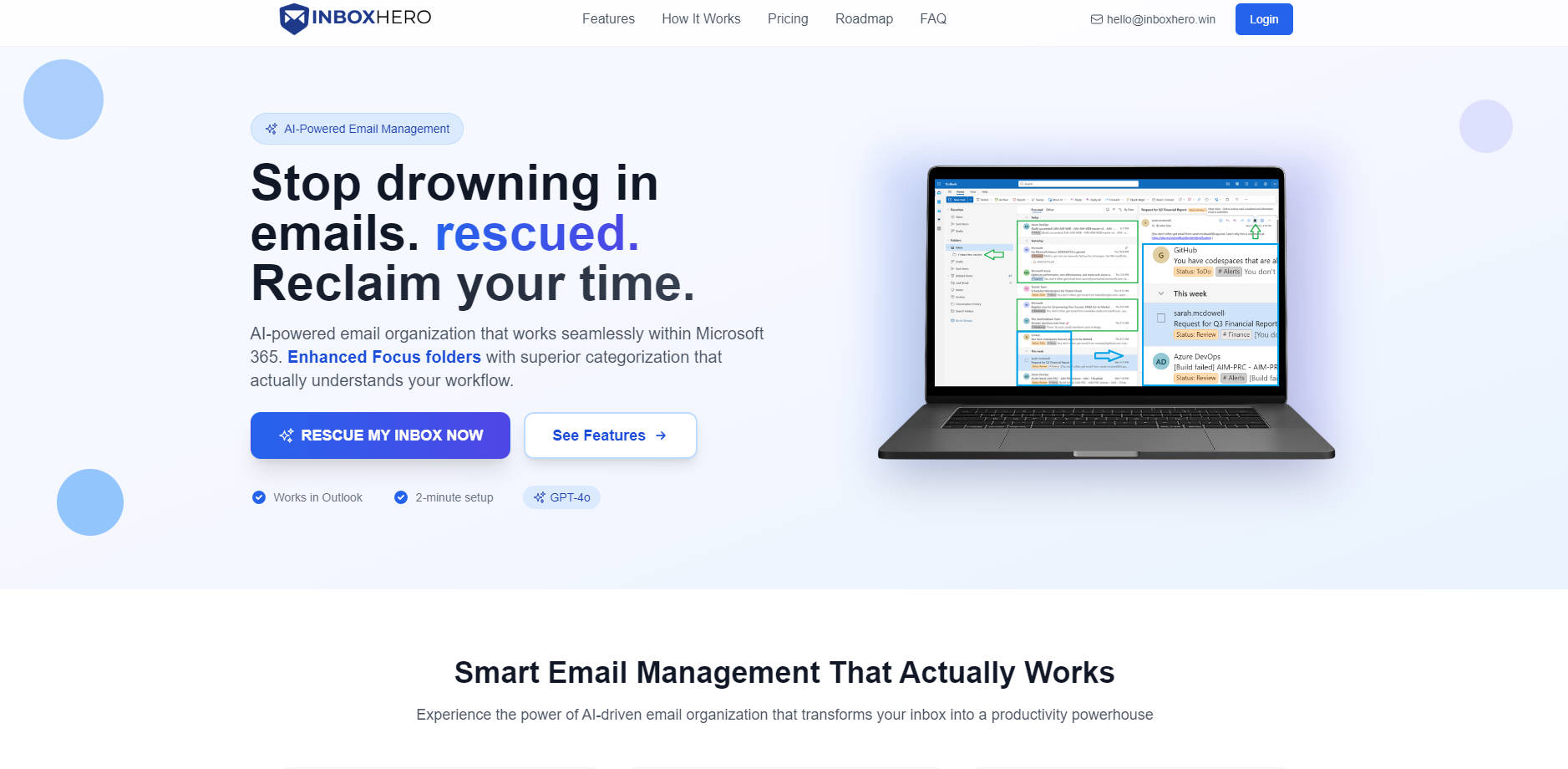
More information on Inbox Hero
Launched
2025-06
Pricing Model
Free Trial
Starting Price
$25 /month
Global Rank
Follow
Month Visit
<5k
Tech used
Inbox Hero was manually vetted by our editorial team and was first featured on 2025-08-14.
Related Searches
Inbox Hero Alternatives
Load more Alternatives-
-

InboxAgents: Your AI inbox unifies all emails, DMs & chats. Prioritize revenue, get personalized AI replies & stop app-hopping. Maximize focus.
-
Reclaim your time with Superinbox AI. Get personalized, context-aware email drafts & intelligent inbox organization for Gmail & Outlook.
-
Cut email time in half with Inbox Zero, the AI assistant for Gmail. Automate sorting, draft replies, unsubscribe & block cold emails easily.
-
