

What is Promptlight ?
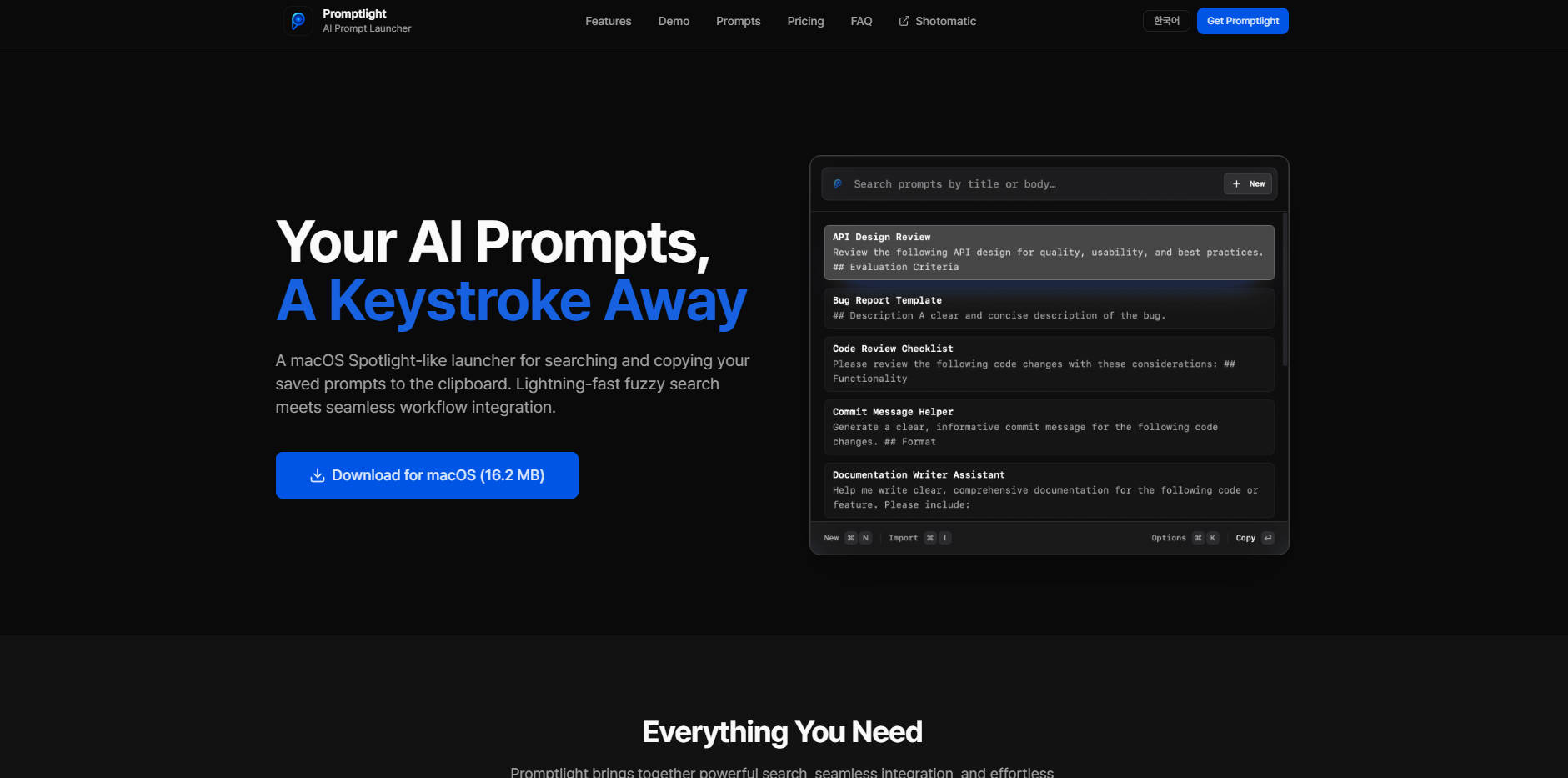
Promptlight is the essential macOS utility designed to eliminate prompt management friction, acting as a powerful, keyboard-first launcher specifically for your reusable AI prompts. By integrating seamlessly into your workflow, Promptlight solves the problem of scattered, difficult-to-recall prompts, allowing you to instantly search, copy, and deploy complex AI instructions across any tool, ensuring rapid, consistent interaction with models like ChatGPT and Claude.
Key Features
Promptlight is engineered for speed and efficiency, bringing the power of macOS Spotlight to your AI workflow.
| Feature | Description & Benefit |
|---|---|
| ⚡️ Lightning-Fast Fuzzy Search | Instantly locate any prompt, regardless of the size of your library. Promptlight leverages intelligent fuzzy matching to find what you need in milliseconds, even if you only remember a few keywords, drastically reducing the time spent searching. |
| ⌨️ Keyboard-First Workflow | Maintain peak efficiency without touching your mouse. Launch Promptlight instantly from any application using a customizable global hotkey (default: ⌘⌥P). Browse, select, and copy your desired prompt directly to the clipboard with a single keystroke. |
| 🔒 Private and Secure Data Storage | Your critical AI instructions remain under your control. All prompts are stored locally on your Mac, ensuring complete privacy and security. Promptlight never transmits your data to external servers or cloud services. |
| 🗂️ Effortless Prompt Management | Easily create, edit, and organize your prompt library without leaving the application. Promptlight also supports bulk importing of existing prompts via Markdown files, making migration and organization straightforward and scalable. |
| ⭐ Quick Access Favorites | Pin your most frequently used or complex prompts as favorites. This ensures they are always instantly visible and accessible, eliminating the need to search for high-priority items every time you need them. |
Use Cases
Promptlight is designed for users who rely on consistency and speed in their AI interactions. Here are tangible ways you can integrate it into your daily tasks:
1. Rapid Persona Switching and Content Consistency
If you manage multiple writing styles (e.g., technical documentation, marketing copy, internal memos), you likely use specific, detailed prompts to set the tone and context for the AI. Instead of manually copying these long instructions, use Promptlight's global hotkey to pull the exact "Technical Editor" or "Brand Voice" prompt instantly, ensuring every output maintains perfect consistency and saves valuable time during context shifts.
2. Instant Code Generation and Debugging Templates
Developers often use structured prompts for generating specific code snippets, refactoring functions, or debugging error logs. Store these complex, multi-line templates in Promptlight. When you encounter a bug or need to generate boilerplate code, launch Promptlight, search for the relevant template (e.g., "Python Unit Test Template"), and paste the prompt directly into your preferred AI chat interface or coding environment in seconds.
3. Universal Tool Compatibility
Promptlight copies the prompt to your system clipboard, making it universally compatible. Whether you are using a dedicated desktop AI application, a web-based tool like ChatGPT or Claude, or integrating prompts into an internal knowledge base, the workflow remains the same: Launch > Search > Copy > Paste. This ensures your prompt library is instantly actionable across your entire digital workspace, regardless of the tool you are currently focused on.
Why Choose Promptlight?
For professionals who value efficiency and data control, Promptlight offers functional advantages over standard text expanders or simple note-taking applications.
Unmatched Workflow Integration
Promptlight is built as a native macOS application, providing performance and seamless integration that generic, cross-platform tools often lack. The core benefit is zero-latency access: the customizable global hotkey ensures your entire prompt library is always one keystroke away, dramatically reducing context switching costs and keeping you focused on the task at hand.
Guarantees Data Sovereignty
In an era where proprietary information is often included in prompts, data security is paramount. Promptlight provides peace of mind by guaranteeing that all your saved prompts and sensitive instructions are stored only locally on your machine. You retain full control over your data, with no reliance on external cloud services or third-party servers.
Simple, User-Focused Ownership
Promptlight is offered as a single, lifetime license purchase, including all future updates and improvements. This means you avoid recurring subscription fees and benefit from continuous feature enhancements, making it a reliable, long-term investment in your productivity workflow.
Conclusion
Promptlight transforms prompt management from a cumbersome task into an instant, integrated action. By combining lightning-fast search with a secure, keyboard-centric design, it ensures that your most valuable AI instructions are always ready when you are. If you seek consistency, speed, and privacy in your generative AI workflow, Promptlight is the essential utility for your Mac.
More information on Promptlight
Launched
Pricing Model
Paid
Starting Price
Global Rank
Follow
Month Visit
<5k
Tech used
Promptlight was manually vetted by our editorial team and was first featured on 2025-11-18.
Promptlight 대체품
더보기 대체품-

FlashPrompt: AI 워크플로우를 완벽하게 마스터하세요. ChatGPT 및 Claude와 같은 모든 AI 도구를 넘나들며 프롬프트를 즉시 관리하고 배포하세요. 안전하고 통합적인 프롬프트 접근을 통해 매일 수 시간을 절약하세요.
-

-

Promptacore는 AI 프롬프트를 중앙 집중화 및 최적화하여 일관되고 고품질의 결과를 보장합니다. 이를 통해 프롬프트 엔지니어링을 완벽히 숙달하고, 시행착오를 없애 예측 가능한 AI 결과물을 손에 넣을 수 있습니다.
-

AI Prompt Manager Chrome 확장 프로그램으로 AI 프롬프트 작업 과정을 간소화하세요. 프롬프트를 쉽게 정리, 버전 관리, 백업 및 공유할 수 있습니다. 개발자, 콘텐츠 제작자 및 AI 애호가에게 이상적입니다. 업무를 간편하게 만들어 보세요 – 자세히 알아보려면 클릭하세요!
-

PromptBlaze는 브라우저를 AI 프롬프트 허브로 바꿔줍니다. 코딩이 필요하지 않습니다. 프롬프트 체이닝, 컨텍스트 실행, 빠른 답변 메뉴와 같은 기능을 즐겨보세요. 데이터를 안전하게 보호하세요.