

What is Modify Video?
Traditionally, altering the environment, lighting, or style within a video shot meant complex, costly, and time-consuming rework. Modify Video, available within Luma AI's Dream Machine, empowers professional creatives like you—VFX artists, filmmakers, and content creators—to fundamentally transform your video footage while critically preserving the integrity of the original performance, motion, camera, and character. It allows you to evolve everything else in your shot without starting from scratch.
Key Features
Modify Video offers powerful features designed to give you creative control over your video shots:
✨ Capture and Transfer Motion: Extract full-body, facial, or lip-sync motion from any video clip – no specialized gear like mocap suits or green screens required. You can then use this captured performance to drive new characters, props, or camera paths in perfect synchronization, allowing you to apply an actor's take onto a CG creature or animate objects along choreographed routes.
🌍 Restyle, Retexture, and World Swap: Effortlessly transform the visual look of your scene while keeping the original motion and framing intact. Imagine turning a simple garage into a sprawling spaceship interior, shifting a daytime shot to a moonlit night, or evolving low-fidelity footage into cinematic realism. You change the world around the performance, not the performance itself.
✂️ Isolated Scene Element Edits: Gain precise control to edit individual elements within a shot, such as wardrobe, faces, props, or the sky, without affecting the rest of the scene. Need to change a shirt color for continuity, subtly age a character in-scene, or add a specific object like a UFO to the sky? Modify Video makes this possible without tedious manual masking or tracking.
⚙️ Structured Transformation Presets: Guide the AI transformation with three distinct strength levels: Adhere for subtle changes like retexturing or lighting adjustments; Flex for a balanced approach, allowing significant style changes while keeping core elements recognizable; and Reimagine for maximum creative freedom, enabling dramatic transformations including mapping human motion to non-humanoid forms.
How Modify Video Solves Your Problems: Use Cases
Modify Video directly addresses common challenges in video production and creative workflows:
Rapidly Prototype Visual Concepts: Quickly explore multiple stylistic variations or environment swaps for a shot early in the process. Use Modify Video for previs or pitch decks to visualize complex ideas like turning live-action into animation or placing a character in fantastical settings without needing extensive 3D rendering or set building upfront.
Streamline Post-Production Edits: Eliminate the need for time-consuming post-production tasks like rotoscoping, complex masking, or frame-by-frame adjustments for specific element changes. Easily alter wardrobe details, modify props, or add visual effects anchored to elements within the scene in minutes, not hours.
Unlock New Creative Possibilities: Leverage performance from any source footage to drive entirely new animated characters or creature concepts. Capture a dancer's motion from a phone video and apply it to a CG monster, or use an actor's facial performance on a digital avatar, opening up unique creative avenues previously requiring specialized motion capture setups.
Unique Advantages
Modify Video is designed with creative control and efficiency in mind:
Performance Preservation: Unlike tools that generate video from prompts alone, Modify Video uses advanced performance signals (pose, facial expression, lip sync) to understand and preserve the critical motion and action of your source footage, ensuring temporal consistency and a coherent viewing experience.
Prompt-Optional Control: While text prompts are supported, you can also guide transformations using visual references or a specific "Start Frame" image, giving you more direct control over the output's style and initial appearance without relying solely on descriptive text.
Flexible Transformation Levels: The Adhere, Flex, and Reimagine presets provide a structured way to control the degree of transformation, allowing you to tailor the output precisely to your creative intent, from subtle enhancements to complete scene reinterpretation.
Conclusion
Modify Video fundamentally changes how you can approach video transformation, enabling you to keep the essential performance and motion of your footage while gaining unprecedented flexibility to reimagine everything else. It removes traditional barriers like expensive gear and complex post-production techniques, putting powerful creative control directly in your hands.
Modify Video is available now within Luma AI's Dream Machine with all paid subscriptions.
Explore how Modify Video can help you transform your shots and unlock infinite creative possibilities.
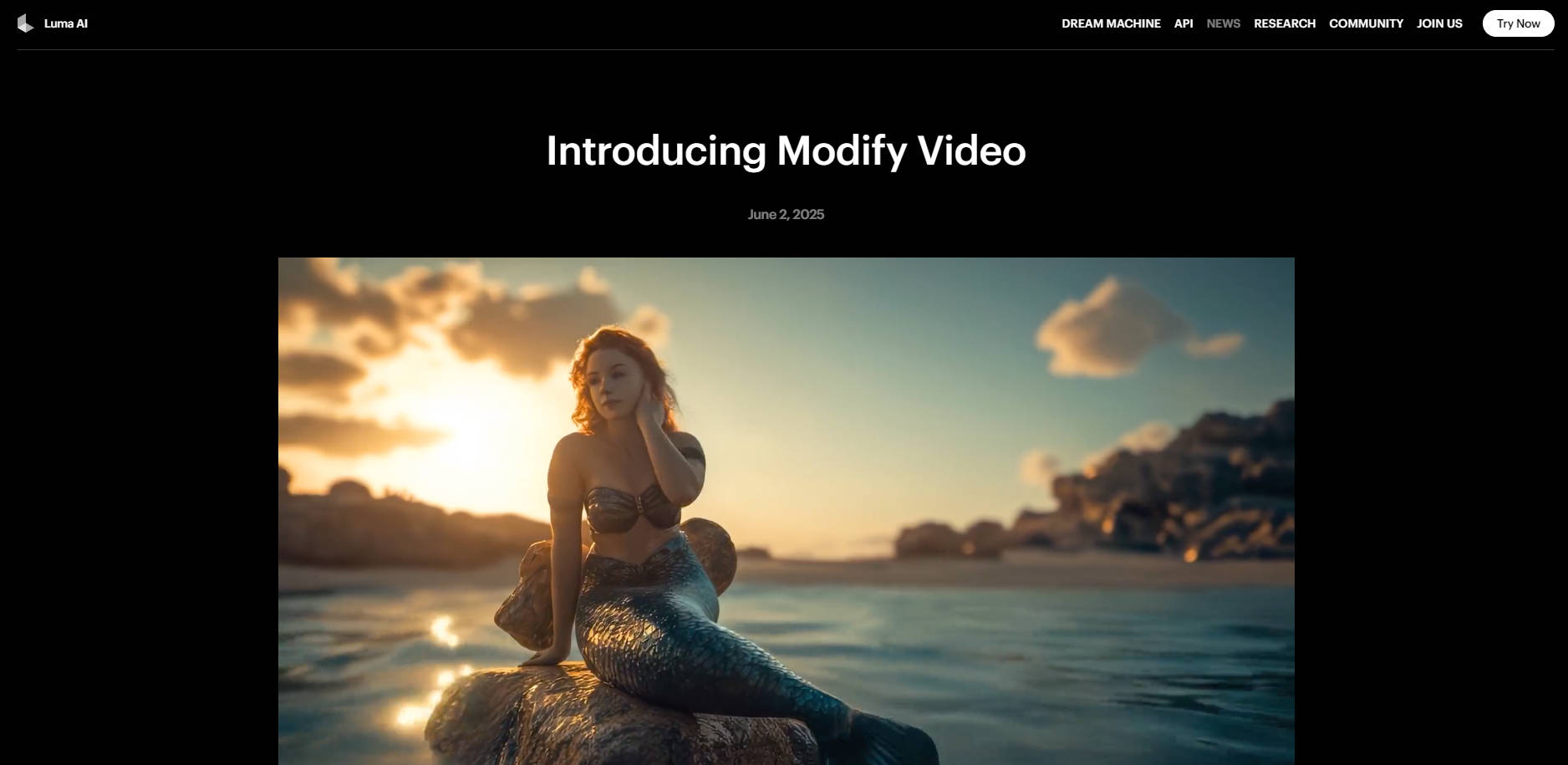
More information on Modify Video
Launched
2021-06
Pricing Model
Freemium
Starting Price
Global Rank
Follow
Month Visit
1M
Tech used
Top 5 Countries
14.86%
7.82%
5.8%
5.62%
4.48%
United States
India
Korea, Republic of
Russia
France
Traffic Sources
1.37%
0.33%
0.05%
13.86%
14.79%
69.6%
social
paidReferrals
mail
referrals
search
direct
Source: Similarweb (Sep 25, 2025)
Modify Video was manually vetted by our editorial team and was first featured on 2025-06-08.
Related Searches
Modify Video Alternatives
Load more Alternatives-
Lucy Edit AI: AI video editor for text-guided video transformations. Edit with simple prompts, preserving original motion flawlessly for professional results.
-
-

Create professional videos instantly with AI prompts. Replace complex editing with simple commands and get high-quality results fast.
-

Deja Videos AI: Your all-in-one video toolkit. Instantly apply unique styles, replace characters, erase objects & enhance quality. Transform your vision with ease.
-
