

What is OpenCreator?
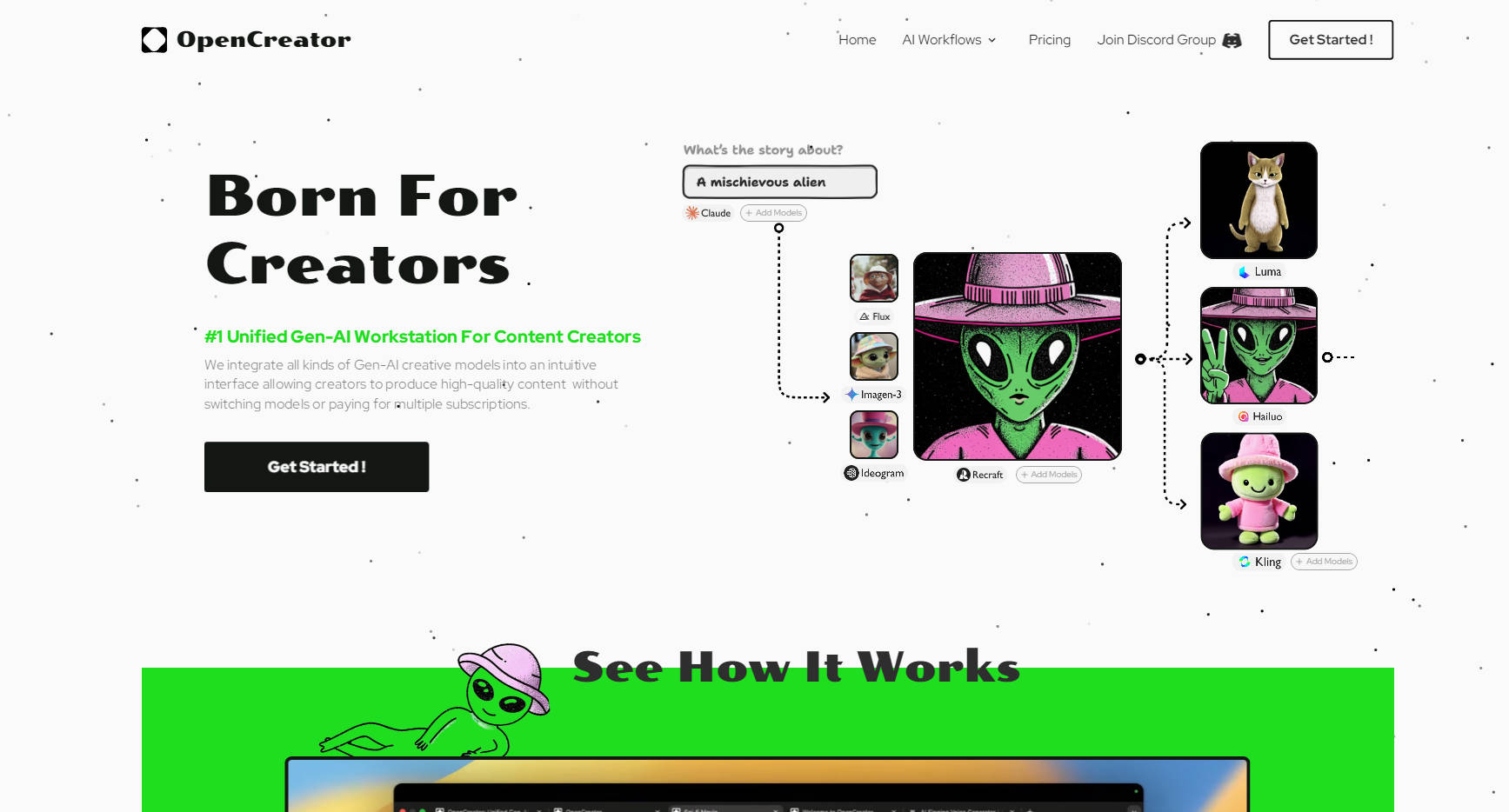
Finding the right AI tool for your creative projects often means juggling multiple platforms, learning different interfaces, and paying for several subscriptions. What if you could access a wide array of generative AI models—for images, video, and more—all from one intuitive workspace? OpenCreator brings the power of diverse AI tools directly to you, streamlining your workflow so you can focus on what you do best: creating.
OpenCreator is designed to simplify how you incorporate AI into your content production. Forget switching tabs and managing separate accounts. We provide a single, clean interface where you can experiment with, compare, and utilize leading AI models efficiently.
Key Features
Unified Model Access: Work with over 20 top Gen-AI models like Kling, Luma, Runway, Stable Diffusion, OpenAI, and more, all within OpenCreator. No more platform hopping.
🔍 Effortless Comparison: Generate outputs from different models side-by-side with a single click to easily choose the best result for your needs.
💰 Transparent Pay-As-You-Go Pricing: Access every integrated model at its base cost ("factory price") with zero markup. Pay only for the resources you actually use, eliminating wasted subscription fees.
✨ Creator-Focused Interface: Get started in minutes. The platform is built with creators in mind, offering an intuitive experience without a steep learning curve. Produce high-quality AI-assisted content significantly faster than manual methods.
🔄 Continuous Model Integration: Gain access to promising new Gen-AI models as soon as they emerge. We handle the integration, so you always have the latest tools available.
Use Cases
Social Media Content Variety: Imagine you need a short promotional video, several unique post images, and engaging caption ideas for a campaign. Instead of using separate video, image, and text generators, you can use OpenCreator to access models like Luma or Runway for video, Ideogram or Stable Diffusion for images, and an OpenAI model for text, all within the same project space. Compare outputs quickly and maintain a consistent style.
Blog Post Illustrations: As a writer, you want custom visuals for your latest article but lack design skills or budget for stock photos. Use OpenCreator to try different image generation models (like Recraft or Ideogram) with the same prompt. Compare the styles and select the image that best fits your article's tone, paying only for the generation process itself.
Marketing Asset Prototyping: Your team needs visuals for a new ad campaign but wants to explore different creative directions rapidly. Use OpenCreator to generate multiple concepts using various AI models simultaneously. This allows for quick A/B testing of visual styles and messaging, helping you make data-informed decisions faster and without committing to multiple expensive tool subscriptions.
Why Choose OpenCreator?
OpenCreator centralizes your AI creative toolkit. It saves you time by eliminating the need to switch between different AI services and saves you money with its transparent, pay-as-you-go pricing at base cost. You get access to a broad spectrum of cutting-edge AI models through an easy-to-use interface, empowering you to produce exceptional content more efficiently. Plus, you retain full commercial rights to everything you create.
More information on OpenCreator
Launched
2024-11
Pricing Model
Paid
Starting Price
Global Rank
1393507
Follow
Month Visit
11.7K
Tech used
Google Analytics,Google Tag Manager,Framer,Google Fonts,Gzip,HTTP/3,OpenGraph,HSTS,YouTube
Top 5 Countries
55.11%
29.43%
3.69%
3.08%
2.84%
China
United States
Hong Kong
Indonesia
Canada
Traffic Sources
5.84%
0.61%
0.04%
3.28%
48.51%
41.65%
social
paidReferrals
mail
referrals
search
direct
Source: Similarweb (Sep 25, 2025)
OpenCreator was manually vetted by our editorial team and was first featured on 2025-04-10.
Related Searches
OpenCreator Alternatives
Load more Alternatives-
-

-
-
ImagineAPP: Unified AI video creation. Stop juggling tools & access top text-to-video, image-to-video, & music video models easily.
-

VideoWeb AI: Your all-in-one hub for AI video, image, & music creation. Access leading models like Luma, Suno, Kling & more in one place.