

What is PapersGPT For Zotero?
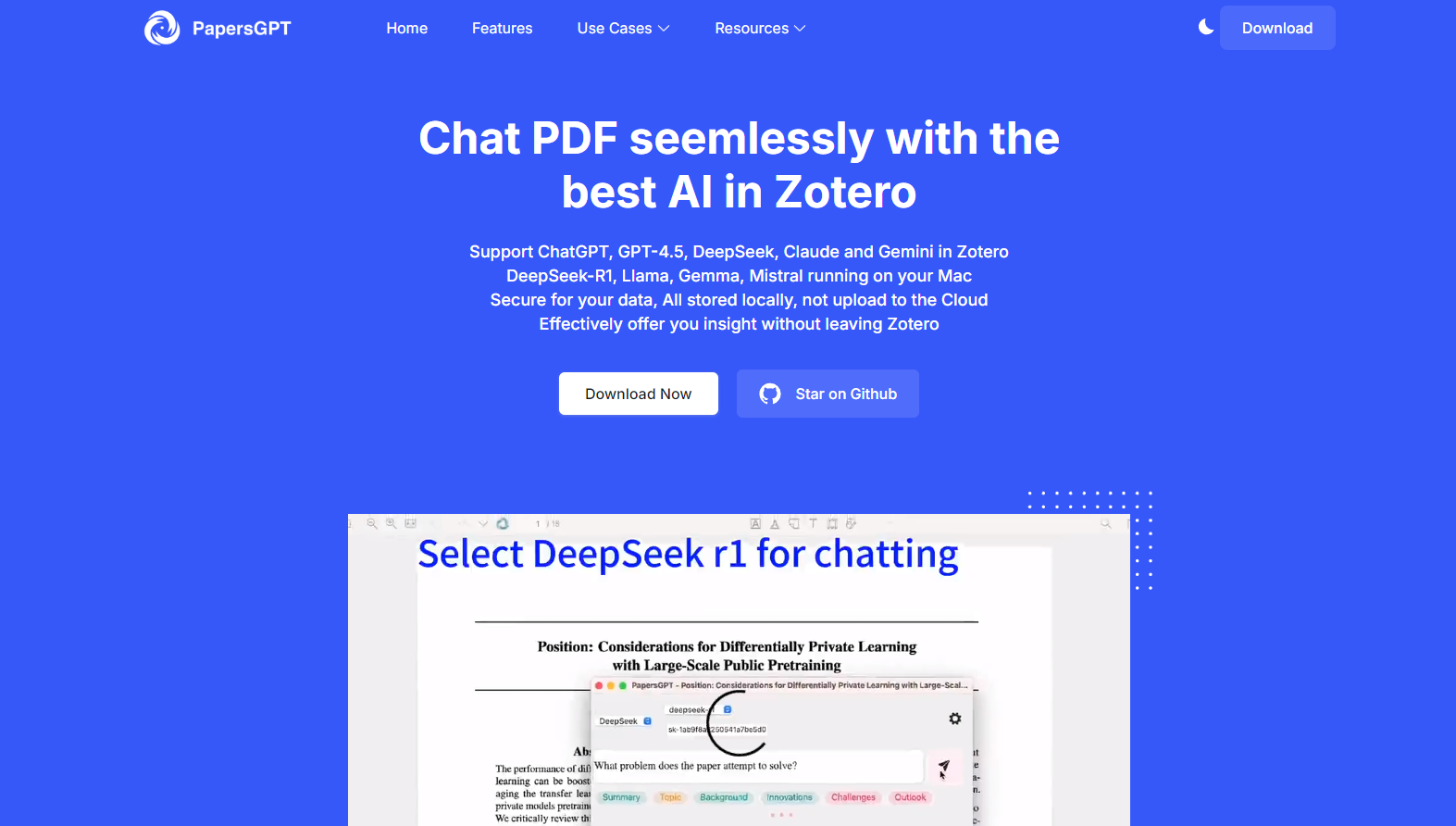
Navigating through dense research papers can be overwhelming, especially when you’re trying to extract key insights or answer specific questions. PapersGPT for Zotero is here to simplify your workflow. This AI-powered plugin integrates seamlessly with Zotero, offering you the ability to converse with PDFs, extract critical information, and manage your research more efficiently. Whether you’re a scholar, researcher, or student, PapersGPT transforms how you interact with academic texts, making your reading and research process smarter and faster.
Key Features
🔍 Access to Cutting-Edge LLMs: Choose from a wide range of state-of-the-art language models, including DeepSeek, Gemini, Claude, and GPT-4.5, ensuring high accuracy and efficiency for your research needs.
💻 Local Open-Source Models for Mac Users: Use powerful open-source models like Gemma 3, QwQ-32B, and DeepSeek-R1-Distill-Llama directly on your Mac, with all data stored locally for absolute privacy.
🔒 100% Privacy and Security: With local RAG modules and vector databases, your data never leaves your device, ensuring complete confidentiality.
📚 Seamless Zotero Integration: Manage and chat with your documents directly within the Zotero interface, eliminating the need to switch between applications.
💡 Save and Share Insights: Easily save, export, or share the insights and annotations you extract from your conversations with PDFs.
Use Cases
📄 Research Assistance: Quickly summarize lengthy papers, identify key concepts, and get answers to specific questions without reading every word.
✍️ Academic Writing: Generate insights for literature reviews or dive deep into specific sections of papers to support your arguments.
🤝 Collaborative Projects: Share annotated PDFs and responses with colleagues or team members to streamline collaborative research efforts.
How to Use
1️⃣ Installation: Download the plugin file and install it via Zotero’s Add-ons menu.
2️⃣ Startup: Press the designated keys (Command + Enter for Mac, Ctrl + Enter for Windows) to launch the plugin.
3️⃣ Select Models: Choose from a variety of business or open-source LLMs tailored to your needs.
4️⃣ Chat with PDFs: Open any PDF in Zotero and start asking questions. PapersGPT will process the document and provide insightful responses.
5️⃣ Manage Insights: Save, export, or share the extracted insights for future reference.
Conclusion
PapersGPT for Zotero is more than just a plugin—it’s a powerful research assistant that enhances how you interact with academic texts. With its integration of advanced language models, local privacy features, and seamless Zotero compatibility, it’s the ultimate tool for anyone dealing with large volumes of PDFs. Simplify your research process and unlock the full potential of your academic work with PapersGPT.
More information on PapersGPT For Zotero
Launched
2024-11
Pricing Model
Free
Starting Price
Global Rank
3681297
Follow
Month Visit
5.4K
Tech used
Next.js,Vercel,Gzip,Webpack,HSTS
Top 5 Countries
88.51%
10.4%
0.61%
0.49%
United States
Japan
Hong Kong
Germany
Traffic Sources
10.36%
1.38%
0.12%
8.72%
34.32%
44.78%
social
paidReferrals
mail
referrals
search
direct
Source: Similarweb (Sep 25, 2025)
PapersGPT For Zotero was manually vetted by our editorial team and was first featured on 2025-03-17.
Related Searches
PapersGPT For Zotero Alternatives
Load more Alternatives-
-
-

AskYourPDF: AI chat for documents. Instantly summarize PDFs, get precise answers, & extract key insights for research, study, and work. Save hours.
-

Transform research with GPT Researcher. This AI autonomous agent provides in-depth, factual, cited reports from 20+ sources in minutes.
-
