

Click outside to close
What is PixAI Art?
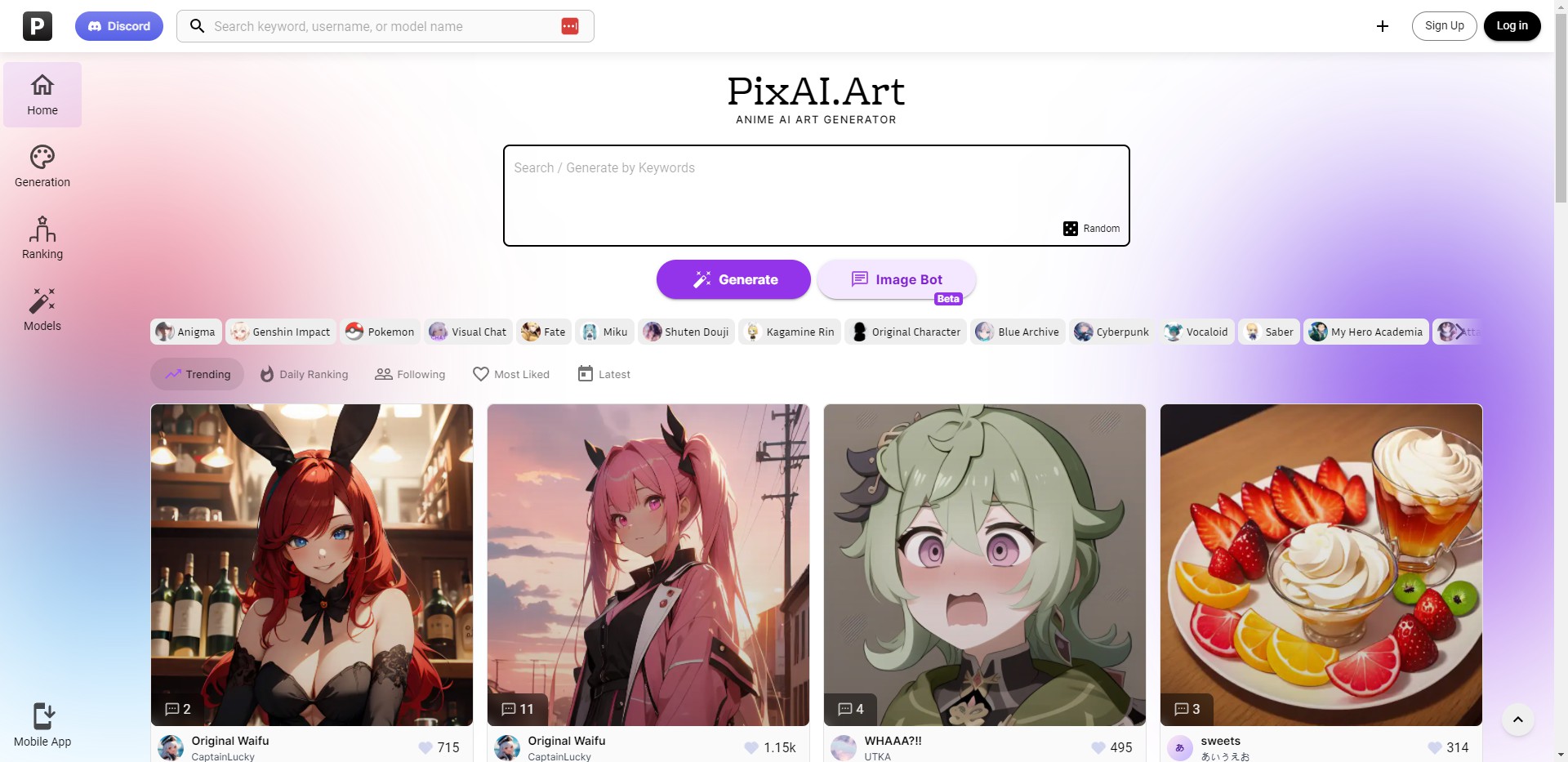
PixAI is a comprehensive AI-driven ecosystem designed for creators who want to produce high-quality anime art without the steep learning curve of traditional digital illustration. Whether you’re an aspiring character designer or a seasoned artist looking to accelerate your workflow, PixAI provides the specialized models and precision tools necessary to bring complex visual ideas to life.
By bridging the gap between advanced Stable Diffusion technology and a user-friendly interface, PixAI allows you to move beyond simple text-to-image generation. It offers a collaborative environment where you can train custom models, participate in community challenges, and refine your work with professional-grade editing suites—all within a single, accessible platform.
Key Features
- 🎨 Expansive Model Marketplace: Access a massive library of specialized AI models, including exclusive SDXL and Dit-based architectures like Tsubaki and Serin. These models are specifically tuned for anime aesthetics, ensuring your generations maintain stylistic consistency and high visual fidelity.
- 🧠 Intelligent Prompt Assistance: Streamline your creative process with Auto-complete and the "Prompt Helper." These tools use natural language processing to interpret complex descriptions and suggest relevant tags, helping you achieve optimal results even if you aren't familiar with technical prompt engineering.
- 🏗️ Integrated LoRA Training: Go beyond generic outputs by training your own LoRA (Low-Rank Adaptation) models directly in the app. This allows you to "teach" the AI specific characters, unique art styles, or consistent outfits, giving you unparalleled control over your creative intellectual property.
- 🎬 Dynamic "Animate" Suite: Transform static illustrations into engaging video content with the Image-to-Video feature. By applying motion to your generated art, you can create cinematic clips and social-media-ready animations that breathe life into your characters.
- 🛠️ Precision ControlNet & Editing: Use ControlNet to guide image composition via reference poses or sketches. If a generation is nearly perfect but needs a tweak, the "Inpainting" and "Flow Editing" tools allow you to modify specific details or change elements through simple text commands.
Use Cases
- Character Concepting for Writers: Quickly visualize protagonists and world-building elements for light novels or webtoons. By using LoRA training, you can ensure your character looks identical across dozens of different scenes and poses.
- Social Media Content Creation: Generate unique, high-resolution avatars or themed illustrations for your online presence. Use the "Animate" feature to turn these images into eye-catching motion graphics for platforms like TikTok or Instagram.
- Artistic Style Exploration: Study how different artistic influences interact by using "Style Mix." This allows you to blend the characteristics of multiple models, helping you discover entirely new visual languages for your creative projects.
Why Choose PixAI?
PixAI distinguishes itself by offering a full-cycle creative workflow rather than just a generation tool. While many platforms limit you to basic image creation, PixAI provides the infrastructure to train, edit, and animate your work in one place.
The platform’s "Flow Editing" (formerly Chat Editing) is a significant differentiator. It allows you to interact with your art conversationally—for example, telling the AI to "add a sunset background" or "change the character's expression to a smile"—making complex edits accessible to everyone. Furthermore, the credit-based system, supported by daily logins and community events, ensures that high-end AI art generation remains accessible without mandatory upfront costs.
Conclusion
PixAI is more than a generator; it is a professional-grade playground for the next generation of digital creators. By combining the power of specialized anime models with intuitive editing and training tools, it empowers you to define your own artistic boundaries. As you explore the Generation Panel and engage with the community, you’ll find that the only limit to what you can create is the depth of your own vision.
More information on PixAI Art
Top 5 Countries
52.3%
10.17%
3.84%
3.24%
Japan (52.3%)
United States (10.17%)
Russia (3.84%)
Taiwan (3.24%)
Korea, Republic of (1.94%)
Traffic Sources
69.8%
26.1%
mail (0.02%)
direct (69.8%)
search (26.1%)
social (1.54%)
referrals (2.46%)
paidReferrals (0.07%)
Source: Similarweb (Jan 3, 2026)
PixAI Art was manually vetted by our editorial team and was first featured on 2023-08-03.
PixAI Art Alternatives
PixAI Art Alternatives-
PICPIK.AI: Professional AI art generation integrated directly into Photoshop. Access specialized models and rapid fine-tuning for production-ready designs.
-
Enhance, restore, and colorize images with PixAI—an AI-powered image processing tool for iPads. Upgrade your photo quality effortlessly. Try it now!
-
AniGen AI enables effortless creation of stunning anime artwork with customizable options for uniqueness, suitable for various users.
-

Need AI videos or images? PXZ AI creates them from text! Multiple models & tools. Try it now & unleash your creativity!
-
CreateVision AI: Free AI image generation & editing. Transform concepts into pro visuals with smart prompts, multi-engine speed & unique tools.