

Click outside to close
What is PyVideoTrans?
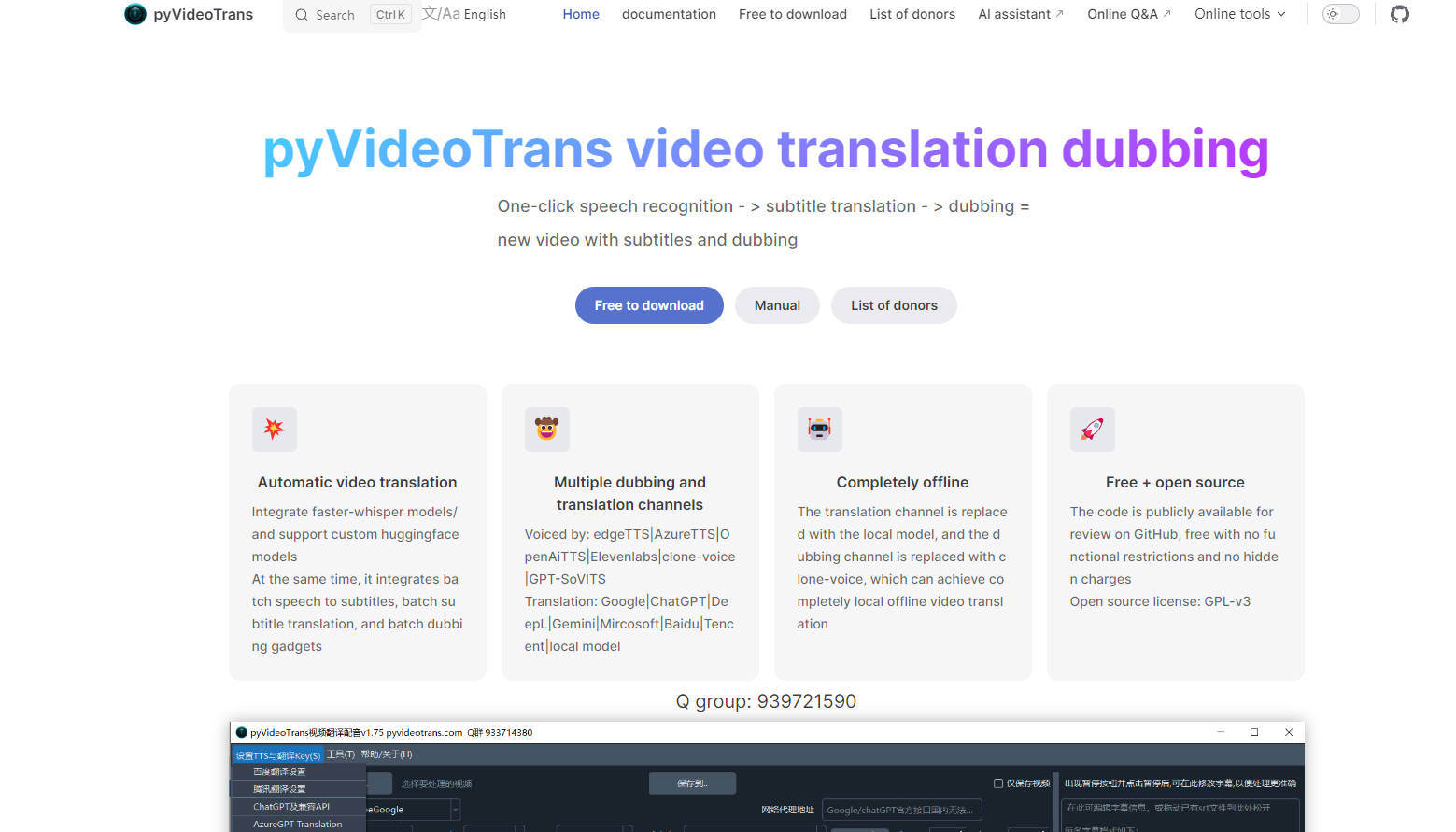
pyVideoTrans is a powerful, open-source desktop application designed to eliminate language barriers in your video content. It provides a complete, automated workflow for translating, transcribing, and dubbing videos, making it an essential tool for content creators, educators, and anyone looking to reach a global audience. The software is entirely free to use, with no feature limitations or required registration.
Key Features
🎤automating the entire process from transcription and translation to voice synthesis and final video rendering.
🗣️ High-Accuracy Speech Transcription Leveraging advanced models like faster-whisper, OpenAI API, and Gemini, you can batch-process video or audio files to generate precise, time-coded SRT subtitle files. The software intelligently processes human speech, operating independently of any pre-existing hardcoded subtitles in the video.
🌐 Versatile Subtitle Translation Translate existing SRT files into dozens of languages using a wide array of services, including DeepL, Google Translate, ChatGPT, and even offline models. pyVideoTrans preserves the original time codes and offers multiple bilingual subtitle styles for clarity.
🎙️ Flexible Text-to-Speech (TTS) Dubbing Generate natural-sounding voiceovers for your videos directly from subtitle files. You can utilize leading TTS engines like Edge TTS, Azure AI, and ElevenLabs, or even innovative options like GPT-SoVITS for voice cloning. The tool also supports assigning different voice roles to different lines of dialogue for multi-character videos.
🛠️ Integrated Media Toolkit Beyond translation, pyVideoTrans includes a suite of essential utilities. You can merge audio, video, and subtitle files, separate vocals from background music (based on UVR5), convert media formats, add watermarks, and edit subtitles, all within a single application.
Use Cases
For Content Creators: Imagine you run a popular YouTube channel in English. To expand your reach to a Japanese-speaking audience, you can use pyVideoTrans to automatically generate Japanese subtitles and a natural-sounding Japanese voiceover for your entire video library, creating a fully localized version with minimal manual effort.
For Corporate Trainers & Educators: You have a series of technical training videos in German and need to distribute them to your company's global teams. With pyVideoTrans, you can efficiently create versions for your English, Spanish, and French-speaking colleagues, complete with both accurate subtitles and clear audio dubbing, ensuring your message is understood everywhere.
Why Choose pyVideoTrans?
Completely Free and Open-Source: pyVideoTrans is free to download and use without any subscriptions or functional restrictions. Its full source code is available on GitHub, offering complete transparency. You only pay for third-party API usage if you choose to use commercial services.
Unmatched Integration Flexibility: You are in complete control of your workflow. Choose from a vast selection of cutting-edge local models for offline processing to ensure privacy and cost-efficiency, or connect to powerful third-party APIs for premium quality. The platform supports custom API integration, giving you limitless options.
A True All-in-One Solution: Instead of juggling separate tools for transcription, translation, voice synthesis, and video editing, pyVideoTrans consolidates the entire localization pipeline into one cohesive interface. This integrated approach saves you significant time and simplifies a traditionally complex process.
Conclusion
pyVideoTrans offers a comprehensive and remarkably flexible solution for anyone serious about making their video content accessible across languages. By combining a powerful automated workflow with an open, user-controlled architecture, it gives you the tools to connect with a global audience effectively.
Explore the full potential of pyVideoTrans by downloading it from GitHub and start breaking down language barriers today!
Frequently Asked Questions (FAQ)
Is pyVideoTrans really free to use? Yes, the software itself is 100% free and open-source. There are no fees, subscriptions, or hidden costs to use the application and all its features. You are only responsible for costs associated with any third-party APIs (like OpenAI, DeepL, or Azure) that you choose to connect to the platform. You can also use it entirely for free with local, offline models.
How does the software handle videos that already have subtitles burned in? pyVideoTrans works by analyzing the audio track of the video to detect human speech. It does not read or extract hardcoded subtitles (text that is part of the video image). This means it can process any video that contains spoken dialogue, whether it has existing subtitles or not. It cannot, however, process a silent video that only contains music and on-screen text.
What operating systems does it support? pyVideoTrans provides a pre-packaged version for easy installation on Windows 10 and 11. For macOS and Linux users, the software can be installed by following the clear, step-by-step source code deployment instructions provided in the official documentation on GitHub.
More information on PyVideoTrans
Top 5 Countries
54.88%
11.07%
9.87%
5.1%
4.54%
China (54.88%)
Costa Rica (11.07%)
Taiwan (9.87%)
Hong Kong (5.1%)
United States (4.54%)
Traffic Sources
3.2%
8.86%
25.23%
61.47%
social (3.2%)
paidReferrals (0.25%)
mail (0.97%)
referrals (8.86%)
search (25.23%)
direct (61.47%)
Source: Similarweb (Sep 24, 2025)
PyVideoTrans was manually vetted by our editorial team and was first featured on 2024-05-31.
PyVideoTrans Alternatives
PyVideoTrans Alternatives-

Reach a global audience! Translate video, documents, and images instantly with AI. Preserve quality, formatting, and layout across 130+ languages.
-
Instantly batch-translate video subtitles into 100+ languages. Reach global audiences with perfect timing & cultural nuance.
-

Unlock video potential! TranscribeTube uses AI for 96% accurate YouTube video to text conversion. Summarize, translate & repurpose content effortlessly.
-

Translate SRT & VTT files with AI. Free subtitle translation. Keep original timing. SubTranslate: fast, accurate & easy to use!
-
Upload video of any language and get english subtitles automatically. We use OpenAI-Whisper for best-in-class quality for subtitle generation.