

What is MicDrop ai?
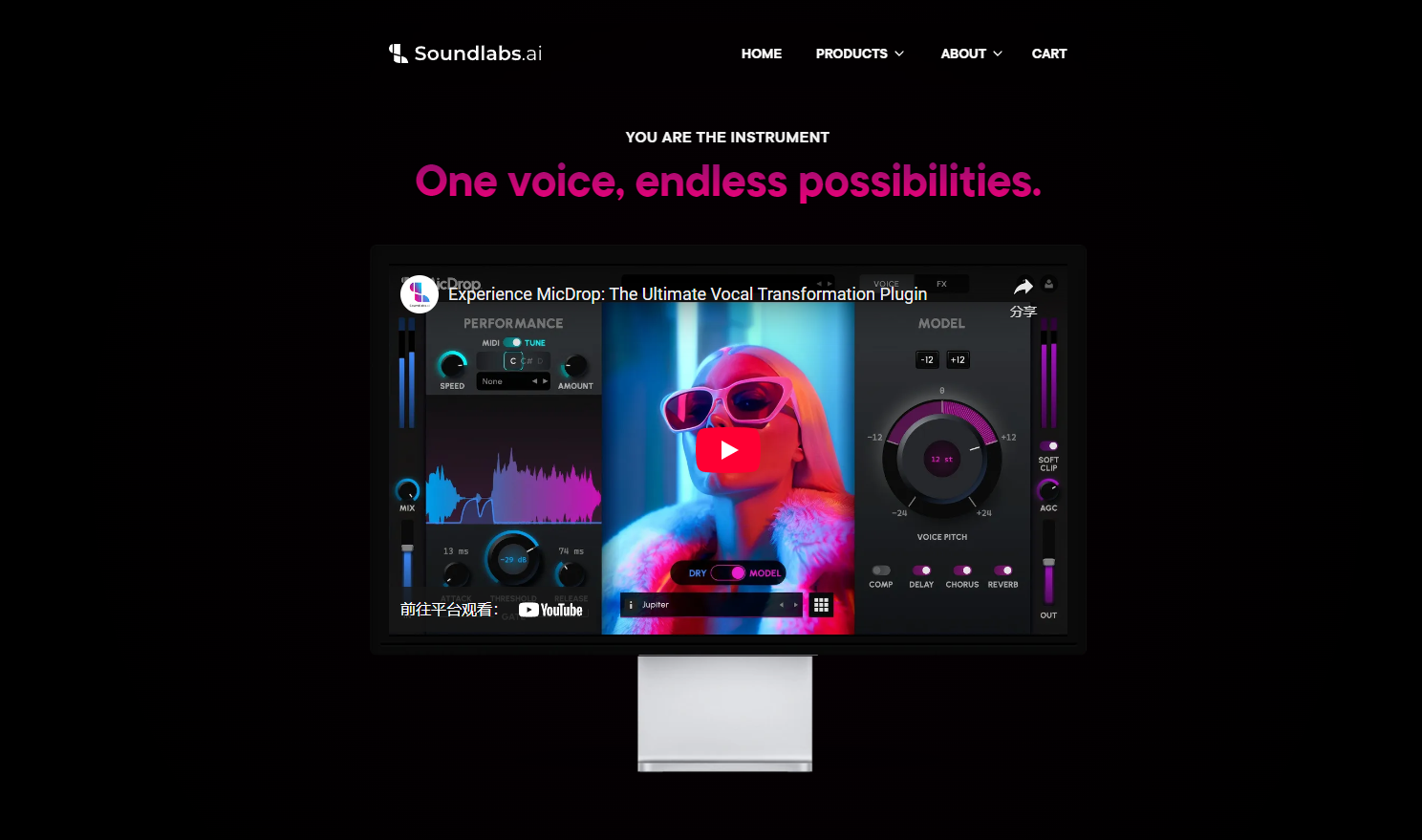
MicDrop is an innovative audio plugin tailored for music producers, sound designers, and artists looking to elevate their vocal manipulation and instrument creation capabilities. It solves common challenges such as achieving studio-quality vocals, crafting unique harmonies, and transforming sounds in real-time. With MicDrop, you can seamlessly morph your voice into other voices, instruments, or even crowd effects, all within your digital audio workstation (DAW).
Key Features:
🎤 Real-Time Voice Transformation: Instantly convert raw vocals into studio-quality recordings, bypassing the need for expensive equipment or ideal recording conditions.
🎹 MIDI-Controlled Harmonies: Generate complex vocal harmonies and layers with zero latency, enabling on-the-fly creativity. Effortlessly switch between real-time vocoder and playback modes.
🎺 Voice-to-Instrument Conversion: Expand your sonic palette by transforming your voice into instruments like saxophones, cellos, or slap basses, opening up new creative possibilities.
✨ Vocal Restoration: Enhance less-than-perfect recordings, even those captured on a phone, and turn them into polished, studio-grade vocals with a single click.
⚖️ Royalty-Free Hybrid Models: Create freely with ethically sourced and legally compliant hybrid voices, ensuring your work remains your own for commercial use.
🔄 Monthly Content Updates: Stay inspired with regularly updated voice and instrument packs, keeping your sound library fresh and expanding your creative toolkit.
Use Cases:
The Bedroom Producer: Recorded a vocal take on a laptop microphone but lack professional polish? MicDrop can instantly transform raw recordings into studio-quality vocals, ready for mixing.
The Live Streamer: Performing live and want to add dynamic harmonies? MicDrop’s MIDI control lets you create layered harmonies in real-time, enhancing your performance without additional singers.
The Sound Designer: Need a unique sound effect for a film score? Instead of sifting through sample libraries, use MicDrop to transform your voice into a cello, crafting a bespoke sound tailored to your project.
Conclusion:
MicDrop is a versatile and powerful tool for anyone working with vocals and audio. Its real-time transformation capabilities, combined with an ethical and royalty-free model library, make it an essential asset for creative expression and professional-quality audio production.
FAQ:
Can I purchase a perpetual license?
Yes, a perpetual license option is available.How do subscriptions work?
Subscriptions offer flexible payment options. "MicDrop Classic" provides access to base models, while "MicDrop Unlimited" includes all models and monthly new voice and instrument packs. Access is maintained as long as the subscription is active.What are the system requirements?
MacOS: macOS 14 (Sonoma) or later, Apple Silicon processor (M1 or later), 8 GB RAM (16 GB recommended), 2 GB storage, Core Audio compatible audio hardware, broadband internet.
Windows: Windows 10 (64-bit), Intel Core i5 or equivalent AMD processor, 8 GB RAM (16 GB recommended), 2 GB storage, dedicated DirectX 12 compatible graphics card (Nvidia 1050 Ti works), ASIO compatible audio hardware, broadband internet.
Additional: Screen resolution of 1280x800 minimum. A MIDI interface is required for optional MIDI features.
What is the recommended usage?
MicDrop is resource-intensive. For optimal performance:Create and Commit: Craft your sound, then bounce it in place.
Optimize Your System: Minimize other active programs.
Consider Resource Limits: Most computers can run one or two instances simultaneously.
Platform Compatibility: Windows ARM computers are not yet supported.
Do I own the songs or vocals I create?
Yes, as long as you own the input material, you can use any MicDrop model commercially.How do I get technical support?
Open a support ticket on our Discord server.How are voice models trained?
Models are trained from scratch using a proprietary blend of voices (public domain, friends & family) to create new hybrid singers.
More information on MicDrop ai
Launched
2022-10
Pricing Model
Paid
Starting Price
Global Rank
1329197
Follow
Month Visit
18.9K
Tech used
Google Analytics,Google Tag Manager,Cloudflare CDN,Shopify,Gzip,HTTP/3,OpenGraph,Shopify Pay,HSTS,YouTube
Top 5 Countries
35.82%
17.67%
16.37%
6.27%
5.11%
United States
France
United Kingdom
India
Sweden
Traffic Sources
8.03%
1.19%
0.11%
6.93%
39.9%
43.55%
social
paidReferrals
mail
referrals
search
direct
Source: Similarweb (Sep 25, 2025)
MicDrop ai was manually vetted by our editorial team and was first featured on 2025-03-06.
Related Searches
MicDrop ai Alternatives
Load more Alternatives-
Revocalize AI: Get studio-quality vocals with AI. Transform, perfect, and generate hyper-realistic voices. Seamless VST plugin for music pros.
-

Elevate your music with studio-quality AI vocal transformation. Get royalty-free vocals from diverse, ethically trained voice models.
-

-
-

Synthesizer V Studio 2 Pro: Create human-level, expressive AI vocals for music. Enjoy unmatched control, Voice-to-MIDI, & fast rendering for producers.