

What is Video 2X?
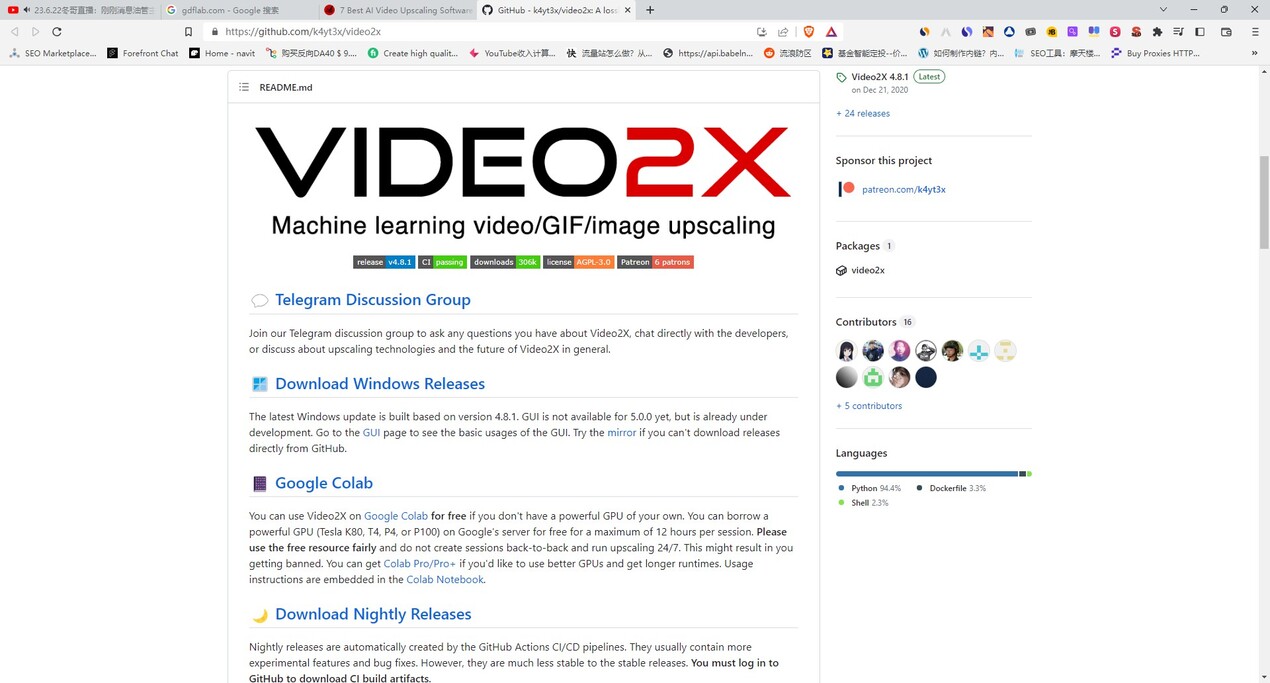
Video2X is a robust, open-source utility engineered to significantly enhance the resolution of low-quality video content. It addresses the fundamental challenge of retaining detail when scaling video by employing advanced, AI-driven image upscaling models on a frame-by-frame basis. For media enthusiasts, archivists, and developers, Video2X provides a powerful, flexible, and efficient solution for transforming legacy footage into high-definition and 4K media.
Key Features
Video2X utilizes a sophisticated, multi-stage processing pipeline to ensure maximum quality and flexibility, allowing you to achieve vastly improved visual fidelity compared to standard interpolation methods.
🖼️ Precision Frame-Based Upscaling
Unlike conventional video upscalers that attempt to process the video stream as a whole, Video2X first extracts individual frames using FFmpeg. This critical step allows the application to leverage powerful, specialized AI image upscaling algorithms (like waifu2x, SRMD, or Anime4KCPP) designed for static images. By treating each frame as a high-priority image, the tool drastically reduces artifacts, noise, and blur, leading to vastly improved output quality when the video is reconstructed.
⚡ Optimized Performance and Architecture
The Video2X project has been completely rewritten in C/C++ (Version 6.0.0 and newer), resulting in a faster and more efficient architecture. This foundational improvement ensures that the complex frame extraction, AI processing, and video reconstruction stages execute with greater speed and stability, particularly when leveraging modern GPU acceleration capabilities through Vulkan support.
⚙️ Customizable AI Model Selection
You retain control over the output quality and aesthetic by selecting the specific AI upscaling model used. This customization is essential, as different models are optimized for various content types—for instance, waifu2x excels at cleaning and scaling anime and line art, while other models might be better suited for real-life footage. This flexibility ensures you achieve the best possible result for your source material.
☁️ Free Cloud GPU Access via Google Colab
If your local hardware does not meet the necessary requirements (e.g., AVX2 CPU support or a Vulkan-compatible GPU), Video2X offers full integration with Google Colab. This allows users to utilize powerful, cloud-based NVIDIA T4, L4, or A100 GPUs for free for short sessions, ensuring that powerful video upscaling capabilities are accessible to everyone, regardless of their local machine specifications.
Use Cases
Video2X serves a variety of demanding use cases, delivering professional results across different media types and technical requirements.
1. Archival and Legacy Media Restoration
You can restore old or low-resolution video archives, such as family footage, historical clips, or standard definition content, to modern high-resolution standards. By cleaning noise and accurately reconstructing detail through AI models, Video2X ensures that these valuable memories are preserved and viewable on modern 4K displays without significant quality loss.
2. Specialized Media Enhancement (Anime and Cartoons)
For specialized content like anime or high-fidelity cartoons, Video2X provides superior results. By selecting models specifically trained on line art and vector graphics (such as waifu2x), you can eliminate common compression artifacts, smooth jagged edges, and upscale 360P or 480P source material into crisp 1080P or 4K, often at higher frame rates (as demonstrated in the included Bad Apple!! demo).
3. Automated, Cross-Platform Production Workflows
For developers, power users, and those running dedicated servers, Video2X supports multiple deployment methods. Whether you use the simple GUI installer on Windows, the command-line interface on Linux (via AppImage or AUR packages), or deploy the container image via Docker/Podman, you can easily integrate Video2X into custom batch scripts or automated production pipelines for large-scale processing.
Why Choose Video2X?
Video2X stands out not just for its capability, but for its commitment to performance, accessibility, and user control.
Superior Quality Through Architecture: The core methodology of splitting video into individual frames and applying specialized AI models ensures the output quality is genuinely enhanced, moving beyond simple interpolation to true detail reconstruction.
Accessibility and Flexibility: Whether you prefer the simplicity of a Windows GUI, the customization of a Linux command line, or need the powerful, free GPU resources offered by Google Colab, Video2X provides a path for you to achieve high-quality upscaling without requiring a massive initial hardware investment.
Open-Source Customization: As an open-source project, Video2X allows advanced users to dive deep into the process, select specific models, and utilize scripting capabilities (batch/bash) for complex, tailored upscaling jobs that meet highly specific quality standards.
Conclusion
Video2X delivers professional-grade video upscaling by combining the power of AI image models with a robust, efficient frame-based processing pipeline. If you require a reliable, high-quality, and highly customizable tool to elevate your video library to modern resolution standards, Video2X offers the speed, efficiency, and flexibility you need.
Explore the comprehensive documentation to learn more about installation, model selection, and how Video2X can transform your video content.
More information on Video 2X
Launched
2023
Pricing Model
Free
Starting Price
Global Rank
Follow
Month Visit
<5k
Tech used
Video 2X was manually vetted by our editorial team and was first featured on 2023-06-23.
Related Searches
Video 2X Alternatives
Load more Alternatives-
Photo/Video/GIF enlargement and Video frame interpolation using machine learning
-

Aiarty Video Enhancer: AI-powered 4K upscaling, denoise, deblur, & smooth motion. Restore old videos, perfect new content, fast & private.
-

-

-