

Click outside to close
What is Visla?
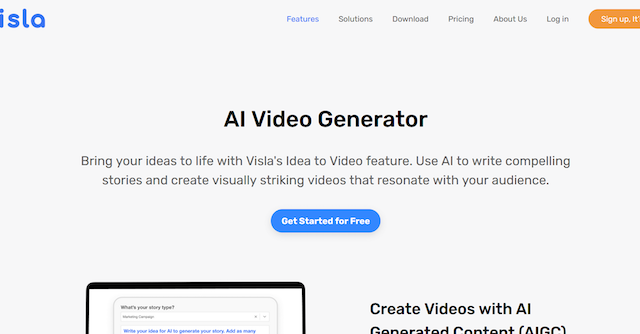
Visla is an AI-powered video creation and editing platform designed to help businesses and individuals create professional-quality videos effortlessly. With its intuitive interface and powerful AI features, Visla makes video production accessible to everyone, regardless of their technical expertise. Users can generate videos from various content formats, including text, scripts, web pages, and audio, or record directly using screen capture, webcam, or mobile phone. Visla also provides robust editing tools, stock footage libraries, branding options, and collaboration features, enabling teams to work together seamlessly on video projects.
Key Features:
AI Video Generator
🧙♂️: Transform ideas, scripts, text, or even web pages into engaging videos automatically. Visla's AI analyzes your content and selects appropriate visuals and music to create a compelling video narrative.
AI Video Editor
🎞️: Edit videos with ease using AI-powered tools. Features like footage recommendations, AI summaries, filler word removal, and automatic video transitions streamline the editing process.
Screen & Webcam Recording
🎥: Capture high-quality video footage directly from your screen, webcam, or mobile device. Perfect for creating tutorials, product demos, or presentations.
Collaboration & Sharing
🤝: Work together on video projects with Visla's collaborative Workspaces and Teamspaces. Share feedback, manage permissions, and streamline workflows with ease.
Branding & Customization
🎨: Add your company logo, intro/outro sequences, and brand colors to create consistent and professional-looking videos.
Stock Library & Media Management
📚: Access a vast library of free and premium stock footage and music to enhance your videos. Organize and manage your media files effortlessly within Visla's platform.
Use Cases:
Marketing Team Creating a Product Demo:
A marketing team needs to quickly create a compelling product demo video to showcase new features. Using Visla, they can generate a video from their existing product documentation, add screen recordings of the software in action, and incorporate branding elements for a polished final product.
Sales Representative Sending a Personalized Video Message:
A sales representative wants to connect with a potential client on a personal level. Using Visla's webcam recording and AI editing features, they can quickly record a personalized video message introducing themselves and their company, tailoring the message to the client's specific needs.
Training Manager Developing Onboarding Materials:
A training manager needs to create engaging onboarding videos for new employees. Utilizing Visla's screen recording and AI voiceover capabilities, they can develop step-by-step tutorials for internal systems and processes, making training more accessible and efficient.
Conclusion:
Visla empowers businesses and individuals to harness the power of video without the need for extensive technical skills or expensive software. By simplifying video creation and editing, Visla enables users to focus on their message and connect with their audience in a more impactful way. Whether you're creating marketing materials, educational content, or internal communications, Visla provides the tools you need to bring your video vision to life.
FAQs
Do I need any prior video editing experience to use Visla?
No, Visla is designed to be user-friendly and accessible to everyone, regardless of their experience level. The AI-powered features automate many of the complex tasks associated with video editing.
What types of videos can I create with Visla?
You can create a wide variety of videos with Visla, including marketing videos, product demos, tutorials, presentations, social media content, and more.
Can I use my own media files in Visla?
Yes, you can upload your own images, videos, and audio files to use in your Visla projects. You can also access Visla's extensive stock library.
Does Visla offer team collaboration features?
Yes, Visla offers Workspaces and Teamspaces where teams can collaborate on video projects, share feedback, and manage permissions.
Is there a free trial available for Visla?
Yes, Visla offers a free plan with limited features, allowing you to try the platform before upgrading to a paid plan for more advanced functionality.
More information on Visla
Top 5 Countries
11.89%
9.83%
9.65%
8.69%
5.68%
Morocco (11.89%)
India (9.83%)
United States (9.65%)
China (8.69%)
Brazil (5.68%)
Traffic Sources
8.51%
46.79%
41.09%
social (2.62%)
paidReferrals (0.69%)
mail (0.27%)
referrals (8.51%)
search (46.79%)
direct (41.09%)
Source: Similarweb (Jan 3, 2026)
Visla was manually vetted by our editorial team and was first featured on 2023-03-07.
Visla Alternatives
Visla Alternatives-
VisImagine instantly transforms scripts into AI storyboards & high-quality videos. Enjoy consistent characters, pro voiceovers, and rapid pre-production.
-

Transform text to studio-quality videos with lifelike AI avatars. No technical skills required — just type your script and get a professional video in minutes.
-

Veo 3 AI is an integrated platform that uses artificial intelligence to generate images, videos, and music from simple text descriptions or existing media, designed to simplify content creation.
-
Get creative with Videoleap, a powerful video editing app by Lightricks. Easy to use, stunning visuals, ready-to-go templates, and more. Try it now!
-

Create stunning software wireframes & prototypes from hand-drawn sketches, app screenshots, built-in templates, and soon, text prompts.