How to make ai song covers: A Step-by-Step Tutorial
Have you ever wondered what it would sound like if your favorite singer performed a song by another artist? Or if you could hear a famous voice singing a melody you created? Or if you could create a unique and original song cover using your own voice and an artificial intelligence (AI) tool?
If you answered yes to any of these questions, then you might be interested in making AI song covers. An AI song cover is a musical rendition of a song or melody that is generated by an AI tool using a voice model of a singer, celebrity, or any other person. AI song covers are becoming increasingly popular among music lovers, creators, and enthusiasts, as they offer a fun and easy way to experiment with different songs, melodies, and voices.
Some examples of AI song covers that have gone viral on the internet are:
- [Adele singing “Hello” in the style of Billie Eilish]
- [Taylor Swift singing “Blank Space” in the style of Britney Spears]
- [Barack Obama singing “Shape of You” by Ed Sheeran]
- [SpongeBob SquarePants singing “All Star” by Smash Mouth]
There are many platforms that can generate AI song covers, such as Voicify, FineShare Singify, Voiceflip, Vocalize, and more. Each platform has its own features, advantages, and limitations, and you can choose the one that suits your needs and preferences.
The main purpose and benefits of making AI song covers are:
- To have fun and express your creativity
- To explore different genres, moods, tempos, and lyrics of songs and melodies
- To discover new and interesting combinations of songs, melodies, and voices
- To learn more about music theory, composition, and production
- To share your AI song covers with your friends, family, and audience
If you are interested in making AI song covers, you might be wondering how to do it. In this blog post, we will guide you through the steps to make an AI song cover using any platform of your choice. Let’s get started!
How to Make AI Song Covers

Step 1: Choose an AI Music Platform
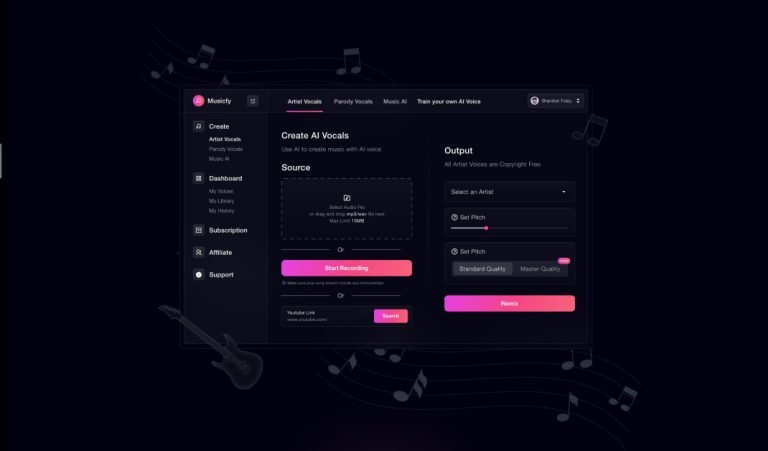
The first step to make an AI song cover is to choose an AI music platform that can generate AI song covers. There are many platforms available on the internet, and each one has its own features, advantages, and limitations. Here are some of the most popular and widely used platforms that can generate AI song covers:
- Voicify: Voicify is a platform that allows you to create AI song covers using your own voice and a voice model of your choice. You can upload or record your voice, select a voice model from a library of singers, celebrities, cartoons, anime, and more, and generate your AI song cover in minutes. Voicify also allows you to adjust the pitch, speed, and volume of your voice and the voice model, and preview the result before downloading it. Voicify is free to use, but it has a limit of 10 minutes per AI song cover, and it requires an internet connection to work.
- FineShare Singify: FineShare Singify is a platform that allows you to create AI song covers using a song or melody of your choice and a voice model of your choice. You can upload or find a song or melody from YouTube, Spotify, SoundCloud, or other sources, select a voice model from a library of singers, celebrities, cartoons, anime, and more, and generate your AI song cover in minutes. FineShare Singify also allows you to adjust the pitch, speed, and volume of the song or melody and the voice model, and preview the result before downloading it. FineShare Singify is free to use, but it has a limit of 15 minutes per AI song cover, and it requires an internet connection to work.
- Voiceflip: Voiceflip is a platform that allows you to create AI song covers using a song or melody of your choice and a voice model of your choice. You can upload or find a song or melody from YouTube, Spotify, SoundCloud, or other sources, select a voice model from a library of singers, celebrities, cartoons, anime, and more, and generate your AI song cover in minutes. Voiceflip also allows you to adjust the pitch, speed, and volume of the song or melody and the voice model, and preview the result before downloading it. Voiceflip is free to use, but it has a limit of 20 minutes per AI song cover, and it requires an internet connection to work.
- Vocalize: Vocalize is a platform that allows you to create AI song covers using a song or melody of your choice and a voice model of your choice. You can upload or find a song or melody from YouTube, Spotify, SoundCloud, or other sources, select a voice model from a library of singers, celebrities, cartoons, anime, and more, and generate your AI song cover in minutes. Vocalize also allows you to adjust the pitch, speed, and volume of the song or melody and the voice model, and preview the result before downloading it. Vocalize is free to use, but it has a limit of 30 minutes per AI song cover, and it requires an internet connection to work.
These are some of the most popular and widely used platforms that can generate AI song covers, but there are many others that you can explore and try. To choose the best platform for your needs and preferences, you should consider the following factors:
- The quality and variety of the voice models available
- The ease and speed of the generation process
- The customization and editing options available
- The cost and accessibility of the platform
You can also read reviews and ratings of different platforms, watch tutorials and demos, and compare the results of different platforms to make an informed decision.
Step 2: Select a Song or Melody
The second step to make an AI song cover is to select a song or melody that you want to create a cover for. You can either find or upload a song or melody that already exists, or you can create your own song or melody using a tool or instrument of your choice.
If you want to find or upload a song or melody that already exists, you can use any of the following sources or tools:
- YouTube: YouTube is a video-sharing platform that has millions of songs and melodies from different genres, artists, and eras. You can search for any song or melody that you like, and copy the link or download the audio file to use it for your AI song cover. YouTube also has many playlists and channels that feature songs and melodies from different categories, such as pop, rock, jazz, classical, etc. You can browse through these playlists and channels to find inspiration and ideas for your AI song cover.
- Spotify: Spotify is a music-streaming platform that has millions of songs and melodies from different genres, artists, and eras. You can search for any song or melody that you like, and copy the link or download the audio file to use it for your AI song cover. Spotify also has many playlists and podcasts that feature songs and melodies from different categories, such as mood, activity, genre, etc. You can browse through these playlists and podcasts to find inspiration and ideas for your AI song cover.
- SoundCloud: SoundCloud is an audio-sharing platform that has millions of songs and melodies from different genres, artists, and eras. You can search for any song or melody that you like, and copy the link or download the audio file to use it for your AI song cover. SoundCloud also has many groups and communities that feature songs and melodies from different categories, such as indie, electronic, hip-hop, etc. You can browse through these groups and communities to find inspiration and ideas for your AI song cover.
- Other sources: There are many other sources that you can use to find or upload a song or melody that already exists, such as iTunes, Amazon Music, Google Play Music, etc. You can use any of these sources that you prefer, and copy the link or download the audio file to use it for your AI song cover.
If you want to create your own song or melody using a tool or instrument of your choice, you can use any of the following sources or tools:
- GarageBand: GarageBand is a music creation software that allows you to create your own songs and melodies using a variety of instruments, loops, and effects. You can use GarageBand to record your voice, play a keyboard, guitar, drum, or any other instrument, and mix and edit your tracks to create your own song or melody. You can then export your song or melody as an audio file to use it for your AI song cover.
- FL Studio: FL Studio is a music production software that allows you to create your own songs and melodies using a variety of instruments, samples, and effects. You can use FL Studio to record your voice, play a piano, synthesizer, drum, or any other instrument, and arrange and edit your patterns and tracks to create your own song or melody. You can then export your song or melody as an audio file to use it for your AI song cover.
- Other tools: There are many other tools that you can use to create your own song or melody using a tool or instrument of your choice, such as Ableton Live, Logic Pro, Audacity, etc. You can use any of these tools that you prefer, and export your song or melody as an audio file to use it for your AI song cover.
Step 3: Select an AI Voice Model
The third step to make an AI song cover is to select an AI voice model that matches your song or melody. An AI voice model is a digital representation of a person’s voice that is created by an AI tool using a voice sample or a voice dataset. An AI voice model can mimic the voice of a singer, celebrity, or any other person, and can generate speech or singing in different languages, accents, and styles.
There are many AI voice models that are available on different platforms, such as singers, celebrities, cartoons, anime, and more. Some examples of AI voice models that you can use for your AI song cover are:
- Singers: You can use AI voice models of singers to create AI song covers of their songs or songs by other artists. For example, you can use an AI voice model of Adele to create an AI song cover of “Someone Like You” or “Rolling in the Deep”, or an AI song cover of “Bad Guy” or “No Time to Die” by Billie Eilish. You can also use an AI voice model of a singer from a different genre, era, or language to create an AI song cover of a song that is not in their usual style. For example, you can use an AI voice model of Elvis Presley to create an AI song cover of “Despacito” or “Shape of You”, or an AI song cover of “Hound Dog” or “Jailhouse Rock” by Luis Fonsi or Ed Sheeran.
- Celebrities: You can use AI voice models of celebrities to create AI song covers of their songs or songs by other artists. For example, you can use an AI voice model of Barack Obama to create an AI song cover of “Happy” or “Can’t Stop the Feeling”, or an AI song cover of “Shape of You” or “Perfect” by Pharrell Williams or Justin Timberlake. You can also use an AI voice model of a celebrity from a different field, profession, or background to create an AI song cover of a song that is not in their usual domain. For example, you can use an AI voice model of Stephen Hawking to create an AI song cover of “Bohemian Rhapsody” or “We Will Rock You”, or an AI song cover of “A Brief History of Time” or “The Theory of Everything” by Queen or Hans Zimmer.
- Cartoons: You can use AI voice models of cartoons to create AI song covers of their songs or songs by other artists. For example, you can use an AI voice model of SpongeBob SquarePants to create an AI song cover of “F.U.N.” or “The Best Day Ever”, or an AI song cover of “All Star” or “I’m a Believer” by Smash Mouth or The Monkees. You can also use an AI voice model of a cartoon from a different genre, era, or language to create an AI song cover of a song that is not in their usual style. For example, you can use an AI voice model of Mickey Mouse to create an AI song cover of “Let It Go” or “Do You Want to Build a Snowman”, or an AI song cover of “Mickey Mouse Clubhouse Theme” or “Hot Dog” by Idina Menzel or They Might Be Giants.
- Anime: You can use AI voice models of anime to create AI song covers of their songs or songs by other artists. For example, you can use an AI voice model of Naruto to create an AI song cover of “Wind” or “Haruka Kanata”, or an AI song cover of “Believer” or “Radioactive” by Imagine Dragons or OneRepublic. You can also use an AI voice model of an anime from a different genre, era, or language to create an AI song cover of a song that is not in their usual style. For example, you can use an AI voice model of Sailor Moon to create an AI song cover of “Moonlight Densetsu” or “Sailor Star Song”, or an AI song cover of “Bad Romance” or “Poker Face” by Lady Gaga or Katy Perry.

These are some of the examples of AI voice models that you can use for your AI song cover, but there are many others that you can explore and try. To select an AI voice model that matches your song or melody, you should consider the following factors:
- The style, tone, pitch, and accent of the voice model, and how they match the genre, mood, tempo, and lyrics of your song or melody
- The quality and realism of the voice model, and how they affect your AI song cover’s authenticity and credibility
- The popularity, familiarity, and relevance of the voice model, and how they affect your AI song cover’s appeal and impact
You can also read reviews and ratings of different voice models, watch tutorials and demos, and compare the results of different voice models to make an informed decision.
Step 4: Generate Your AI Song Cover
The fourth step to make an AI song cover is to use the platform to generate your AI song cover using the song or melody and the voice model that you have selected. The generation process may vary depending on the platform that you are using, but it usually involves the following steps:
- Uploading or recording your voice: If you are using a platform that requires your own voice as an input, such as Voicify, you will need to upload or record your voice singing or humming the song or melody that you want to create a cover for. You can use a microphone, a smartphone, or any other device that can capture your voice. You should try to sing or hum as clearly and accurately as possible, and follow the rhythm and tempo of the song or melody. You can also use a metronome, a backing track, or a karaoke version of the song or melody to help you keep the pace and pitch.
- Adjusting the settings: After uploading or recording your voice, you will need to adjust the settings of the platform to generate your AI song cover. You can adjust the pitch, speed, and volume of your voice and the voice model, and choose the language, accent, and style of the voice model. You can also apply some effects, such as reverb, echo, chorus, etc., to enhance your AI song cover. You should experiment with different settings and combinations to find the best match for your song or melody and your voice model.
- Previewing the result: Before downloading or exporting your AI song cover, you should preview the result to check the quality and accuracy of the generation. You can listen to your AI song cover and compare it with the original song or melody and the voice model. You should pay attention to the following aspects:
- The synchronization and alignment of your voice and the voice model
- The clarity and realism of the voice model
- The harmony and balance of the voice model and the song or melody
- The expression and emotion of the voice model and the song or melody
You should also look for any errors, glitches, or distortions that may occur during the generation, such as:
- The voice model skipping or repeating words or syllables
- The voice model sounding robotic or unnatural
- The voice model changing pitch or tone abruptly or inconsistently
- The voice model losing sync or alignment with the song or melody
If you are not satisfied with the result, you can go back and adjust the settings, upload or record your voice again, or select a different song or melody or voice model, and generate your AI song cover again.
- Downloading or exporting your AI song cover: After previewing and approving the result, you can download or export your AI song cover as an audio file. You can save it as an MP3, WAV, or any other format that is supported by the platform. You can also upload it to a cloud service, such as Google Drive, Dropbox, or OneDrive, to store it or share it with others.
The generation process of an AI song cover may seem simple and straightforward, but it also has some challenges and limitations that you should be aware of. Some of the challenges and limitations are:
- The quality and variety of the voice models available on different platforms may vary and may not meet your expectations or preferences
- The generation process may take some time and may depend on the speed and stability of your internet connection and the platform’s server
- The generation process may not be able to capture the nuances, subtleties, and emotions of your voice and the voice model, and may lose some of the originality, creativity, and complexity of the song or melody
- The generation process may not be able to handle some songs or melodies that are too long, too fast, too slow, too high, too low, or too complex, and may produce errors, glitches, or distortions
To overcome some of these challenges and limitations, you can use some tips and tricks to improve or enhance your AI song cover, such as:
- Editing your AI song cover using a software or tool of your choice, such as Audacity, GarageBand, FL Studio, etc., to fix any errors, glitches, or distortions, and to add some effects, such as reverb, echo, chorus, etc., to enhance your AI song cover
- Mixing your AI song cover with other tracks, such as a backing track, a karaoke version, or an instrumental version of the song or melody, to create a fuller and richer sound
- Mastering your AI song cover using a software or tool of your choice, such as LANDR, SoundCloud, MasteringBOX, etc., to optimize the sound quality, volume, and loudness of your AI song cover
- Experimenting with different songs, melodies, and voice models to create different AI song covers and to discover new and interesting combinations
Step 5: Share Your AI Song Cover

The fifth and final step to make an AI song cover is to share your AI song cover with your audience. You can share your AI song cover with your friends, family, and fans, and get their feedback, comments, and reactions. You can also share your AI song cover with other music lovers, creators, and enthusiasts, and join a community of AI song cover makers. You can share your AI song cover on any platform or channel of your choice
- Before sharing your AI song cover, be aware of legal and ethical issues:
- Respect copyright by giving proper credit to original song, voice model, and platform terms.
- Obtain consent from original song and voice model, and ensure platform approval.
- Uphold ethics by respecting dignity of original content and platform values.
- Share your AI song cover responsibly, following guidelines to avoid controversy.
Conclusion
Making AI song covers is a fun and easy way to express your creativity and explore different songs, melodies, and voices.
We hope that this blog post has inspired you to try making your own AI song covers and to have fun with music and AI. If you have any questions, comments, or feedback, please feel free to leave them below. We would love to hear from you and see your AI song covers. Happy singing!
Here are some frequently asked questions (FAQs) about making AI song covers:
- What is an AI song cover?
An AI song cover is a musical rendition of a song or melody that is generated by an AI tool using a voice model of a singer, celebrity, or any other person.
- How can I make an AI song cover for free?
You can make an AI song cover for free using any of the platforms that we have mentioned in this blog post, such as Voicify, FineShare Singify, Voiceflip, Vocalize, and more. These platforms are free to use, but they may have some limitations, such as the length, quality, and variety of the AI song covers that you can generate.
- What are the best AI music platforms to make AI song covers?
There is no definitive answer to this question, as different platforms may have different features, advantages, and limitations, and you may have different needs and preferences. However, some of the factors that you can consider when choosing an AI music platform to make AI song covers are:
- The quality and variety of the voice models available
- The ease and speed of the generation process
- The customization and editing options available
- The cost and accessibility of the platform
You can also read reviews and ratings of different platforms, watch tutorials and demos, and compare the results of different platforms to make an informed decision.