How to Use ChatGPT Voice Chat Feature: An In-Depth Guide
ChatGPT's Voice Chat feature offers a novel and engaging way to interact with AI, providing both entertainment and practical benefits. This guide delves into its usage, customization, and potential applications.
Introduction to ChatGPT Voice Chat
ChatGPT Voice Chat, a feature of the ChatGPT app, enables voice conversations with AI bots and other users. It's designed for natural, engaging dialogues, supporting various languages and accents. This feature is available on both Android and iOS devices, accessible to all users.
Getting Started with ChatGPT Voice Chat
Installation and Access
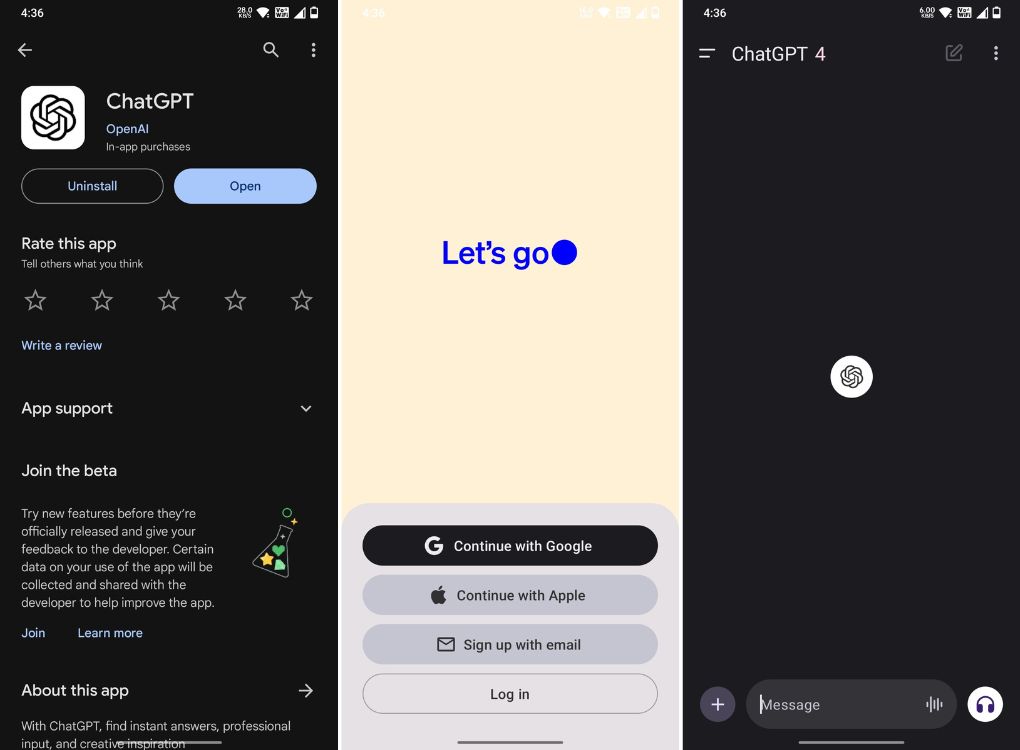
- Download the ChatGPT App: Available for free on Android and iOS.
- Account Sign-In: Open the app and sign into your OpenAI account.
- Initiate Voice Chat: Tap the "headphone" icon in the app to start.
Customizing Voice Settings
- Navigate to the 'Voice' option under 'Settings'.
- Choose from different voice options like 'Juniper', 'Ember', 'Sky', 'Cove', and 'Breeze'.
Tips for Effective Use
- Clarity and Conciseness: Speak clearly, avoid background noise, and use simple sentences.
- Keyword Usage: Utilize keywords to guide ChatGPT's responses.
- Content Review: Always review ChatGPT's output for accuracy and relevance.
Benefits of ChatGPT Voice Chat
- Enhanced Communication Skills: Especially beneficial for non-native English speakers.
- Entertainment and Companionship: Provides interaction and engagement.
- Insights on Various Topics: ChatGPT offers a wealth of knowledge and information.
- Time and Effort Saving: Speaking is faster than typing for many users.
- Natural Interaction: A more intuitive conversational experience.
Frequently Asked Questions
- ChatGPT's Intelligence: Powered by advanced AI models like GPT-3.
- Accessing Voice Chat: Tap the 'headphone' icon or browse available voice chat rooms.
- Voice Options: Multiple voice choices are available for customization.
Conclusion
ChatGPT's voice chat is user-friendly and offers an immersive experience. It's a step forward in AI-powered communication, allowing users to engage in natural conversations with AI. Remember to review the content for accuracy and to think creatively when interacting with ChatGPT.
Additional Observations
- ChatGPT’s voice chat feels more natural and continuous compared to assistants like Google Assistant or Siri. It provides a better voice synthesis and conversational flow, although it may respond slower than expected.
- The feature uses OpenAI's models, including Whisper, for speech-to-text and text-to-speech conversion, ensuring a seamless interaction. Voice Conversations are currently available for ChatGPT Plus and Enterprise users.
- Users should note that there might be room for improvement in voice conversation. For example, pauses in speech might be interpreted as the end of a question, which can sometimes lead to interruptions.
Usage Tips
- Enabling Voice Conversations: Go to 'Settings' > 'New Features' and activate the 'Voice Conversations' toggle.
- Selecting Voice Models: Choose from various voice options to personalize your experience.
- Initiating Conversations: Tap the 'Headphone' icon for starting a conversation.
- Exiting Conversations: Tap the 'X' button to exit, and access the conversation transcript from chat history.
This comprehensive guide aims to enhance your experience with ChatGPT's Voice Chat feature, making your interactions both enjoyable and effective.