

What is Dereference?
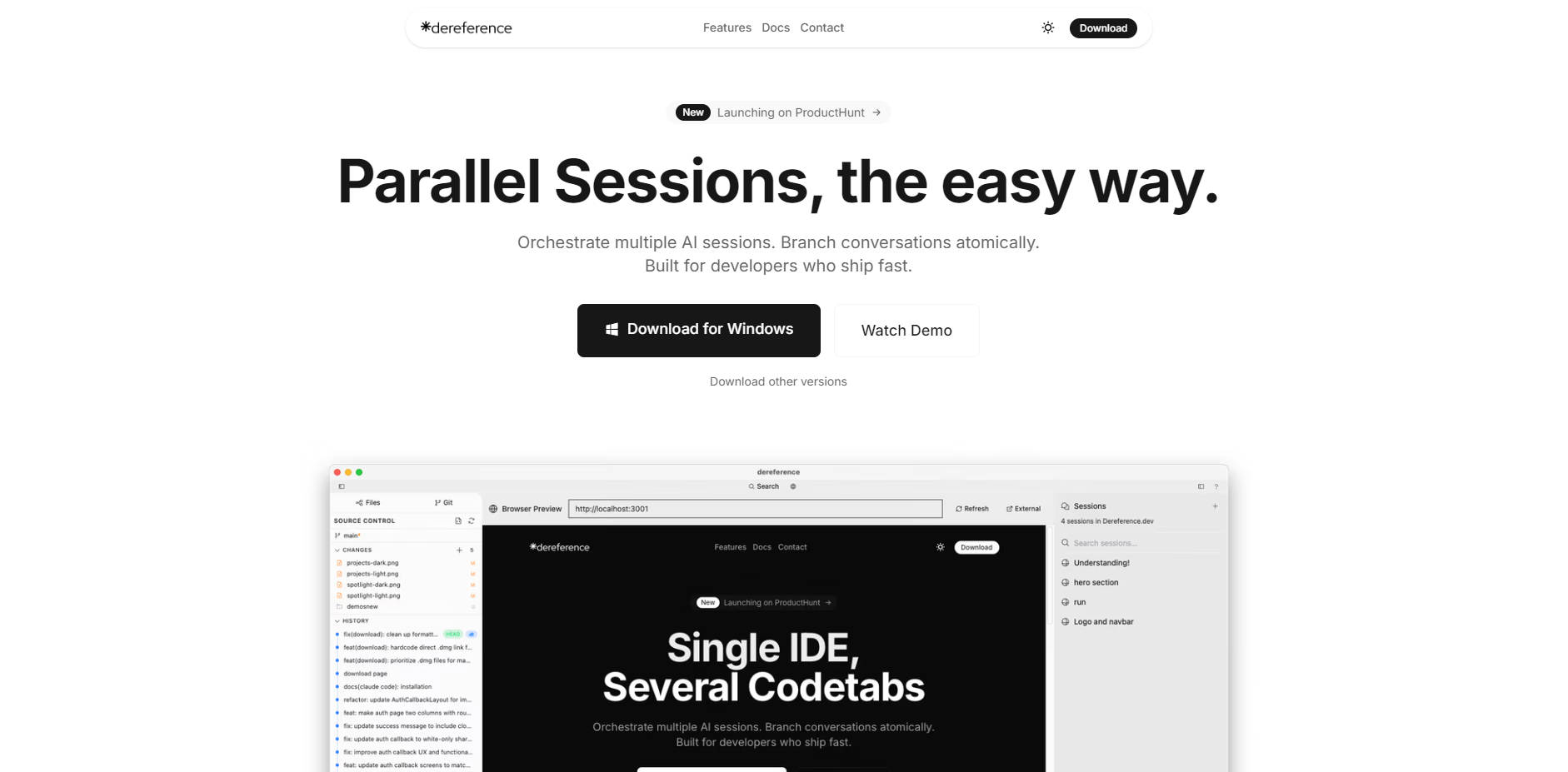
If you leverage powerful command-line AI tools like Claude Code or Gemini CLI, you know the challenge: managing multiple conversations and complex coding tasks in a standard terminal is inefficient and chaotic. Dereference is the purpose-built, native IDE designed to bring structure, power, and seamless organization to your AI-assisted development workflow, helping you ship faster and with greater clarity.
Key Features
⚡️ Orchestrate Multiple AI Sessions: Run parallel conversations with different models (Claude, Gemini, GPT-4) or for different tasks, all within a single, organized interface. You can switch between contexts instantly without losing your place or juggling multiple terminal windows.
🌿 Atomic Branching for Conversations: Treat your AI conversations like code. At any point in a discussion, you can create a "branch" to explore an alternative solution or refactor path. This allows you to experiment freely and then merge the best approach back into your main line of thought, just as you would with Git.
🔗 Seamless CLI Tool Integration: Dereference works directly with your existing installations of popular AI command-line tools. It automatically detects your setup for tools like Claude Code, providing a beautiful and efficient graphical user interface without altering your core backend.
🔒 Privacy-First Architecture: Your code and conversations are your own. Dereference runs entirely locally on your machine. There is no telemetry, no tracking, and your authentication tokens are stored securely in your system's keychain, never transmitted to our servers.
How Dereference Solves Your Problems:
Dereference is designed for practical, everyday development scenarios:
Refactoring Complex Code: When tackling a legacy function, start a session with Claude. When it suggests a path, you can branch the conversation to ask, "What if we used a more modern pattern?" You can explore this new idea in isolation, and if it proves superior, it becomes your new primary path—all without losing the original context.
Comparing AI Model Outputs: Need to see how Claude 3 Opus, Sonnet, and Gemini handle the same complex prompt? With multi-session orchestration, you can run the same query in three parallel tabs and directly compare the code quality, logic, and explanations side-by-side to make the best choice.
Building a New Feature: While working on a new feature, you can keep your project open in the built-in file explorer. When you need the AI to review a specific module, simply type
@to reference the file directly in your prompt. The AI gets the full context instantly, leading to more accurate and relevant suggestions.
Unique Advantages
Dereference is engineered to be fundamentally more effective than generic chat clients or a standard terminal.
While other tools require expensive API keys, Dereference integrates directly with the Claude Code CLI. This means you can leverage the power of official Claude models for free, as it uses the same local authentication you already have.
Unlike standard, linear chat interfaces, Dereference introduces "Atomic Branching." This Git-inspired workflow is a paradigm shift for AI interaction, allowing you to explore multiple solutions non-destructively—a capability built specifically for a developer's mindset.
Dereference is more than just a chat window; it's a complete development environment. With an integrated file explorer, real-time file watching, and Git status indicators, it centralizes your AI-assisted coding workflow in a way that simple wrappers cannot.
Conclusion:
Stop juggling terminal windows and losing valuable context in linear chat logs. Dereference brings the structure, control, and productivity of a modern IDE to your AI-powered development. It’s the professional interface your AI command-line tools deserve.
Explore how Dereference can streamline your workflow today!
Frequently Asked Questions (FAQ)
1. How exactly does Dereference connect to AI models like Claude? Dereference acts as a sophisticated graphical user interface (GUI) for command-line interface (CLI) tools. For Claude, it automatically detects your local claude auth login and uses that free, official backend. This means you don't need to manage or pay for API keys for Claude; you get the power of their models within a superior interface.
2. Is my code secure when using Dereference? Absolutely. Security and privacy are core principles. Your code, project files, and conversation history remain exclusively on your local machine. Dereference does not transmit your code or proprietary information to any external servers.
3. Can I use Dereference with my existing coding projects? Yes. You can open any local folder as a project in Dereference (Cmd+O). The application will display your file tree, show Git file statuses, and allow you to easily reference any file in your prompts to the AI, making it a natural fit for your current work.
More information on Dereference
Launched
Pricing Model
Starting Price
Global Rank
721150
Follow
Month Visit
43.8K
Tech used
Top 5 Countries
100%
Canada
Traffic Sources
100%
direct
Source: Similarweb (Sep 25, 2025)
Dereference was manually vetted by our editorial team and was first featured on 2025-08-09.
Related Searches
Dereference Alternatives
Load more Alternatives-

Desktop Commander MCP is an open-source tool that enables terminal command execution and file editing directly through Claude Desktop app. Enhance your AI workflow with Claude.
-

Claude Code is an agentic coding tool that lives in your terminal, understands your codebase, and helps you code faster by executing routine tasks, explaining complex code, and handling git workflows - all through natural language commands.
-

-

Cursor CLI brings AI coding directly to your terminal. Empower developers, DevOps, & SREs to generate, refactor, debug, and automate code anywhere.
-
