

What is EM Client?
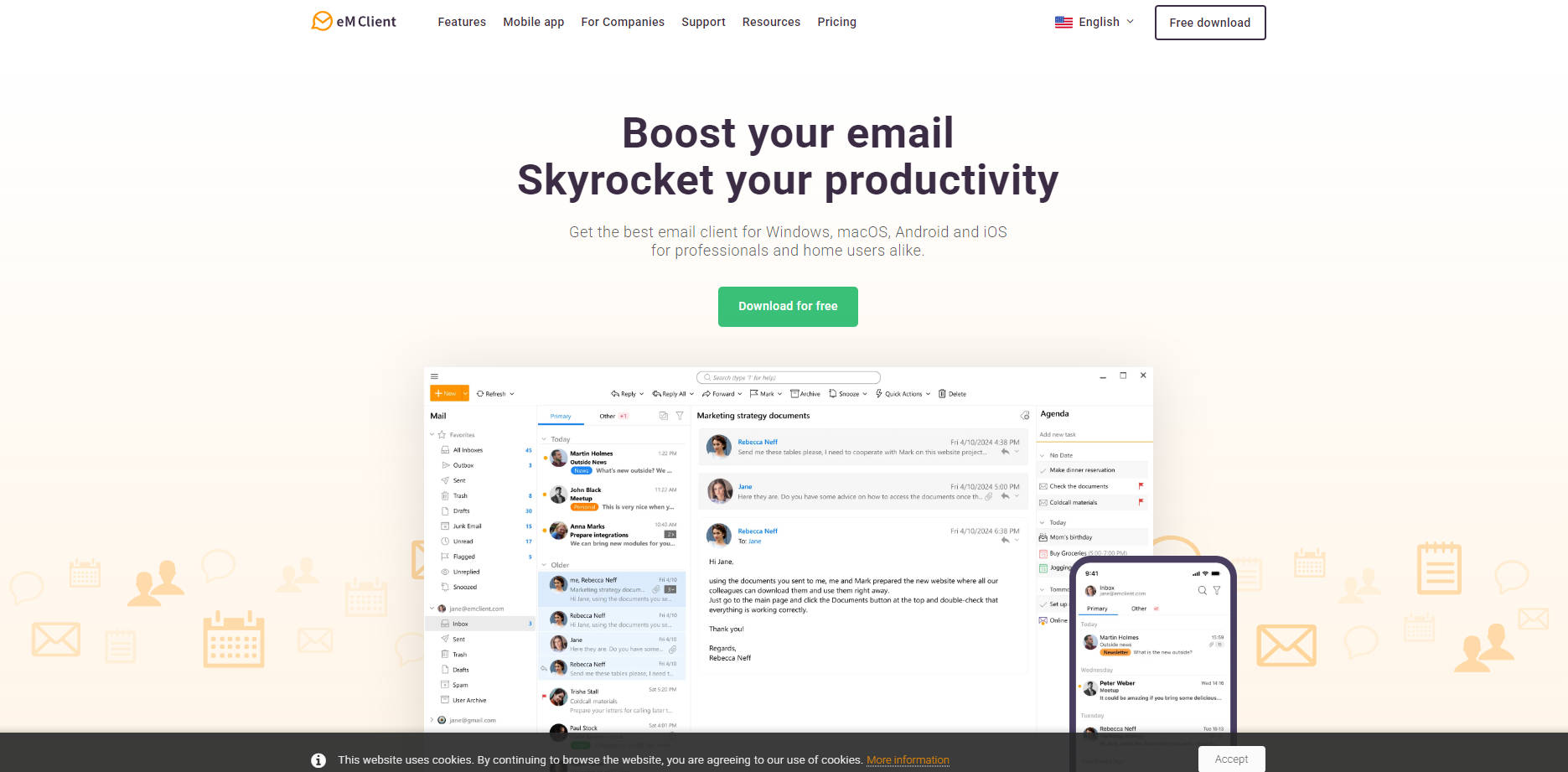
eM Client is a comprehensive desktop and mobile application designed to unify your entire digital workflow. It's built for professionals and power users who need to move beyond a standard email inbox and bring their email, calendars, tasks, contacts, and chats into one powerful, organized hub. If you're looking to streamline your communication and boost your productivity, eM Client provides the tools you need.
Key Features
🤖 AI-Powered Communication Generate, refine, and summarize emails instantly. Leveraging AI powered by ChatGPT, you can draft replies from simple prompts, rewrite text to change its tone, or get quick summaries of long messages. This saves you significant time and mental energy on daily communication tasks.
🗂️ The All-in-One Productivity Hub Go beyond email with a fully integrated suite of tools. eM Client seamlessly combines your email, calendars, tasks, notes, and even chat into a single, clean interface. This eliminates the need to switch between apps, keeping your workflow focused and your data synchronized across all your services.
⚙️ Advanced Email Management Take full control of your inbox with professional-grade tools. Use features like Snooze to postpone emails until you're ready for them, Watch for Reply to track important conversations, and Undo Send to prevent mistakes. Smart Inbox Categories also automatically sort your mail, so you can focus on what truly matters.
🔗 Unmatched Compatibility & Easy Migration Connect to virtually any email service with confidence. eM Client offers full synchronization with Gmail, Google Workspace, Office 365, Exchange, and any standard IMAP or POP3 account. The super-simple import tool makes switching from Outlook, Thunderbird, or other clients a seamless, one-click process.
🛡️ Built-in Privacy and Security Protect your communications with powerful, easy-to-use security tools. You can send and receive encrypted messages using industry-standard PGP or S/MIME. eM Client also automatically blocks hidden tracking pixels in emails, protecting your privacy from senders who monitor when and where you open their messages.
How eM Client Solves Your Problems:
For the Busy Professional Juggling Projects: Instead of bouncing between your email client, a separate calendar app, and a to-do list, you can manage everything in one place. Receive a project email, drag it to your calendar to create a meeting, and then create associated tasks directly from the message—all without leaving eM Client. The unique sidebar shows you your full communication history with the sender, ensuring you always have the right context.
For the User Managing High-Volume Inboxes: If your inbox feels overwhelming, you can use Snooze to clear non-urgent messages until you're ready for them. Use Quick Actions to automate filing or archiving routine emails with a single click. For important outgoing messages, set a Watch for Reply reminder so you never forget to follow up, helping you maintain an "inbox zero" policy with less effort.
Why Choose eM Client?
Deep Customization and Control: Beyond just themes, you can tailor eM Client’s behavior to your exact workflow. The unique sidebar provides instant contextual information (like attachment history or your daily agenda), and customizable Quick Actions let you build your own powerful productivity shortcuts.
A True All-in-One Native Application: Unlike web-based wrappers, eM Client is a native application for Windows, macOS, iOS, and Android. This offers superior performance, reliability, and deep integration with your operating system. It combines this native power with the broadest compatibility on the market, ensuring it works with any service you use.
Conclusion:
eM Client is more than just an email client; it's a complete command center for your professional and personal communication. By bringing your essential tools into one cohesive and powerful application, it empowers you to work more efficiently and stay organized.
More information on EM Client
Top 5 Countries
19.48%
16.64%
7.45%
5.51%
3.08%
United States
Germany
United Kingdom
Italy
Canada
Traffic Sources
1.53%
0.53%
0.09%
5.55%
48.31%
43.97%
social
paidReferrals
mail
referrals
search
direct
Source: Similarweb (Sep 25, 2025)
EM Client was manually vetted by our editorial team and was first featured on 2025-07-16.
Related Searches
EM Client Alternatives
Load more Alternatives-

MailMaestro: AI email assistant for Outlook & Gmail. Draft emails instantly, summarize threads, & manage your inbox faster. Boost productivity & save time.
-
-
Reclaim your time with Superinbox AI. Get personalized, context-aware email drafts & intelligent inbox organization for Gmail & Outlook.
-

-
