

What is SpeakMac?
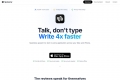
Typing is often the bottleneck that slows down professional workflows and creative output. SpeakMac is the professional-grade, native macOS application designed to instantly convert your thoughts into text, anywhere on your Mac. Leveraging the dedicated processing power of Apple Silicon, SpeakMac delivers highly accurate, punctuation-perfect voice typing that is entirely private and runs offline by default, providing the high-speed dictation experience macOS should have always offered.
Key Features
SpeakMac provides a powerful, seamless bridge between speech and text, optimized for speed and privacy on modern Mac hardware.
- 🔒 Private by Design & Offline First. Your voice data never leaves your device. SpeakMac processes all transcription locally using your Mac's Neural Engine, ensuring zero tracking, maximum security, and complete confidentiality for sensitive documents and communications.
- ⚡️ Blazing-Fast, Instant Transcription. Optimized specifically for Apple Silicon (M-series) chips, transcription occurs in under half a second. You eliminate the latency of server round-trips, meaning the text appears on screen the instant you finish speaking, making it faster than manual typing.
- ✍️ Intelligent Punctuation and Formatting. Speak casually, and SpeakMac handles the editing. It automatically inserts commas, periods, and manages capitalization instantly, transforming raw speech into polished, ready-to-use text without requiring manual voice commands.
- 🌍 Universal Language Support. SpeakMac understands and accurately transcribes over 50 languages right out of the box. This functionality requires no additional plugins, downloads, or API keys, making multilingual dictation instantly accessible.
- 💻 Native macOS Integration. Built with pure, optimized macOS code, SpeakMac is a lightweight, background application that respects your system resources. It avoids the bloat of web wrappers (like Electron), ensuring a fast, stable, and truly native user experience.
Use Cases
SpeakMac integrates effortlessly into your daily digital environment, transforming high-volume tasks into rapid dictation sessions.
- Rapid Drafting and Content Creation: Whether you are a writer, marketer, or executive, you can dictate entire articles, detailed emails, or comprehensive reports faster than you can type. Use SpeakMac to capture complex ideas and long drafts effortlessly, significantly speeding up the initial content creation phase.
- Streamlining Technical Workflows: Developers and engineers can use voice input for adding detailed comments, documentation, or quick notes within specialized integrated development environments (IDEs) like VS Code and Xcode. SpeakMac works universally across applications, allowing you to maintain focus on complex tasks without constant keyboard switching.
- Efficient Professional Communication: Respond to lengthy customer service inquiries or draft detailed replies in messaging apps like Slack and Gmail instantly. The speed and high accuracy, even with background noise or varied accents, ensure clear, professional communication when time is critical.
Why Choose SpeakMac?
SpeakMac offers a distinct philosophical and technical advantage over traditional cloud-based dictation services and built-in operating system tools.
| Differentiator | SpeakMac Approach | Traditional Cloud/OS Tools |
|---|---|---|
| Data Privacy | On-Device: Audio and text never leave your computer. | Cloud Processing: Requires sending data to remote servers for transcription. |
| Pricing Model | Lifetime Ownership: Simple, one-time purchase. | Subscription/Rental: Recurring monthly fees and "credit" systems. |
| Latency/Speed | Instant: Under half a second, no server latency. | Variable: Dependent on internet speed and server load. |
| System Footprint | Lightweight: Native macOS code, optimized RAM usage. | Heavy: Often relies on Electron or less-optimized frameworks. |
SpeakMac delivers the speed, accuracy, and privacy that modern Mac users demand. It removes the typing bottleneck, allowing you to focus on your ideas, not your keyboard. Experience the future of text input and transform how you work.
Frequently Asked Questions
Is SpeakMac a subscription service?
No. SpeakMac operates on a "Buy Once, Own Forever" model. Your purchase grants you a lifetime license for the version you acquire. While optional annual renewals are available for continued feature updates after the first year, the core application you purchased will never stop working.
What are the system requirements for SpeakMac?
SpeakMac requires macOS 14 (Sonoma) or newer and a Mac equipped with Apple Silicon (M1, M2, M3, or newer series chips). The powerful Neural Engine present in these chips is essential for achieving the required speed and high-accuracy local processing capability.
Does SpeakMac work in specialized applications like IDEs or specific browsers?
Yes. SpeakMac is designed to function wherever you have a blinking cursor. It works seamlessly across all standard macOS applications, including text editors, email clients, notes apps, and specialized environments like VS Code, Xcode, and browser-based interfaces (e.g., Google Docs, Slack).

More information on SpeakMac
Launched
Pricing Model
Free Trial
Starting Price
Global Rank
Follow
Month Visit
<5k
Tech used
SpeakMac was manually vetted by our editorial team and was first featured on 2025-11-30.
SpeakMac 代替ソフト
もっと見る 代替ソフト-

Paraspeech: macOS対応、超高速100%オフライン音声文字起こし。入力スピードを倍増させ、データのプライバシーを完全に保護。Apple Siliconに最適化済み。
-
-
-

Superwhisperで、メールを口述したり、macOS上で音声の書き起こしをしたりしましょう。生産性を高め、データのセキュリティを享受し、精神的な負担を軽減します。
-