

What is Newsdrop ?
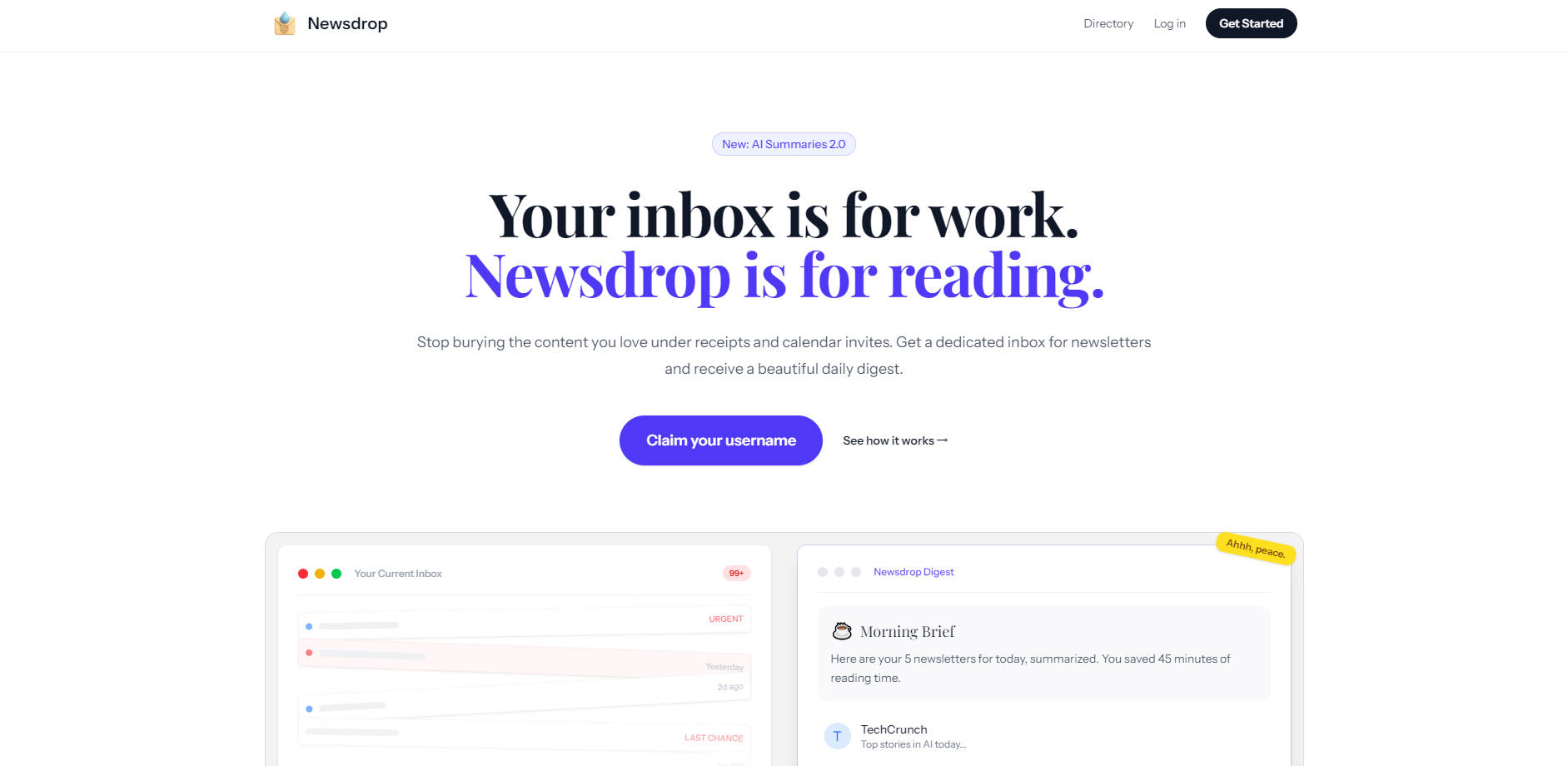
Newsdrop is the dedicated reading environment designed to eliminate information overload and inbox clutter caused by proliferating newsletter subscriptions. It provides a unique, separate email address for all your reading material, ensuring your primary inbox remains focused exclusively on work, urgent communication, and personal correspondence. By leveraging advanced AI to summarize and bundle content, Newsdrop transforms subscription chaos into a single, highly efficient daily digest.
Key Features
Newsdrop focuses on creating a seamless and stress-free reading experience by fundamentally restructuring how you receive and consume subscription content.
📰 Dedicated Subscription Inbox Receive a unique, designated email address (e.g., alex@inbox.newsdrop.io) specifically for all your newsletters. This critical separation ensures that the content you want to read never interferes with the urgent emails you need to answer, eliminating anxiety and improving focus in your professional life.
🧠 Advanced AI Summaries 2.0 Our system automatically processes every incoming newsletter, extracts the key points, and condenses the content into brief, insightful summaries. This capability allows you to absorb the core knowledge and actionable takeaways rapidly, enabling you to stay informed and potentially save significant reading time—often up to 45 minutes per day.
☕️ Consolidated Daily Digest Instead of dozens of sporadic emails disrupting your workflow throughout the day, Newsdrop delivers one single, clean email brief (configurable for daily or weekly delivery). This structured approach ensures you can consume your content mindfully and efficiently, transforming information overload into a manageable morning routine.
🔗 Seamless Newsletter Import Effortlessly connect your existing Gmail account to automatically detect and import past newsletters directly into Newsdrop. This functionality allows you to instantly catch up on valuable content you missed before joining and ensures a smooth, non-disruptive transition for all your current subscriptions.
Use Cases
Newsdrop is engineered to integrate seamlessly into the lives of ambitious professionals and knowledge seekers who value both productivity and continuous learning.
Maintain Peak Work Focus: By routing all non-urgent subscription content to your dedicated Newsdrop address, you eliminate the constant distraction of newsletter notifications in your primary work inbox. This allows you to maintain deep work sessions without interruption, knowing that your reading material is safely categorized and waiting for a scheduled, focused reading time.
Efficient Knowledge Consumption: Instead of scrolling through lengthy, image-heavy email archives, you receive a concise Morning Brief with AI-summarized articles from all your subscriptions. You can quickly scan the summaries, instantly identify the most relevant topics, and click through only on the articles that warrant a deeper dive, ensuring maximum information gain for minimal time investment.
Maximize Return on Paid Subscriptions: If you pay for premium newsletters, Newsdrop ensures you actually consume the value you purchased. The structured, consistent digest delivery makes it easy to track and prioritize paid content, eliminating the frustration of wasted subscription fees on content that simply gets archived or lost in the clutter.
Why Choose Newsdrop?
Newsdrop moves beyond simple filtering to offer a comprehensive solution for digital content consumption, prioritizing clarity, efficiency, and user peace of mind.
- Solve Information Anxiety: Unlike standard email filters that simply shift newsletters to another folder, Newsdrop provides a true separation—a dedicated environment designed only for reading. This architectural difference transforms a chaotic inbox into a place of focus and calm.
- Guaranteed Time Savings: The combination of the consolidated digest and advanced AI Summaries delivers verifiable time savings. You absorb the core value of multiple newsletters in minutes, rather than hours, allowing you to stay current without sacrificing productivity.
- Universal Compatibility: Newsdrop is compatible with virtually every major newsletter platform (Substack, Beehiiv, Ghost, Mailchimp, ConvertKit), ensuring you can consolidate all your reading material regardless of the source.
Conclusion
Newsdrop provides the necessary intelligence and structural separation required to transform overwhelming newsletter chaos into a valuable, stress-free reading habit. Take back control of your primary inbox, reduce digital anxiety, and ensure you actually finish the content you start.
More information on Newsdrop
Launched
2025-11
Pricing Model
Free Trial
Starting Price
Global Rank
Follow
Month Visit
<5k
Tech used
Newsdrop was manually vetted by our editorial team and was first featured on 2025-11-23.
Newsdrop Alternatives
Load more Alternatives-

-

Tired of email chaos? Forage, an AI assistant, works with your existing email provider like Gmail. It filters out junk, provides a concise daily newsletter summary, and adapts to your preferences. Unsubscribe easily. Ideal for busy pros, info seekers, and inbox - zero fans. Reclaim your inbox and your time.
-
-

AI-powered inbox revolution. No spam, no lost tasks, simplified search. Organize your mailbox with AI in just few clicks. Start your free trial today!
-

Cut email time in half with Inbox Zero, the AI assistant for Gmail. Automate sorting, draft replies, unsubscribe & block cold emails easily.