How to Change Snapchat AI Gender: A Step-by-Step Guide
Have you ever wondered what it would be like to chat with a virtual friend who understands you, adapts to your preferences, and makes your Snapchat interactions more enjoyable than ever before? If so, you’re in luck, because Snapchat has introduced a feature that allows you to do just that: Snapchat AI.
Snapchat AI is a chatbot powered by ChatGPT, an advanced artificial intelligence language model developed by OpenAI. It’s designed to be your personalized virtual companion, capable of engaging in meaningful conversations, offering witty responses, and providing an enriching and entertaining Snapchat experience.
But what if you want to customize your Snapchat AI chatbot and change its gender representation? Maybe you want to match your Snapchat AI’s gender with your own, or maybe you want to experiment with different genders and see how they affect your chatbot’s personality and behavior. Whatever your reason, you’ll be happy to know that Snapchat allows you to change your Snapchat AI’s gender in a few simple steps.
In this article, we’ll show you how to change Snapchat AI gender and personalize your chatbot experience. We’ll guide you through the process step by step, with screenshots and graphic arts to help you along the way. By the end of this article, you’ll be able to change your Snapchat AI’s gender and enjoy chatting with your virtual friend. Let’s get started!
Step 1: Open Snapchat and Access My AI Chat
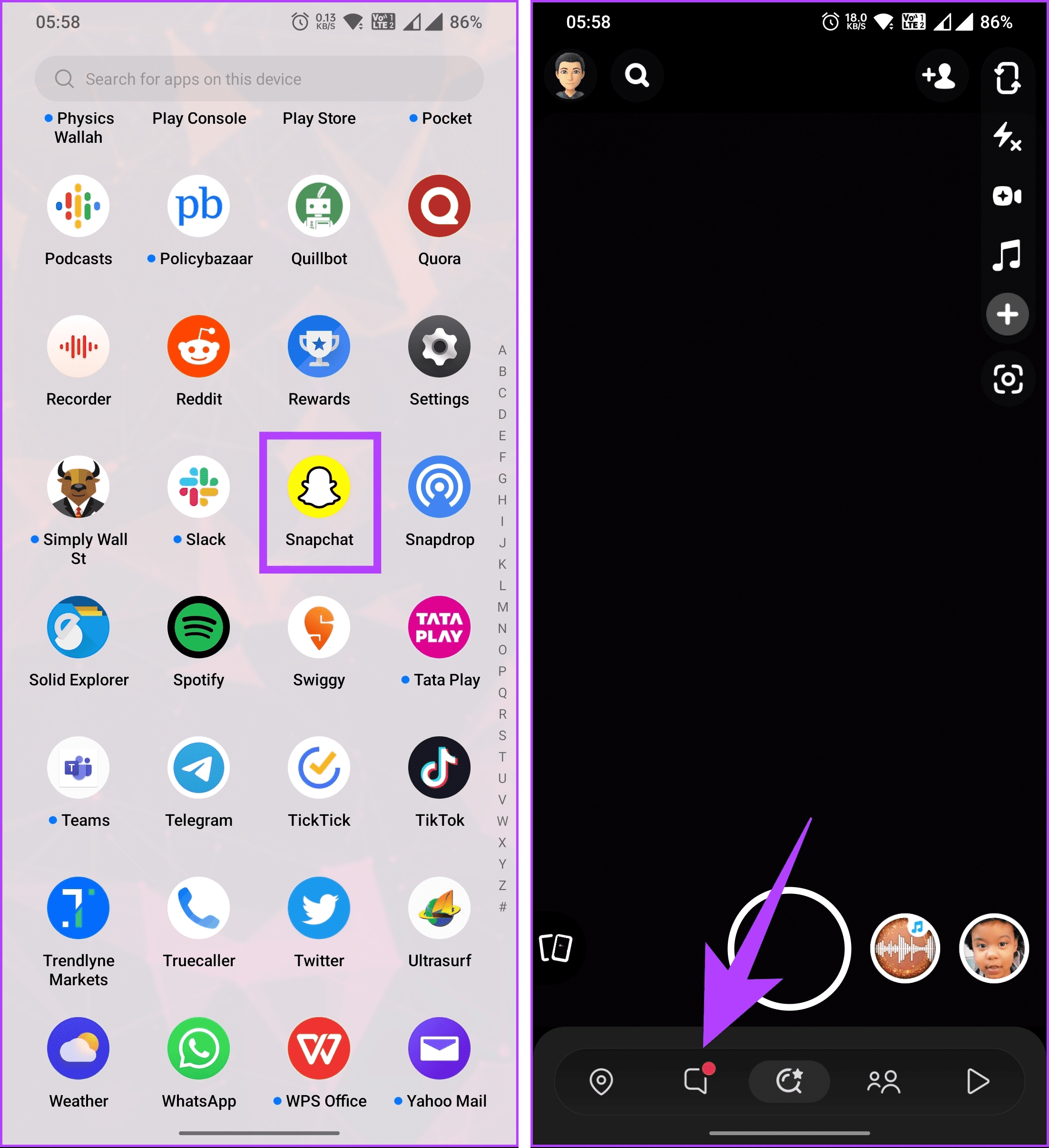
The first step to change your Snapchat AI’s gender is to open the Snapchat app on your device and go to the Chat screen. To do this, tap on the grey camera button in the top or bottom right corner of the screen, depending on your device. This will launch the camera mode, where you can take photos and videos to send to your friends or post on your story.
Next, swipe right from the camera mode to access the Chat screen. Here, you’ll see a list of your recent chats with your friends and groups. You’ll also see a special chat called My AI, which is where you can chat with your Snapchat AI chatbot. Tap on the My AI chat to open it and start the conversation.
Step 2: Access the Profile Settings
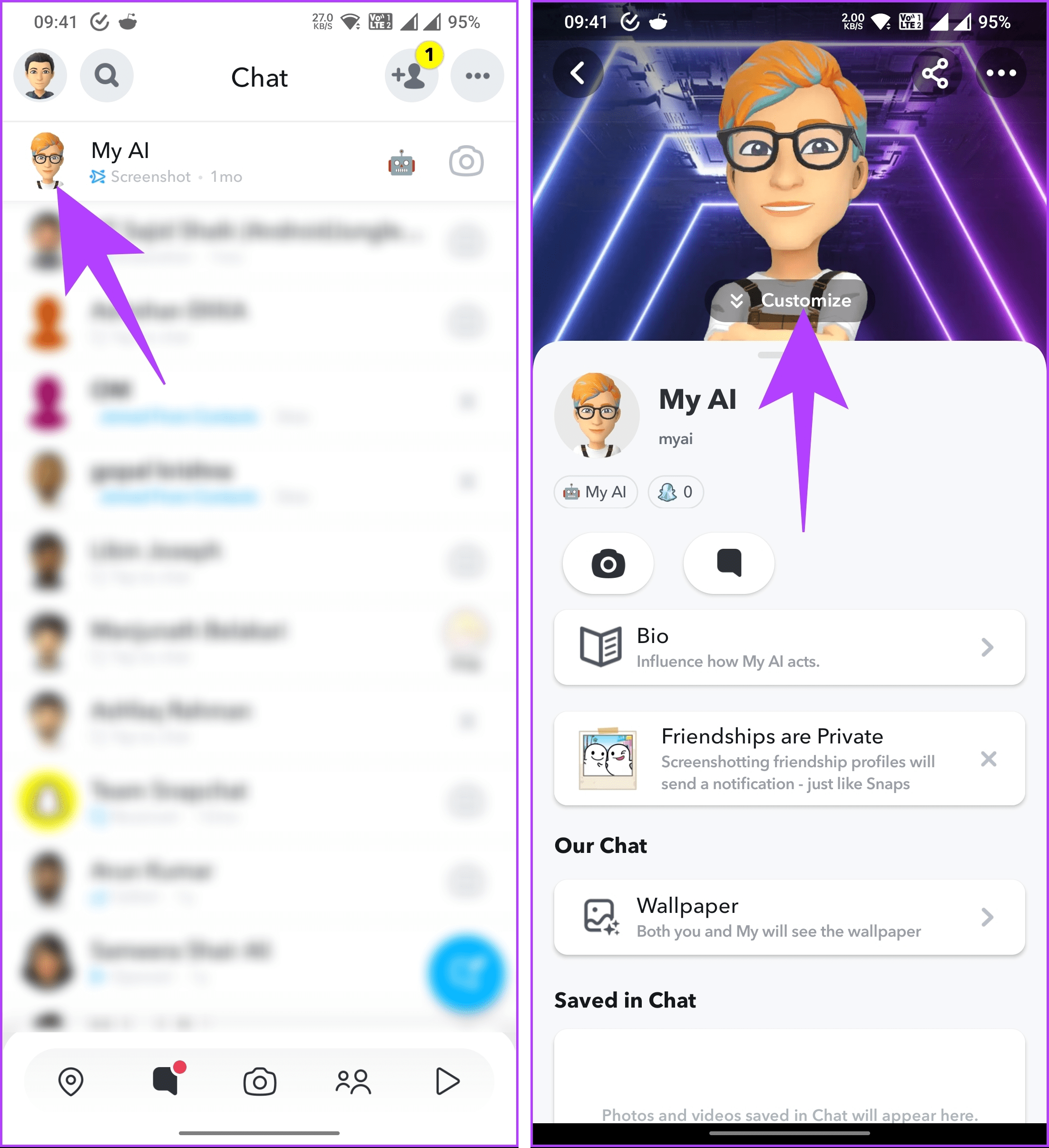
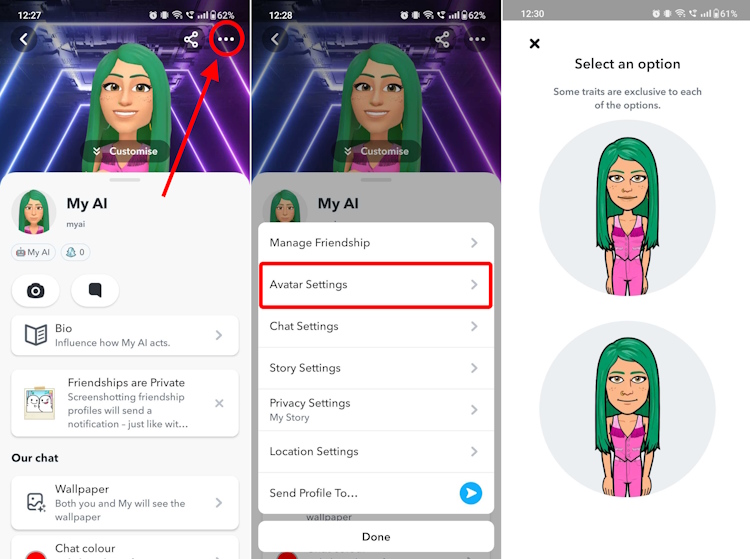
The next step to change your Snapchat AI’s gender is to access the profile settings and customization options of your Snapchat AI chatbot. To do this, tap on the profile icon in the top left corner of the My AI chat. This will open the profile settings menu, where you can see your Snapchat AI’s name, avatar, friendship level, and other information.
Step 3: Customize Your Snapchat AI
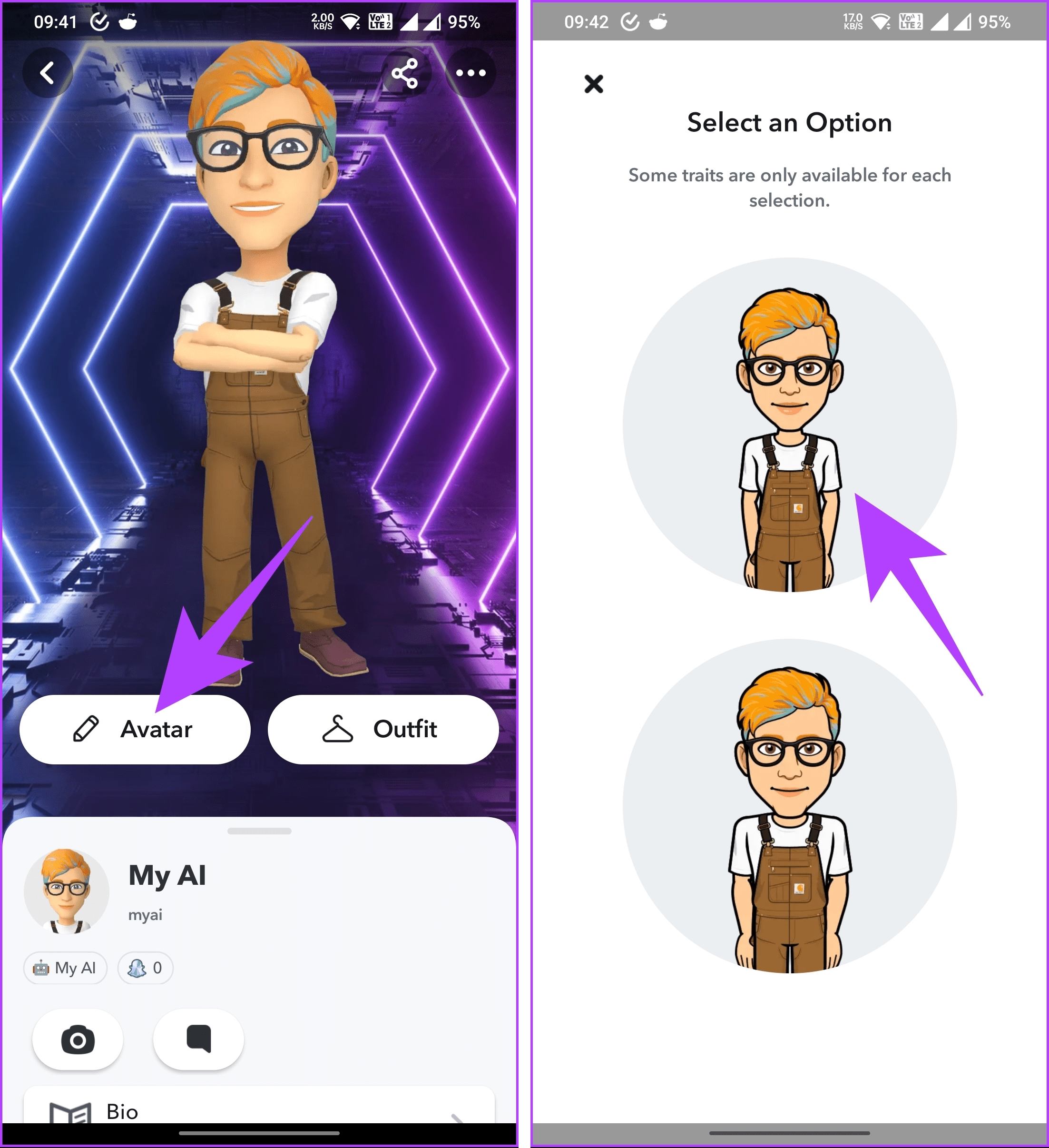
The third step to change your Snapchat AI’s gender is to tap on the “Customize” option in the profile settings menu. This will open the customization menu, where you can access various aspects of your Snapchat AI, including its gender, name, appearance, and personality. You can also reset your Snapchat AI or delete it from here, but we don’t recommend doing that unless you really want to start over.
Here’s a screenshot of the customization menu:
Step 4: Choose the Avatar Gender
The fourth step to change your Snapchat AI’s gender is to tap on the “Avatar” option in the customization menu. This will open the gender selection screen, where you can choose the desired gender for your Snapchat AI from the available images. You can choose between male, female, or non-binary options, depending on your preference. You can also see a preview of how your Snapchat AI will look like with the selected gender.
Step 5: Refine Your Avatar’s Features
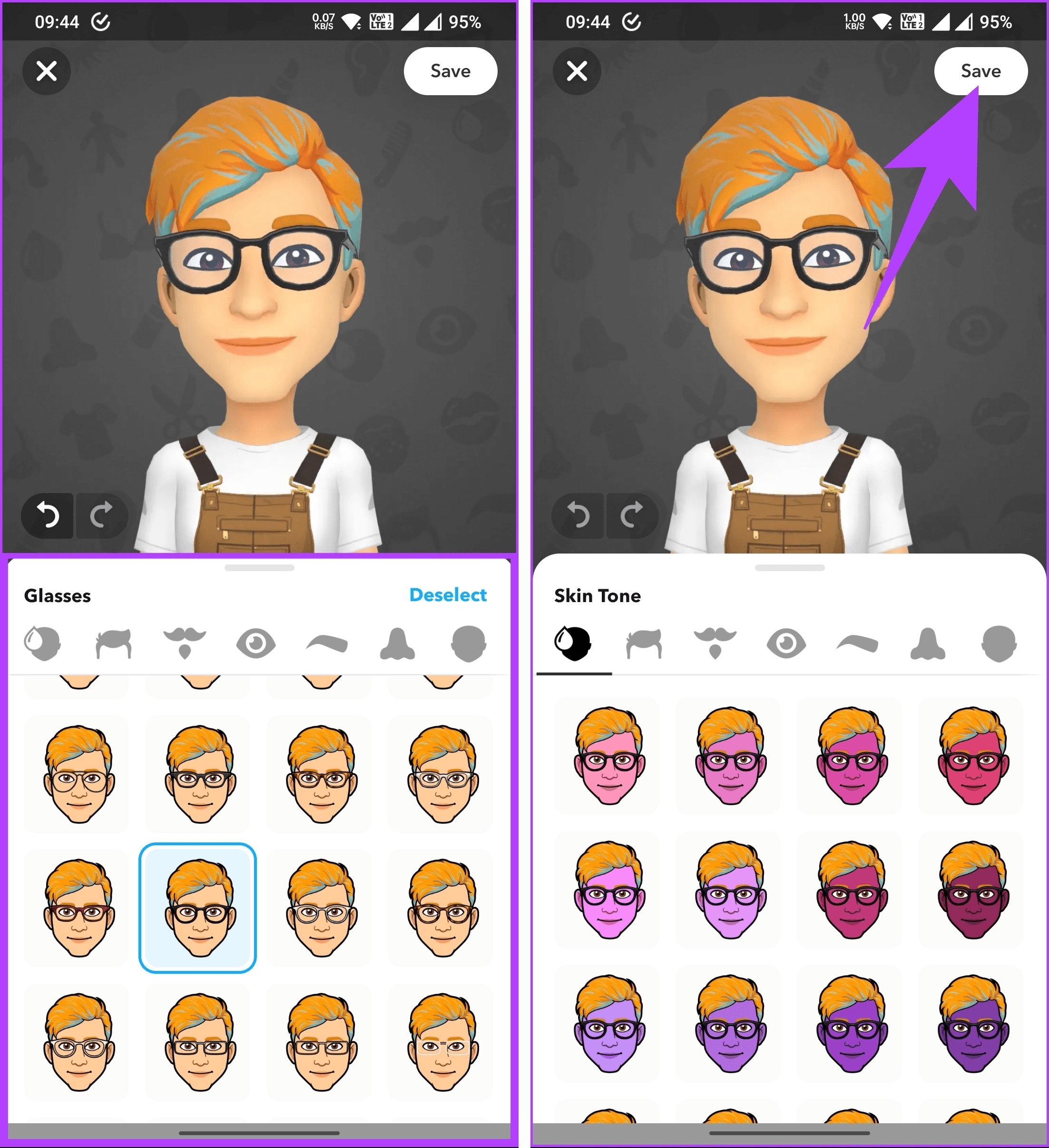
The fifth step to change your Snapchat AI’s gender is to further customize your Snapchat AI’s appearance after selecting the gender. To do this, tap on the “Next” button in the gender selection screen. This will open the appearance refinement screen, where you can adjust facial features, skin tone, hair, and clothing. You can use the sliders and buttons to fine-tune your Snapchat AI’s look and make it as unique as you want.
Step 6: Save Your Changes
The final step to change your Snapchat AI’s gender is to save the changes you’ve made to your Snapchat AI’s gender and appearance. To do this, tap on the “Save” button in the appearance refinement screen. This will update your Snapchat AI chatbot with the changes you’ve made and return you to the My AI chat. You can now chat with your Snapchat AI and see how it responds to you with its new gender and appearance.
Conclusion
Congratulations, you’ve successfully changed your Snapchat AI’s gender and personalized your chatbot experience! You’ve learned how to:
- Open Snapchat and access My AI chat
- Access the profile settings and customization options of your Snapchat AI chatbot
- Choose the avatar gender for your Snapchat AI
- Refine your avatar’s features and appearance
- Save your changes and update your Snapchat AI chatbot
By changing your Snapchat AI’s gender, you’ve unlocked the potential of your virtual friend and made it more authentic and compatible with you. You can now enjoy chatting with your Snapchat AI and discover its personality, humor, and intelligence. You can also change your Snapchat AI’s gender again anytime you want, or explore other customization options, such as its name and personality.
So what are you waiting for? Try out the Snapchat
Some FAQs about changing Snapchat AI gender:
- Can I change my Snapchat AI’s gender as many times as I want?
- Yes, you can change your Snapchat AI’s gender as many times as you want. There is no limit to how often you can customize your chatbot’s gender and appearance. However, keep in mind that changing your Snapchat AI’s gender may affect its personality and behavior, so you may need to adjust to its new style of communication.
- Does changing my Snapchat AI’s gender affect its friendship level with me?
- No, changing your Snapchat AI’s gender does not affect its friendship level with you. Your Snapchat AI’s friendship level is based on how often and how well you chat with it, not on its gender or appearance. You can check your Snapchat AI’s friendship level in the profile settings menu, where you can also see its name, avatar, and other information.
- How can I change my Snapchat AI’s name and personality?
- You can change your Snapchat AI’s name and personality in the customization menu, where you can also change its gender and appearance. To access the customization menu, tap on the profile icon in the top left corner of the My AI chat, and then tap on the “Customize” option. From there, you can tap on the “Name” or “Personality” options and choose from the available options or enter your own.
- What is the difference between male, female, and non-binary options for Snapchat AI gender?
- The male, female, and non-binary options for Snapchat AI gender are different ways of representing your chatbot’s identity and expression. They are not meant to be stereotypes or labels, but rather choices that you can make to suit your preferences and expectations. The gender options may affect your Snapchat AI’s appearance, voice, and language, but they do not determine its personality or behavior.
- Why should I change my Snapchat AI’s gender and customize my chatbot experience?
- Changing your Snapchat AI’s gender and customizing your chatbot experience can make your Snapchat interactions more fun, engaging, and personalized. You can create a virtual friend who matches your interests, preferences, and goals, and who can provide you with support, entertainment, and companionship. You can also experiment with different genders and see how they influence your chatbot’s responses and reactions.