

What is Zen Editor?
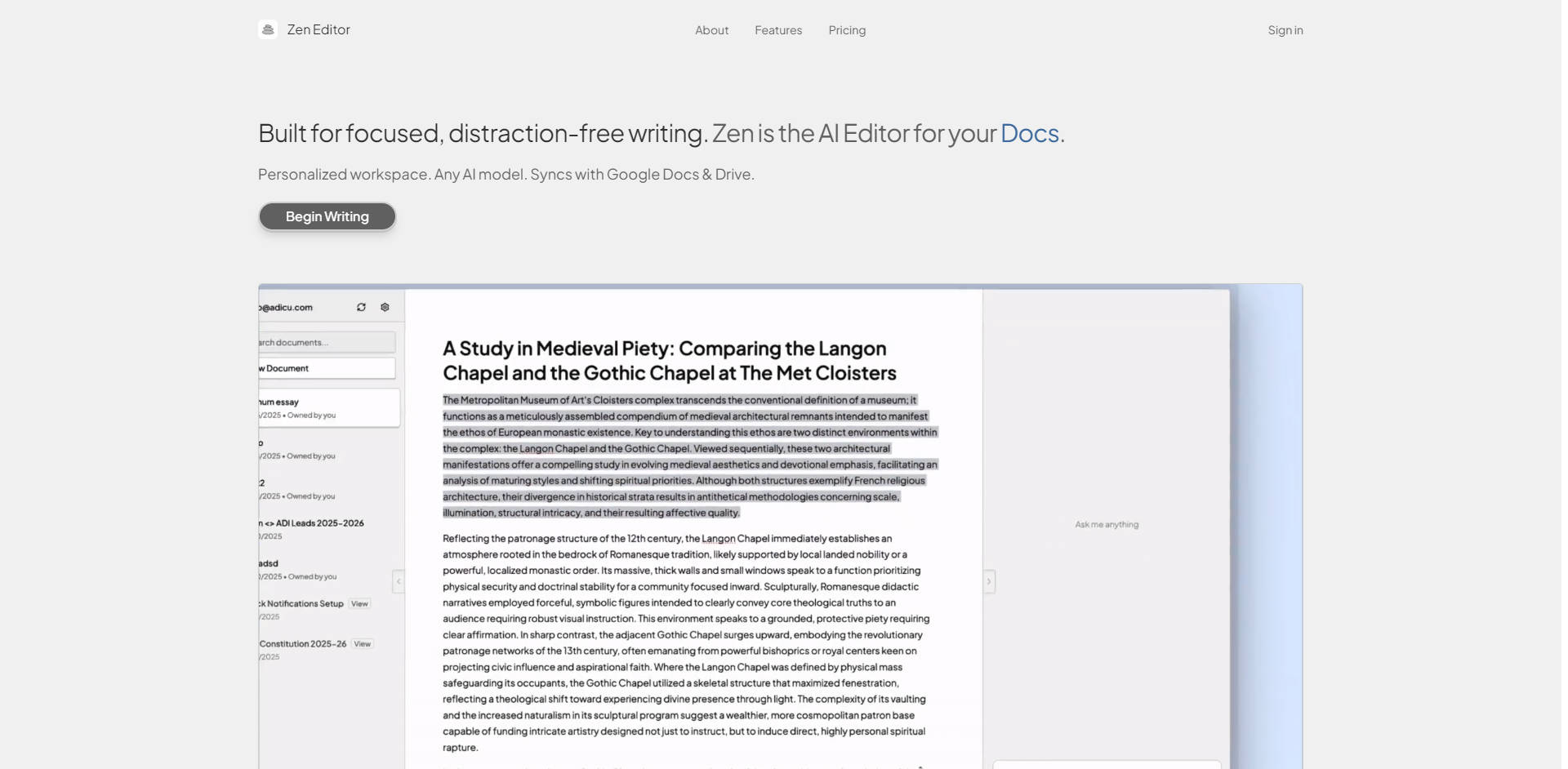
Zen Editor is the sophisticated, AI-powered writing environment designed to eliminate digital distractions and streamline your workflow directly within the Google ecosystem. Built for professionals, academics, and writers who demand focus and integrated intelligence, Zen Editor solves the challenge of juggling multiple tools by bringing powerful AI assistance and a customizable workspace directly to your Google Docs. It allows you to concentrate purely on content creation while ensuring all your work remains automatically synced, secure, and accessible everywhere.
Key Features
Zen Editor provides everything you need for focused, high-efficiency, AI-enhanced content creation, all while maintaining the integrity of your Google Drive workflow.
- 🔗 Seamless Google Drive Integration: Edit your existing Google Docs instantly within the Zen Editor interface. All changes are saved automatically and synced in real-time back to your Google Drive, ensuring you never have to worry about file management, manual saving, or version control.
- 🧠 Multi-Model AI Assistant: Leverage the power of your preferred AI models directly within your writing environment. Use the AI Assistant to improve clarity, expand on initial concepts, transform tone and style, or generate entirely new content, integrating intelligence directly into your drafting process.
- 🔒 Your Data, Your Control: Unlike many third-party editors, Zen Editor prioritizes your security and privacy. Your documents remain exclusively within your Google Drive. We do not store, access, or retain copies of your content, giving you full control and peace of mind over your intellectual property.
- 🎨 Personalized Workspace Configuration: Optimize your writing environment for maximum concentration. Choose your preferred theme, customize the workspace layout, select your default AI model, and control the 'diff view' settings so that every interaction and response aligns perfectly with your working style.
Use Cases
Zen Editor is designed to enhance critical stages of the writing process, from initial drafting to final polish.
Accelerating Draft Completion
When facing writer's block or needing to expand a brief outline, utilize the AI Assistant to generate detailed paragraphs or flesh out complex arguments based on your input. This capability transforms the initial drafting phase from a slow, laborious process into a rapid iteration cycle, allowing you to quickly move to the refinement stage.
Transforming and Refining Content
For professionals needing to adapt complex reports into accessible summaries or marketing copy, Zen Editor allows you to select sections and instantly command the AI to transform the tone, complexity, or length. This significantly reduces the time spent on manual stylistic edits, ensuring your message is perfectly tailored for different audiences.
Ensuring Consistent, Secure Workflow
For users who frequently switch between devices (desktop, tablet, or mobile), the real-time sync capability ensures that whether you’re editing a document in the office or reviewing notes on a commute, your work is always current and automatically saved back to your central Google Drive repository.
Why Choose Zen Editor?
Choosing Zen Editor means opting for a writing environment where focus and functional flexibility take precedence over platform limitations.
- Unparalleled Flexibility in AI Tools: Unlike proprietary editors that lock you into a single AI engine, Zen Editor allows you to choose and configure any AI model that best suits your current task. This means you are never limited by the capabilities or pricing structure of a single vendor, ensuring you always have access to the optimal tool for the job.
- Focus Without Compromise: The core design is rooted in distraction-free writing, achieved through a personalizable interface (themes, layouts, tools). This focus is paired with the essential convenience of Google Docs integration, meaning you gain advanced functionality without sacrificing your existing cloud ecosystem or file structure.
- Guaranteed Data Sovereignty: The explicit commitment to non-storage and non-access of your document data builds a foundational layer of trust. For businesses handling sensitive information or individuals working on confidential projects, knowing your documents stay exclusively within the security perimeter of your Google Drive is a decisive advantage.
Conclusion
Zen Editor provides a powerful, integrated solution for writers seeking to maximize their focus and leverage sophisticated AI assistance without compromising data control or workflow simplicity. By seamlessly merging the convenience of Google Docs with a highly configurable, distraction-free AI editor, Zen Editor helps you achieve clearer, faster, and more confident writing.
Explore how Zen Editor can transform your document creation process today.
More information on Zen Editor
Launched
Pricing Model
Free Trial
Starting Price
Global Rank
Follow
Month Visit
<5k
Tech used
Zen Editor was manually vetted by our editorial team and was first featured on 2025-11-19.
Zen Editor Альтернативи
Больше Альтернативи-

Jetwriter AI: Your personalized, context-aware AI writing assistant. Boost productivity across platforms with multi-model intelligence & your unique voice.
-

-

-
-

SourcePilot: Персональный настольный ИИ-редактор. Получайте быструю, контекстную помощь в написании текста, при этом все ваши данные будут храниться безопасно и локально. Владейте своим IP.