

What is Desktop Docs?
Desktop Docs is a groundbreaking file management platform designed specifically for creators. This all-in-one solution empowers users to effortlessly browse, edit, and export media files, streamlining the creative process. With its advanced AI capabilities, Desktop Docs understands the content of your files, including the intricacies within videos, making file search and organization more intuitive than ever before.
Key Features:
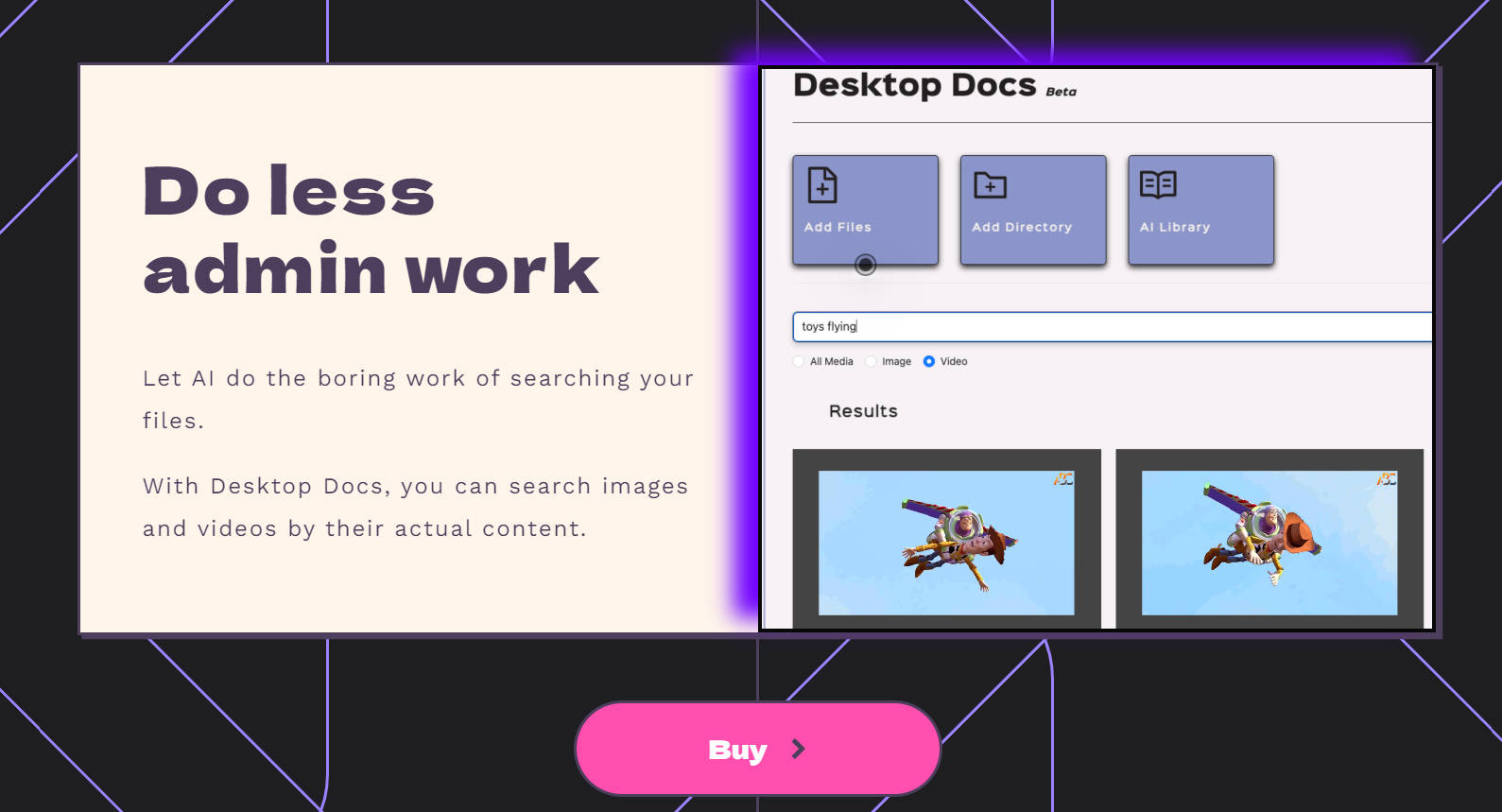
🌐 AI-Powered Search: Desktop Docs leverages AI to search images and videos based on their actual content, eliminating the need for manual tagging and organization.
🎨 Integrated Studio: The built-in Studio allows for quick editing and resizing of files, perfect for on-the-fly adjustments.
🎥 Seamless Integration with Adobe Premiere: For professional video editors, Desktop Docs enables direct export of images and video clips to Adobe Premiere, enhancing the video editing workflow.
🚀 Content-Aware Indexing: The application uses machine learning models to index files based on their content, providing a deeper understanding of your media library.
Use Cases:
Effortless Media Retrieval: Quickly find specific images or video clips within a vast collection, saving time and enhancing productivity.
Streamlined Video Editing: Professional editors can effortlessly import assets into Adobe Premiere, accelerating the editing process.
Organized Creativity: Creators can focus more on their craft, as Desktop Docs takes care of the tedious task of file organization.
How Does It Work?
Desktop Docs employs sophisticated AI algorithms to analyze and index your files. When you search for a file, the application understands your query based on the content of the files, not just metadata. This means you can find a video by describing what’s happening in it, rather than remembering where it’s stored.
How to Use?
After purchasing Desktop Docs for a one-time fee of $24.99, you’ll receive a download link to install the application on your Mac. Once installed, simply let Desktop Docs index your files, and you’re ready to start searching and editing with unparalleled ease.
FAQ:
What’s Included in the Purchase?A one-time purchase of $24.99 gets you the Desktop Docs application for Mac.
Is Windows Supported?Currently, Desktop Docs is only available for Mac, but Windows support may be considered based on user demand.
Does Desktop Docs Collect My Data?No, the application does not collect personal data. All indexing is done locally on your computer.
Who Developed Desktop Docs?Desktop Docs was created by Katrina and Brian, experienced engineers with a passion for creating practical solutions for content creators.
Can I Get a Refund?Desktop Docs is a one-time purchase with no refund policy, but the developers are open to feedback and willing to assist with any issues.
Conclusion:
Desktop Docs is more than just a file management tool; it’s a productivity booster for creators. By simplifying the process of file organization and retrieval, Desktop Docs empowers you to focus on what you do best: creating. Experience the future of file management and unlock your creative potential with Desktop Docs.

More information on Desktop Docs
Launched
2024-03
Pricing Model
Paid
Starting Price
$24.99
Global Rank
10669183
Follow
Month Visit
<5k
Tech used
Google Analytics,Google Tag Manager,Amazon AWS CloudFront,Astro,Gzip,Amazon AWS S3
Top 5 Countries
40.7%
32.33%
19.99%
6.98%
India
France
United Kingdom
Japan
Traffic Sources
4.22%
1.4%
0.29%
13.8%
43%
36.5%
social
paidReferrals
mail
referrals
search
direct
Source: Similarweb (Sep 24, 2025)
Desktop Docs was manually vetted by our editorial team and was first featured on 2024-05-17.
Related Searches
Desktop Docs Alternatives
Load more Alternatives-

-

Stop searching! Dynbox AI file organizer automatically tidies files, lets you search by meaning, and keeps you in control. Organize & save hours.
-
-

Streamline file management on Windows with Folder Pilot. Replace the standard Address bar for quick folder navigation, use a customizable Favorites menu, and search files with natural language. Talk to your documents, ensure data security, and share files effortlessly. It's a productivity - boosting, freemium app for Windows users.
-

AutoSortPro transforms digital clutter. AI intelligently tags, summarizes, and generates descriptive titles for your files. Find anything by content.