
What is Claude Code Workflow Studio?
Claude Code Workflow Studio transforms how you interact with Anthropic’s official CLI. By replacing manual configuration with an intuitive drag-and-drop interface, you can design, refine, and deploy sophisticated AI agent orchestrations without writing a single line of boilerplate code.
Whether you are building a multi-stage data pipeline or a custom PR review agent, this studio bridges the gap between high-level logic and executable .claude automation. It provides a local, secure environment to map out complex decision trees and integrate external tools through a streamlined visual canvas.
Key Features
✨ Visual Drag-and-Drop Editor
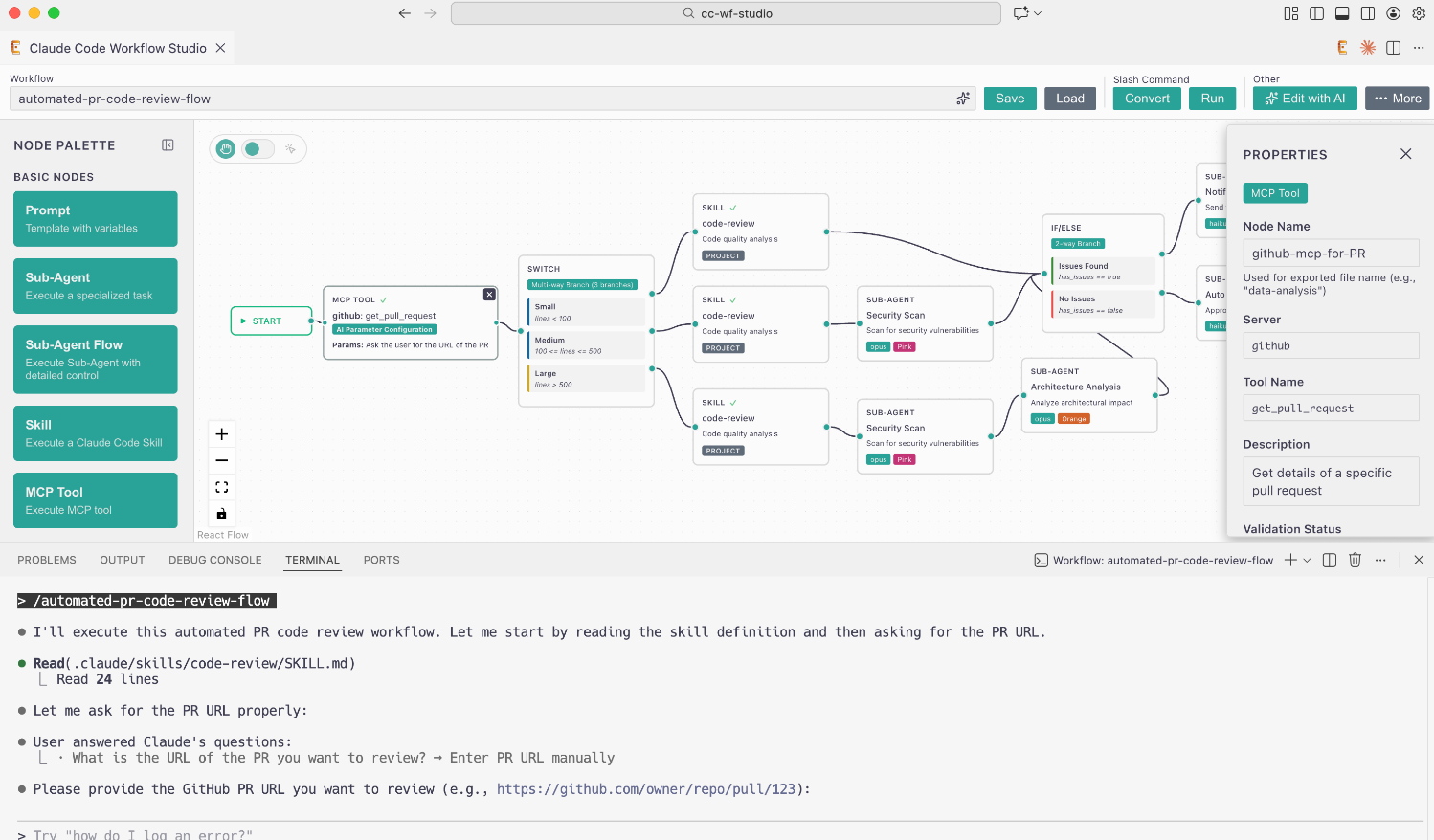
Build complex AI logic by connecting nodes on an intuitive canvas. You can orchestrate Sub-Agents, define conditional branching, and set up user decision points visually, allowing you to see the entire automation flow at a glance.
🤖 AI-Assisted Iterative Refinement
Refine your workflows using natural language. By clicking "Edit with AI," you can request specific changes—like adding error handling or new logic branches—and the studio will automatically update the canvas while maintaining your previous conversation history.
📤 One-Click Claude Code Export
Transition instantly from design to execution. The studio generates ready-to-use .claude/agents/ and .claude/commands/ files, ensuring your visual designs are immediately compatible with the Claude Code CLI environment.
🧩 Extensible MCP & Skill Integration
Deepen your agent's capabilities by integrating Model Context Protocol (MCP) tools and Claude Code Skills. You can browse configured MCP servers or create new Skills directly within the editor to give your agents access to local files, APIs, and custom functions.
🔒 Local-First Security
Maintain full control over your data and logic. All workflow design and file generation occur locally within your VS Code environment, ensuring your proprietary automation logic remains private and secure.
Use Cases
- Automated PR Code Reviews: Create a workflow that uses an MCP tool to fetch pull request details, scans the code for specific patterns using a "Skill" node, and then branches to different Sub-Agents based on the severity of the issues found.
- Intelligent Document Pipelines: Design a flow where a Prompt node collects a file path, a Skill node extracts text from a PDF, and a Switch node routes the content to different processing agents based on the document type (e.g., invoice vs. legal contract).
- Web Automation with MCP: Build a browser-based agent that navigates to a URL using a Playwright MCP tool, asks the user for a specific action (like "Extract Text" or "Take Screenshot"), and then processes the results through a specialized Sub-Agent.
Why Choose Claude Code Workflow Studio?
This studio is designed for users who need to move beyond simple prompts into the realm of autonomous agents. It focuses on functional efficiency and rapid iteration.
- Eliminate Syntax Errors: By using a visual interface, you avoid the common formatting and schema errors associated with manually writing markdown and YAML configuration files for AI agents.
- Accelerated Iteration: The "Edit with AI" feature allows you to prototype complex logic in seconds. You can experiment with different branching paths and node configurations without the friction of manual file editing.
- Team Synchronization: Use the built-in Slack sharing feature to send workflow previews to your team. Others can import your shared logic with a single click, ensuring consistent automation across the entire development group.
Claude Code Workflow Studio provides the structural clarity needed to manage complex AI behaviors. It shifts the focus from managing configuration files to designing high-impact automation logic. By combining visual design with the power of the Claude Code CLI, you can build more reliable, sophisticated, and scalable AI workflows in a fraction of the time.
More information on Claude Code Workflow Studio
Launched
Pricing Model
Free
Starting Price
Global Rank
Follow
Month Visit
<5k
Tech used
Claude Code Workflow Studio was manually vetted by our editorial team and was first featured on 2025-12-31.