

What is Termdock?
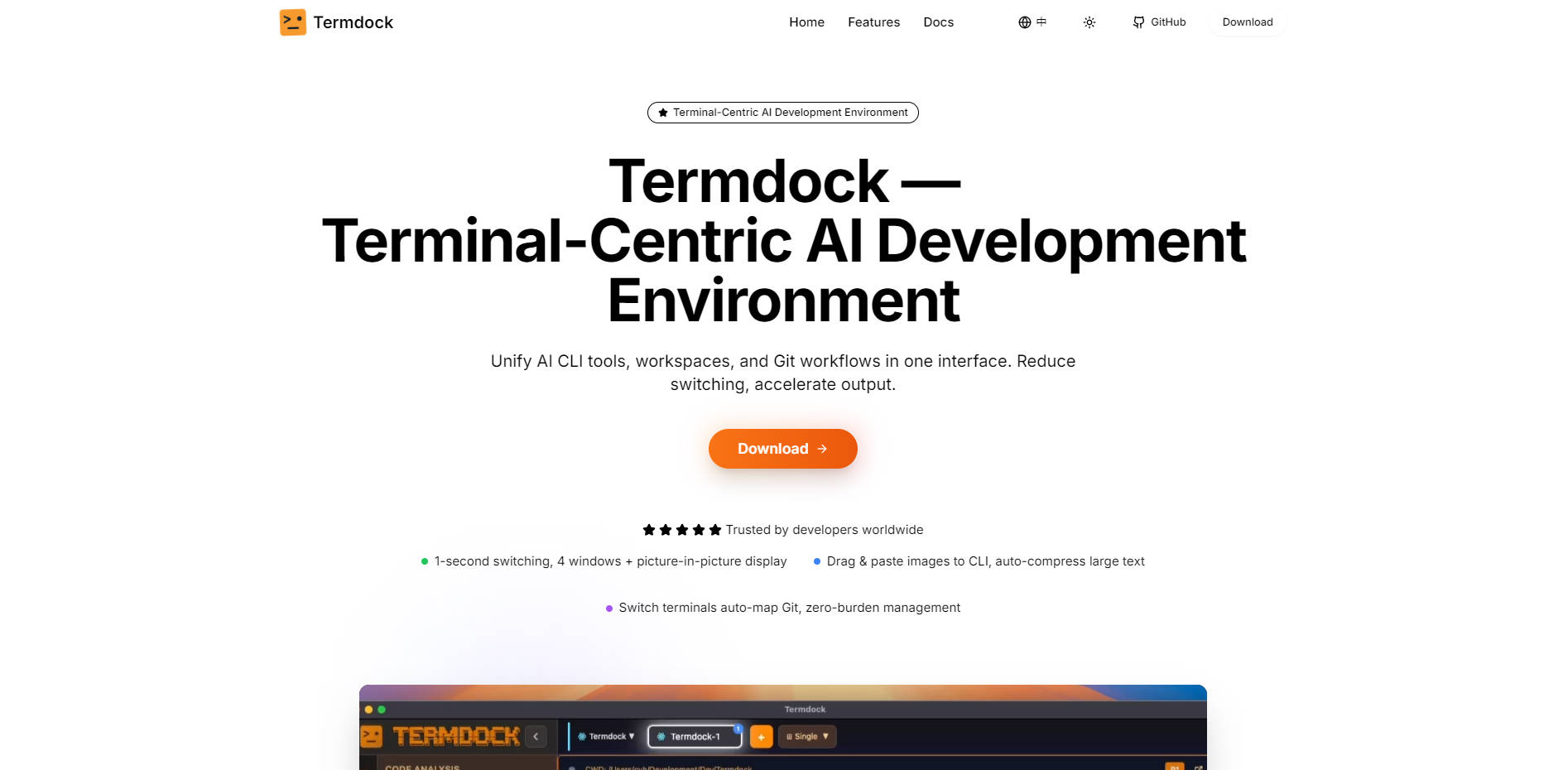
Termdock is a powerful, terminal-centric AI development environment engineered to eliminate workflow fragmentation. It solves the critical developer problem of context switching by unifying AI CLI tools, multi-repository workspaces, and integrated Git workflows into one fluid interface. Designed for developers worldwide who manage complex, concurrent projects, Termdock helps you accelerate output and maintain deep focus.
Key Features
Termdock delivers a cohesive development experience by integrating the tools you rely on directly into the terminal environment, maximizing your fluency and reducing friction.
🤖 Seamless AI CLI Tool Integration
Quickly integrate and utilize popular AI command-line tools like Claude, Copilot, and Aider without breaking your terminal flow. Termdock supports up to four simultaneous display windows plus a picture-in-picture view for AI outputs or monitoring. Furthermore, you can drag and paste images directly into the CLI, which are automatically compressed for smarter, faster terminal operations.
🧭 Intelligent Code Analysis & AST Search
Gain unparalleled insight into large codebases using Tree-sitter based Abstract Syntax Tree (AST) parsing, supporting over 13 programming languages. This advanced capability allows for one-click symbol reference, dependency location, and cross-file symbol search, dramatically reducing file jumping time by up to 60% when tracking down definitions or functional dependencies.
🔄 Frictionless Multi-Workspace Management
Manage multiple project root directories and cross-repository tasks within a single Termdock window. Each workspace maintains isolated configurations, preserving terminal states and records separately. This architecture enables 1-second switching between complex projects, ensuring zero friction when moving between side projects, testing environments, and main development branches.
📺 Multi-Terminal Simultaneous Operation (Picture-in-Picture)
Stop relying on endless tabs. Arbitrarily split your layout to run concurrent tasks like Docker processes, Redis monitoring, live logs, or unit tests side-by-side. The picture-in-picture monitoring feature ensures critical processes remain in sight while you maintain focus on your primary terminal workflow.
🖱️ Drag & Paste for Accelerated Input
Termdock goes beyond standard terminal input. Drag or paste content directly from iTerm, your browser, or local files into the terminal. The system auto-detects commands, environment variables, and paths, reducing manual typing and errors, resulting in less effort and significantly more output.
Use Cases
Termdock is built for real-world developer scenarios, optimizing common high-friction tasks:
| Use Case | Description & Benefit |
|---|---|
| Concurrent Monitoring & Debugging | Use the multi-terminal simultaneous operation to display your application logs, test runners (e.g., npm run test), and primary coding terminal in parallel. This eliminates the constant need to switch tabs or windows, allowing you to instantly see the effect of code changes and pinpoint issues faster. |
| Deep Project Navigation | When onboarding to a large, unfamiliar project or debugging a deep dependency, leverage AST search to instantly locate symbol definitions and visualize function call chains across repositories. You can pinpoint K8s config issues or complex library dependencies in seconds, rather than manually navigating dozens of files. |
| Standardizing Team Workflows | Utilize the integrated Prompt Management feature to create a team-shared library of standardized prompts, command templates, and review scripts. New team members can apply standardized verifications and code review feedback with one click, shortening collaboration friction periods and ensuring consistency. |
Unique Advantages
Termdock’s design is focused on maximizing developer output by unifying disparate tools that typically require constant context switching.
Maximized Fluency: By unifying AI CLI tools, project workspaces, and file/Git workflows, Termdock drastically reduces the cost of context switching, allowing you to stay in the zone.
Quantifiable Efficiency Gains: Achieve up to 60% reduction in file jumping time through Tree-sitter based AST analysis, making large project navigation instantaneous and intuitive.
Zero-Friction Cross-Repo Work: Seamlessly switch between projects and repositories using multi-workspace management, where terminal states and configurations are instantly preserved and restored.
Git Visualization Done Right: Termdock provides visual Git integration (Branch/Tag/Commit visualization, one-click common operations) that supports your workflow without stealing the terminal spotlight, preserving your usage habits while enhancing clarity.
Conclusion
Termdock is the definitive environment for modern developers seeking to unify their workflow, leverage AI tools efficiently, and maximize their coding fluency. By consolidating key development functions—from deep code analysis to multi-project management—Termdock ensures you spend less time managing tools and more time building.
Explore how Termdock can help you accelerate your development output today.
More information on Termdock
Launched
2025-08
Pricing Model
Free
Starting Price
Global Rank
Follow
Month Visit
<5k
Tech used
Termdock was manually vetted by our editorial team and was first featured on 2025-11-04.
Termdock Alternatives
Load more Alternatives-
Wave is an open-source terminal with superpowers, integrating file previews, file editing, AI, web browsing, and workspace organization.
-
Tired of juggling AI coding agents? Claude Squad unifies parallel tasks & isolates code with Git worktrees for seamless, conflict-free development.
-

Codebuff AI: Code faster, smarter directly in your terminal. Use natural language for coding & commands. Understands your entire codebase deeply.
-

Desktop Commander MCP is an open-source tool that enables terminal command execution and file editing directly through Claude Desktop app. Enhance your AI workflow with Claude.
-
