

What is Wave Terminal?
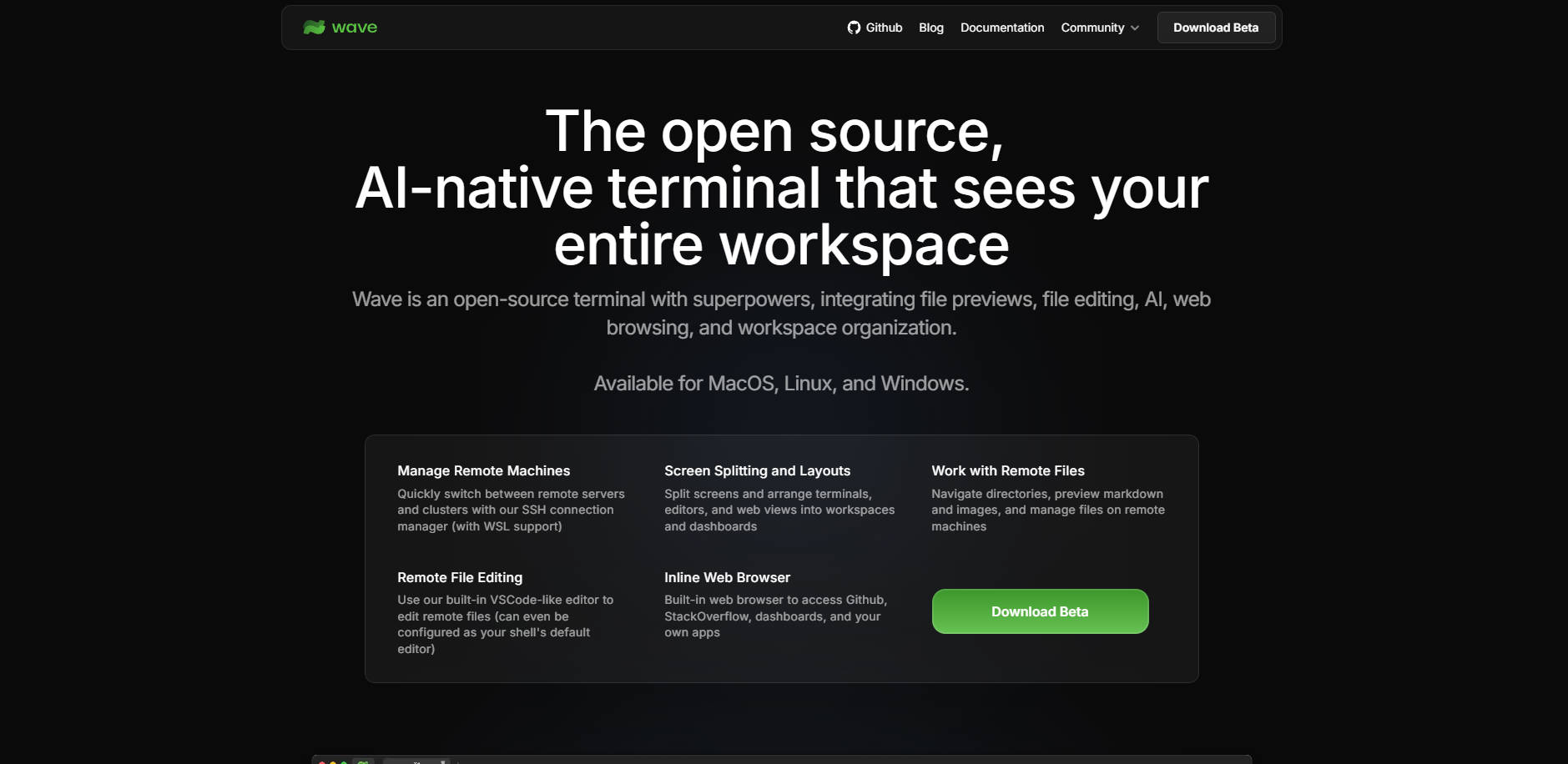
Wave Terminal is an open-source, AI-native command line solution designed to eliminate the friction of context switching in modern development workflows. It merges the power of the traditional terminal with essential graphical tools—including file previews, integrated web browsing, and powerful AI assistance—allowing you to manage remote machines and entire workspaces without ever leaving the core command line interface.
If you find yourself constantly navigating between your terminal, web browser for documentation, and external editors for configuration files, Wave provides a consolidated, efficient environment tailored for maximum productivity.
Key Features
Wave Terminal transforms the command line experience by integrating the visual tools developers rely on daily, controlled directly from the CLI.
💻 Integrated Remote File Editing
Access and modify files on remote servers directly within a VSCode-like GUI editor built into the terminal window. This feature eliminates the need to rely on command-line editors (like Vim or Nano) for complex remote file adjustments. You gain immediate access to modern conveniences like syntax highlighting, indentation support, and mouse-based selection, ensuring precision when managing critical configuration or code snippets on distant machines.
🧠 Multi-Model AI Assistance
Leverage integrated AI chat capabilities supporting multiple leading models (including OpenAI, Claude, Azure, and Ollama). This allows you to query documentation, debug errors, or generate boilerplate code without switching applications. The AI integration is native to your terminal workflow, providing contextual help exactly when and where you need it.
🌐 Inline Web Browser & Dashboards
Stop juggling windows to check documentation, monitoring tools, or GitHub. Wave includes an inline web browser that can be opened directly alongside your terminal sessions. Furthermore, you can build or import rich, graphical dashboards using built-in widgets and stickers, allowing you to visualize application status or system metrics right next to the commands managing them.
🗂️ Dynamic Workspace Organization
Take control of complex projects using flexible screen splitting and custom layouts. Arrange terminal blocks, editors, and web views into designated workspaces that fit your task flow. You can use the powerful wsh command system to manage these layouts from the CLI and share specific, repeatable configurations with teammates.
📂 Rich Remote File Previews
Quickly inspect the contents of remote directories and files without downloading them or opening external applications. Wave supports rich inline previews for essential file types, including images, Markdown, HTML, audio/video, and CSVs, enabling rapid verification and assessment of remote assets.
Use Cases
Wave Terminal enhances efficiency across several key development scenarios by unifying the workflow.
1. Streamlined Debugging and Monitoring
Imagine you receive an alert about a production issue. You can instantly connect to the remote machine using Wave’s connection manager. Within a single pane, you can run diagnostic commands (isolated in Command Blocks), view the resulting log files via the rich file preview, and simultaneously open the related system monitoring dashboard in the integrated web browser. If a configuration change is needed, the built-in editor lets you make and save the remote modification instantly, drastically reducing the time spent switching tools.
2. Rapid Infrastructure Provisioning and Setup
When setting up new infrastructure, you often need to consult documentation, execute setup scripts, and modify configuration files. With Wave, you can load the provider's documentation in one split panel, run the provisioning commands in the main terminal, and use the integrated editor to customize the new server’s SSH or firewall rules immediately upon connection—all within a cohesive, organized workspace.
3. Sharing Complex Workflows
For teams, Wave allows you to define and share complex dashboard layouts and widget configurations. Instead of providing lengthy documentation for environment setup or monitoring, you can share a pre-built Wave workspace that visually tracks key services, displays relevant logs, and provides the necessary terminal sessions, ensuring everyone on the team operates with the same context and efficiency.
Why Choose Wave Terminal?
Wave Terminal is built for developers who demand both high performance and modern usability, offering distinct advantages over traditional terminal emulators.
Zero Context Switching: Unlike traditional setups that force developers into separate windows for editing, browsing, and monitoring, Wave integrates these functions directly, allowing you to maintain flow state and significantly reduce cognitive load.
Open Source and Privacy-Focused: As an open-source project, Wave ensures transparency. Critically, all your data is stored locally, requiring no login or account, ensuring sensitive command line and workspace information never leaves your network.
True Remote Development Integration: Wave doesn't just manage remote connections; it provides deep integration, including a full graphical editor and rich file preview system that operates natively on remote file systems (with robust SSH and WSL support), simplifying cross-platform and distributed development.
Extensive Platform Support: Deployable across all major operating systems—MacOS, Linux, and Windows—Wave provides a consistent, powerful command line experience regardless of your host environment.
Conclusion
Wave Terminal is the essential upgrade for the modern command line, blending the speed and power of the terminal with the visual efficiency of graphical tools. By integrating AI, remote editing, and dynamic workspace management, Wave allows you to consolidate your development tools and focus entirely on execution.
More information on Wave Terminal
Launched
Pricing Model
Free
Starting Price
Global Rank
596750
Follow
Month Visit
54.3K
Tech used
Top 5 Countries
15.46%
9.31%
8%
5.14%
5.11%
United States
India
Vietnam
Russia
France
Traffic Sources
6.97%
0.77%
0.09%
13.82%
42.69%
35.61%
social
paidReferrals
mail
referrals
search
direct
Source: Similarweb (Nov 1, 2025)
Wave Terminal was manually vetted by our editorial team and was first featured on 2025-10-31.
Wave Terminal Alternatives
Load more Alternatives-
-
-
-

-

Desktop Commander MCP is an open-source tool that enables terminal command execution and file editing directly through Claude Desktop app. Enhance your AI workflow with Claude.