

Click outside to close
What is TypeCharm?
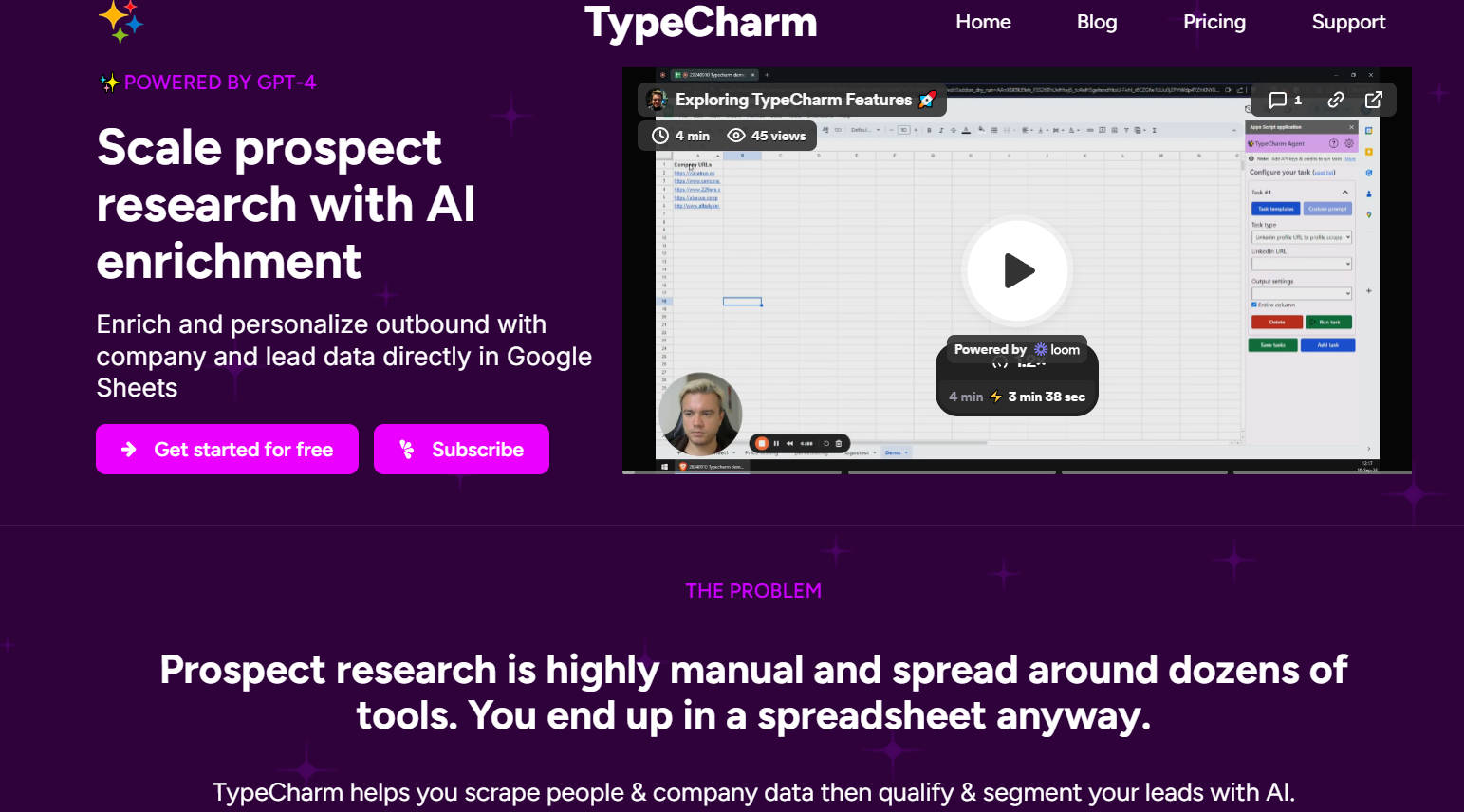
TypeCharm is a powerful tool integrated within Google Sheets that leverages AI to streamline prospect research. TypeCharm enriches lead data with information from company websites and LinkedIn profiles. This tool automates data scraping and segmentation, and allows users to create custom prompts for tailored research results. It is designed to enhance outbound sales efforts by providing detailed and personalized lead information, making the research process more efficient and effective.
Key Features:
🌐 Automated Website Scraping:
TypeCharm efficiently extracts relevant data from company websites. This feature provides users with valuable insights like company descriptions and customer logos directly within their spreadsheets.
🧑💼 LinkedIn Profile Analysis:
The tool analyzes LinkedIn profiles, including posts. Users gain a deeper understanding of prospects' professional backgrounds and interests.
🤖 Templated Qualification Workflows:
TypeCharm offers pre-built workflows to qualify leads based on collected data. Users can quickly assess lead suitability, ensuring sales efforts focus on the most promising prospects.
📝 Custom Prompt Creation:
Users design AI prompts tailored to specific research needs. TypeCharm provides a structured framework to enhance the accuracy and relevance of AI-generated responses, covering aspects like persona, tasks, steps, context, and examples.
📈 Lead Segmentation:
TypeCharm utilizes AI to categorize and organize leads based on various criteria. Sales teams efficiently prioritize their outreach, improving productivity and conversion rates.
Use Cases:
Sales Development Representatives (SDRs):
SDRs often struggle with the time-consuming task of manual prospect research. With TypeCharm, an SDR can input a list of company URLs into Google Sheets, and TypeCharm automatically populates the spreadsheet with detailed company descriptions and customer logos. The SDR can then use this enriched data to personalize outreach, increasing engagement and response rates.
Account Executives (AEs):
AEs need in-depth knowledge of potential clients to tailor sales pitches. For instance, an AE targeting a tech company can use TypeCharm to scrape the company's website for descriptions and then analyze the LinkedIn profiles of key decision-makers. This process provides insights into the company's goals and the professional background of the contacts, allowing the AE to craft a more relevant and compelling sales pitch.
Marketing Teams:
Marketing teams use TypeCharm to segment leads for targeted campaigns. A marketing manager can use TypeCharm's custom prompts to categorize leads based on specific industry data and online behavior. By segmenting the leads, the team can create personalized marketing campaigns that address the unique needs and interests of each segment, enhancing the effectiveness of their marketing efforts.
Conclusion:
TypeCharm significantly enhances the efficiency and effectiveness of prospect research by integrating AI-powered data enrichment directly into Google Sheets. By automating data scraping, offering templated qualification workflows, and enabling custom prompt creation, TypeCharm empowers sales and marketing teams to focus on high-potential leads and tailor their outreach for better results. TypeCharm saves time and improves the quality of lead data, making it an invaluable tool for any organization looking to optimize its sales and marketing efforts.
FAQs
What kind of data does TypeCharm collect?
TypeCharm collects publicly available data from company websites, such as company descriptions and customer logos. Also, TypeCharm gathers information from LinkedIn profiles, including professional details and posts.
How does TypeCharm ensure data privacy?
TypeCharm does not store any user data. It uses a Google Authentication Token (OAuth) to access and update Google Sheets, and all data processing occurs without permanent storage on TypeCharm's servers.
Can TypeCharm be used for languages other than English?
Yes, while the TypeCharm interface is in English, it understands inputs in all languages that work with ChatGPT. Templated tasks generate results in English, but custom prompts can be used to request any language.
How do I get started with TypeCharm?
To start, install TypeCharm from the Google Workspace Marketplace. Then, create a TypeCharm account. Next, open a Google Sheet with company or LinkedIn URLs, launch the TypeCharm extension, and add your API key.
What is the pricing structure for TypeCharm?
TypeCharm offers a 7-day free trial with 100 credits. After the trial, a monthly subscription is available for $25, which includes 20,000 credits that roll over each month. Additional credits can be purchased at a discount.
More information on TypeCharm
Top 5 Countries
100%
Norway
Traffic Sources
44.36%
34.06%
13.8%
4.84%
1.14%
0.35%
Search
Direct
Referrals
Social
Paid Referrals
Mail
Source: Similarweb (Jan 22, 2025)
TypeCharm was manually vetted by our editorial team and was first featured on 2024-12-11.
Related Searches
TypeCharm Alternatives
Load more Alternatives-
-

Simplify data analysis and automation with ChatGPT in Google Sheets. Generate automated insights, save time, use advanced analytics, and more.
-

-

-
TabTabTab: AI agent for Google Sheets. Automate research, enrich data, and build targeted lists effortlessly using natural language commands.