

Click outside to close
What is Conductor?
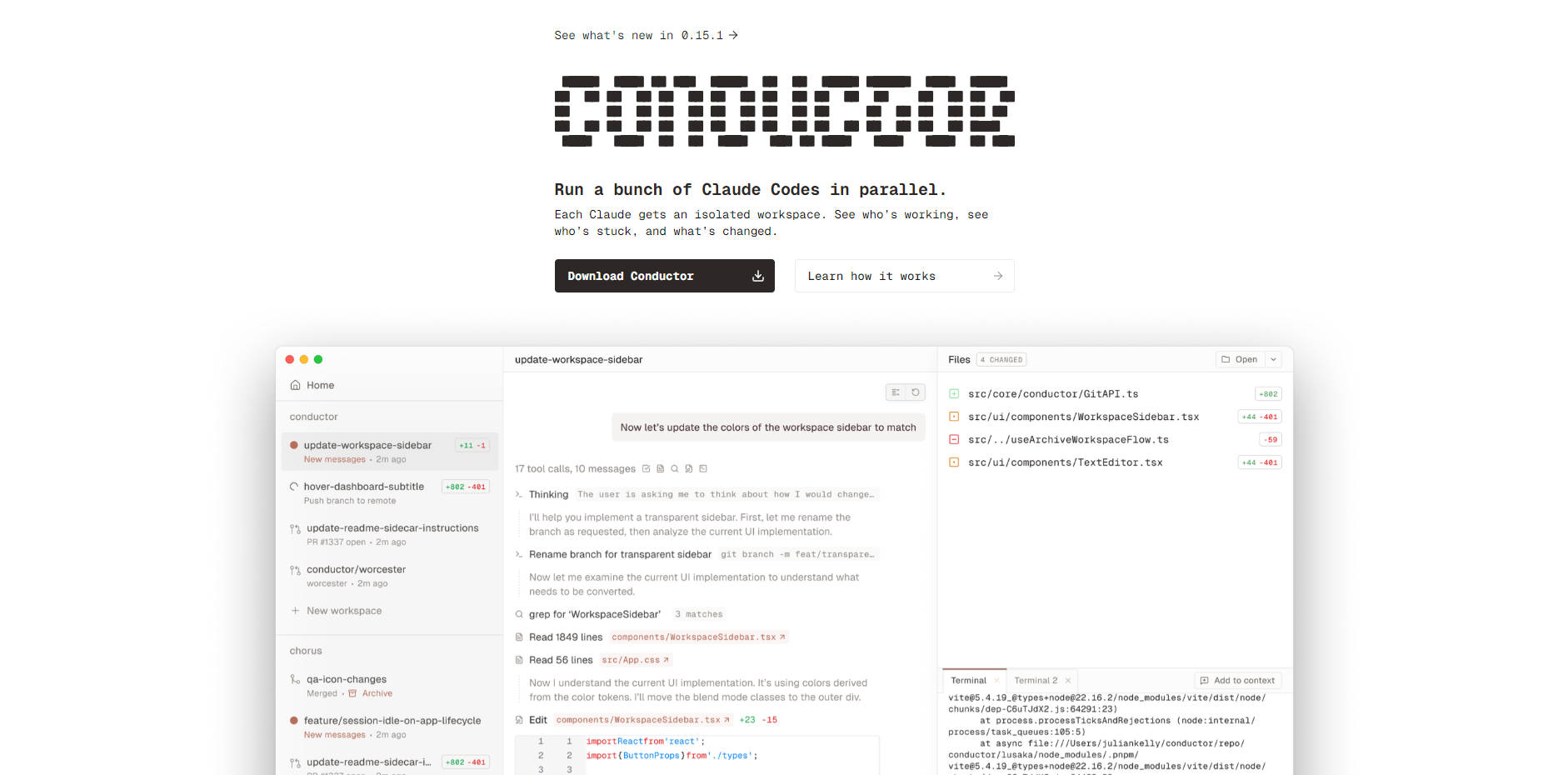
Conductor is the essential orchestration platform designed for developers running complex, concurrent projects with AI code generation. It solves the critical problem of managing multiple, independent AI development streams by allowing you to run several Claude Code agents simultaneously. Conductor provides each agent with a clean, isolated workspace directly on your Mac, ensuring efficiency, preventing cross-contamination, and giving you complete oversight of all AI activity.
Key Features
🚀 Parallel Agent Execution & Isolation
Easily launch multiple Claude Code agents simultaneously using a simple keyboard command (⌘ + N). Each agent receives a dedicated, isolated workspace—implemented as a new Git worktree—ensuring that changes made by one Claude never interfere with the work of another. This allows you to tackle multiple features, experiments, or bugs concurrently with confidence.
⚙️ Automated Git Worktree Management
Conductor removes the friction associated with managing multiple parallel environments by handling all the underlying Git worktree logistics automatically. You gain the power of isolated development without the complexity of manual setup, branch management, or cleanup, streamlining your local development process.
📝 Advanced Workflow Scripting
Automate repeated development actions to ensure consistency and speed across your projects using the declarative conductor.json file. Define three key script types:
Setup Scripts: Run instantly upon workspace creation (e.g., installing dependencies or copying untracked
.envfiles).Run Scripts: Easily launch web servers, applications, or unit tests with a single button click, supporting nonconcurrent modes to manage execution.
Archive Scripts: Automatically clean up external resources when a workspace is retired.
📊 Real-Time Monitoring and Code Review
Maintain oversight of all parallel agents through Conductor’s beautiful, centralized UI. Quickly identify which agents are active, which are stuck, and review the exact code changes they’ve made using the integrated Diff Viewer. This visibility facilitates rapid code review and decision-making before merging changes or syncing them with GitHub.
🔗 Model Context Protocol (MCP) Integration
Extend the capability of your Claude Code agents by connecting them to external tools and data sources. MCP servers provide Claude Code with access to databases, APIs, and proprietary knowledge bases (such as Context7 for documentation search or Linear for issue tracking), enabling the agent to work with real-time, project-specific context.
Use Cases
Concurrent Feature Development and Bug Fixing: Instead of pausing one task to address an urgent issue, you can immediately launch a new, isolated workspace. Run Agent 1 to fix a critical production bug while Agent 2 continues developing a new feature, ensuring both tasks progress efficiently without risk of collision or accidental commitment.
Automated Onboarding and Environment Setup: By checking your standardized
conductor.jsonfile into Git, new developers can clone the repository and instantly set up their environment. Pre-configured Setup scripts handle dependency installation and launch the application via Run scripts, drastically reducing environment setup time and standardizing the local development experience across the team.Informed Code Generation with External Data: Configure the Model Context Protocol (MCP) to provide Claude Code access to your internal documentation repositories or issue trackers. When asking the agent to implement a complex feature or resolve a specific issue, it can reference real-time, proprietary project context, resulting in more accurate and contextually relevant code suggestions.
Unique Advantages of Conductor
Conductor is engineered specifically for developers who demand control, isolation, and efficiency when leveraging AI code agents.
True Local, Private Operation: Conductor clones the repository and works entirely on your Mac. This local operation often leads to faster execution times and ensures that proprietary code remains within your secure, personal machine environment.
Guaranteed Isolation via Worktrees: Unlike relying on simple local branches, Conductor fully manages Git Worktrees for every agent. This guarantees deep, non-interfering isolation, eliminating the common risks associated with context switching and overlapping file changes.
Versioned and Repeatable Workflows: The configuration-as-code approach, utilizing the
conductor.jsonfile, allows your entire team to share standardized setup, run, and cleanup scripts. This ensures consistent, repeatable developer workflows, minimizing "it works on my machine" issues.
Conclusion
Conductor transforms AI code generation from a single, sequential process into a powerful, concurrent orchestration system. By automating Git complexity, guaranteeing isolated environments, and providing real-time visibility, Conductor empowers developers to manage multiple complex tasks efficiently and with complete confidence. Explore how Conductor can accelerate and stabilize your AI-assisted development workflow today.
More information on Conductor
Top 5 Countries
46.35%
10.09%
9.58%
5.21%
4.47%
United States (46.35%)
Vietnam (10.09%)
China (9.58%)
Thailand (5.21%)
India (4.47%)
Traffic Sources
20.93%
11.94%
9.19%
57.5%
social (20.93%)
paidReferrals (0.34%)
mail (0.05%)
referrals (11.94%)
search (9.19%)
direct (57.5%)
Source: Similarweb (Oct 18, 2025)
Conductor was manually vetted by our editorial team and was first featured on 2025-10-18.
Conductor Alternatives
Conductor Alternatives-

Conductor: Run multiple Claude Code agents in parallel on Mac. Boost AI coding productivity with isolated workspaces & integrated Git.
-

Tired of juggling AI coding agents? Claude Squad unifies parallel tasks & isolates code with Git worktrees for seamless, conflict-free development.
-

Autonomous multi-agent coding framework that plans, builds, and validates software for you.
-

Sculptor empowers developers to integrate Claude AI agents for parallel coding, instant testing, & confident merges. Accelerate dev, preserve your craft safely.
-
GitHub Copilot CLI brings AI-powered coding assistance directly to your command line, enabling you to build, debug, and understand code through natural language conversations.