
What is Markdown Studio?
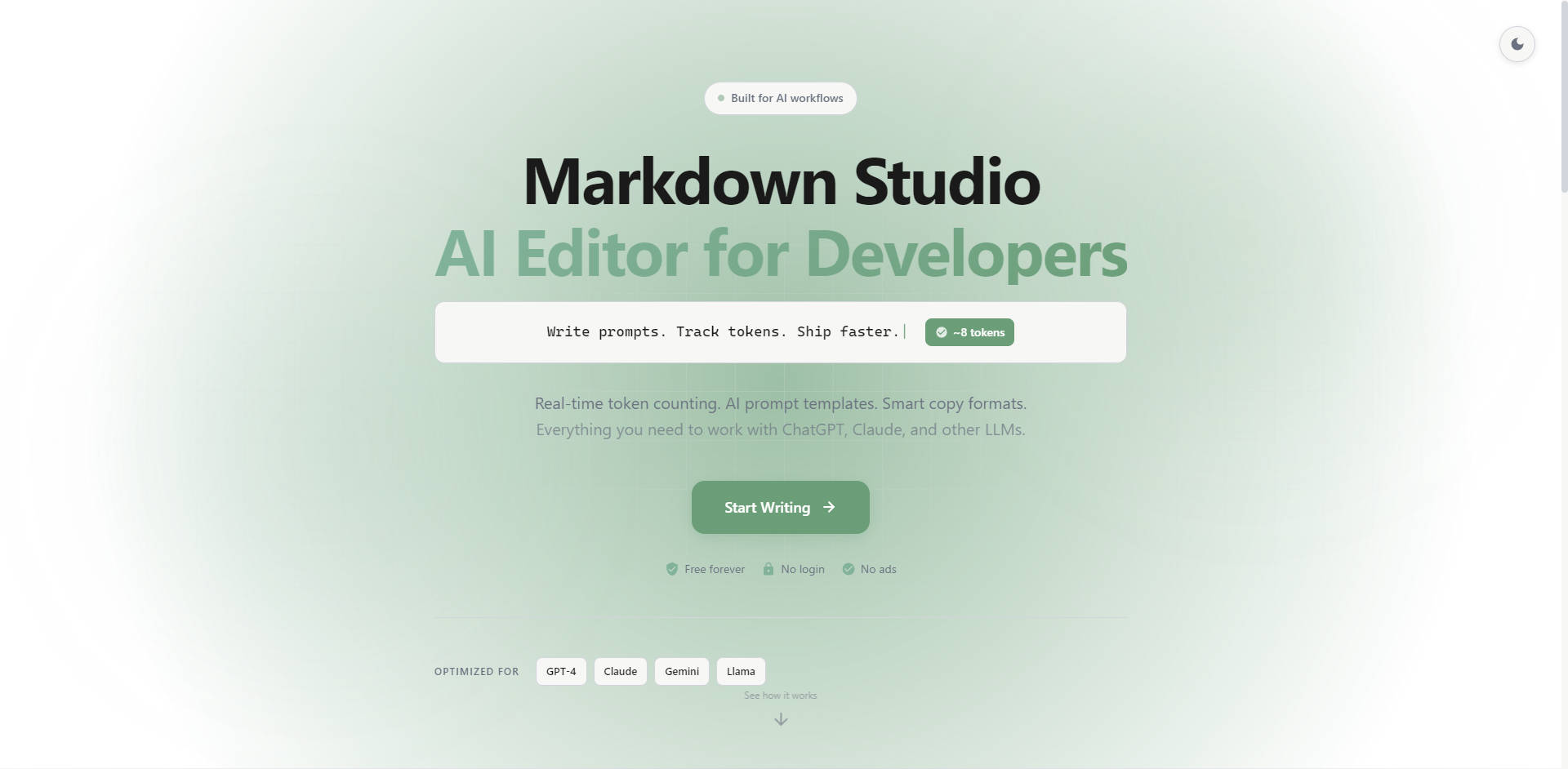
Markdown Studio is a powerful, professional Markdown editor built specifically to accelerate AI workflows and technical documentation. It addresses the developer pain points of managing complex prompt formatting and adhering to strict token limits when working with large language models (LLMs) like GPT-4, Claude, and Gemini. This tool provides a unified, high-speed writing environment, merging standard, robust documentation features with essential AI engineering capabilities.
Key Features
Markdown Studio integrates deep AI optimization with a complete modern writing experience, ensuring precision and speed for every project.
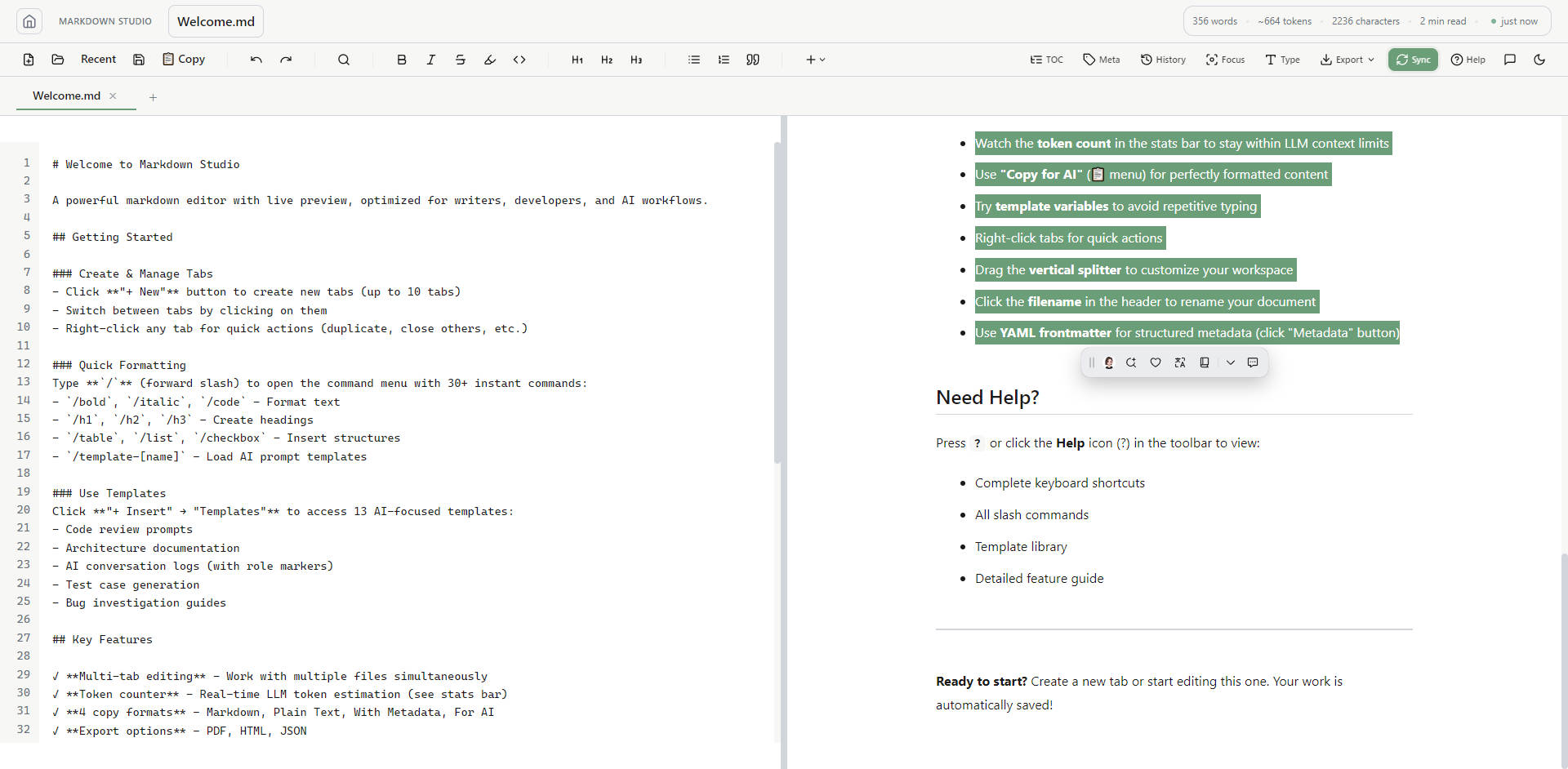
- Real-time LLM Token Counter 📊: Know exactly how much context your prompt consumes before execution. This critical feature tracks tokens, words, and reading time instantly, allowing you to optimize inputs and ensure compliance with the specific context window limits of major models (GPT-4, Claude 3, Gemini).
- 13 Specialized AI Prompt Templates 💡: Eliminate repetitive setup time by starting with battle-tested prompts for common developer tasks. Access templates for efficient code review requests, structured bug analysis, test case generation, and detailed architecture documentation with a single click.
- Smart Copy Formats for AI 📋: Go beyond standard plain text copying. With dedicated options, you can copy content as pure Markdown, Plain Text, With Metadata, or optimized specifically for AI consumption, guaranteeing clean, perfect formatting for model input every time.
- Integrated Conversation Logging 🧑💻🤖: Streamline the process of tracking complex, multi-turn AI chats. Built-in role markers (User 🧑 and Assistant 🤖) provide clear structure for logging interactions, making debugging, sharing, and refining lengthy prompt chains straightforward and efficient.
- Keyboard-First Workflow with Slash Commands ⌨️: Access core formatting and structure insertion instantly. Type / to open a command menu featuring 30+ commands to quickly insert tables, code blocks, checklists, Mermaid diagrams, and load AI prompt templates, maximizing productivity.
Use Cases
Markdown Studio is engineered to enhance specific, high-value developer and prompt engineering workflows:
- Optimizing Code Submissions for LLM Review: A developer needs GPT-4 to analyze a large codebase for security vulnerabilities and performance issues. They use the 'Code Review Request' template, paste the code, and refine their instructions while watching the token counter. This ensures the entire submission fits within the model's context window, guaranteeing a complete and accurate analysis without costly truncation.
- Creating Structured Technical Documentation: An engineer drafts detailed architecture documentation, utilizing Multi-tab Editing to manage several related files simultaneously. They incorporate complex visuals using Mermaid diagrams and write precise formulas using LaTeX Math syntax. The Live Split Preview confirms accuracy instantly, and the document is ready for export as PDF or HTML.
- Refining and Sharing Prompt Engineering Assets: A prompt engineer develops a complex series of instructions for bug investigation. They leverage Conversation Logging to capture the interaction history and use template variables (e.g., {{date}}, {{uuid}}) to ensure consistency. They then use the "Copy for AI" format to package the entire, perfectly structured prompt for sharing or loading into a different LLM environment.
Markdown Studio differentiates itself by providing a deeply integrated toolset specifically engineered for the demands of modern LLM workflows, moving beyond the capabilities of generic text editors.
- Prompt Engineering First: Unlike editors that merely support Markdown syntax, Markdown Studio integrates critical AI-specific functionality directly into the writing experience. Features like real-time token tracking and specialized AI prompt templates are designed to save prompt engineers significant time and virtually eliminate context-window errors.
- Uncompromised Format Control: The Smart Copy feature ensures the content you send to an LLM is perfectly formatted for understanding, eliminating common issues where rich content like tables or code blocks are misinterpreted due to poor copy-paste practices.
- Reliable and Accessible: Offered free forever, with no required login or advertisements, Markdown Studio provides an immediate, reliable, and friction-free professional environment focused purely on output and efficiency.
Conclusion
Markdown Studio is the definitive choice for developers, prompt engineers, and technical writers who demand precision, efficiency, and deep integration with modern AI technologies. By unifying powerful Markdown editing with essential prompt engineering tools, it ensures your focus remains on high-value output, not tedious formatting or token management. Start writing smarter, not harder. Explore how Markdown Studio can streamline your AI workflow today.
More information on Markdown Studio
Launched
Pricing Model
Free
Starting Price
Global Rank
Follow
Month Visit
<5k
Tech used
Markdown Studio was manually vetted by our editorial team and was first featured on 2025-12-03.
Markdown Studio Alternatives
Plus Alternatives-
Concevez des invites efficaces, générez des variations et testez des scénarios complexes facilement avec Prompt Studio. Simplifiez votre flux de travail dès aujourd'hui.
-
-

PromptBuilder génère systématiquement des résultats de LLM de niveau expert. Optimisez les prompts pour ChatGPT, Claude et Gemini en quelques secondes.
-

-