

What is Orchestra AI?
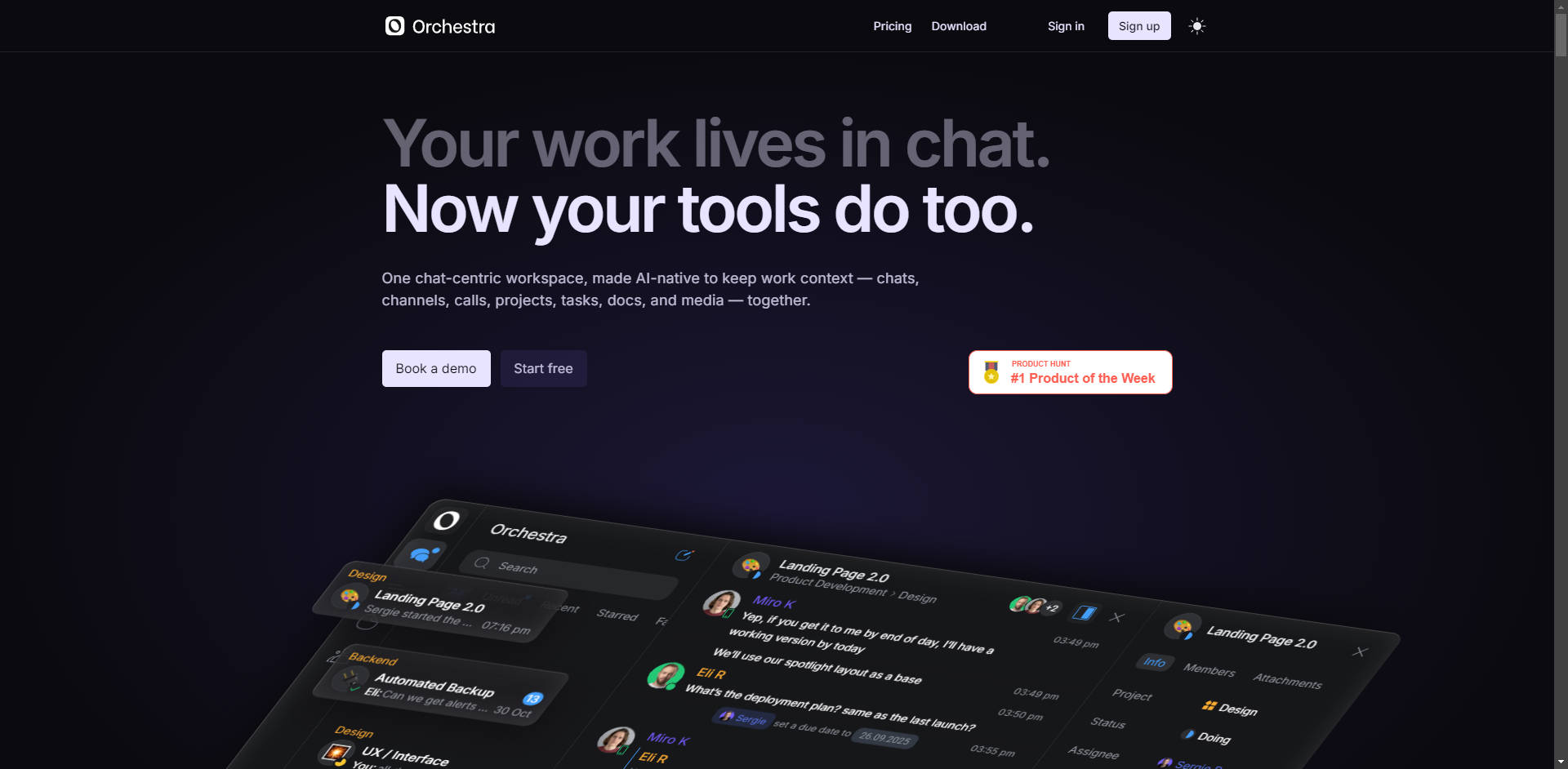
Orchestra is a unified, AI-native workspace designed for modern teams who recognize that work context increasingly lives within communication channels. It solves the critical problem of fragmented workflows and tool-switching by integrating all essential work elements—chats, channels, calls, projects, tasks, and documents—into a single, chat-centric environment. You eliminate the productivity drag caused by switching between separate messaging, project management, and documentation applications, allowing your team to maintain focus and context effortlessly.
Key Features
Orchestra is built around the premise that messaging should not be separate from action. It transforms your communication flow into a powerful, organized system for execution.
💬 Contextual Project Chats
Unlike traditional platforms where discussions happen about a task in a separate channel, Orchestra makes chats the dedicated container for the work itself. Every project and task automatically has its own focused chat, ensuring that discussions, decisions, and files are permanently linked to the relevant deliverable. This eliminates confusion about who needs to be involved and keeps conversations strictly work-relevant.
⚡ Instant Message-to-Task Conversion
Stop losing critical action items buried in long chat histories. Orchestra allows you to turn any message into a structured task with a single click. The new task remains anchored within the original chat thread, ensuring you never lose the context or the supporting discussion surrounding the action item.
🎙️ Integrated Voice and Video Rooms
Collaboration requires synchronous communication, but switching to a separate meeting tool breaks flow. Orchestra embeds voice and video rooms directly within your chats and channels. You can start a call instantly without needing extra links, and leverage built-in functionality for asynchronous updates, such as recording Loom-style video messages to share directly with the team.
🧠 AI-Powered Meeting Summaries
Focus entirely on the conversation while an AI assistant handles the administrative work. Orchestra automatically transcribes, translates, or summarizes team meetings, creating immediate, actionable meeting notes within the relevant chat thread. This ensures decisions and next steps are captured accurately and instantly available, freeing your team from manual note-taking.
🗃️ Unified, Searchable Docs and Media
Documents and media live precisely where the work happens—in the relevant task or project chat. This integrated storage model ensures that files are instantly findable and contextually relevant, eliminating the need to search across separate cloud drives or documentation tools. Files are meant to be used, not hunted down.
Use Cases
Orchestra is designed to streamline complex, collaborative workflows across departments, ensuring context remains intact from idea to execution.
1. Streamlining Product Development Cycles: A product team is discussing a new feature rollout in their dedicated project chat. A designer shares updated mockups and asks about API requirements. An engineer immediately converts the designer’s question into a subtask, assigns it a priority, and sets a due date—all from within the chat interface—without ever opening a separate task manager.
2. Conducting Efficient Design Reviews: The design team holds a video call directly within the "Landing Page 2.0" project chat. The AI bot automatically transcribes the discussion, noting key feedback on color palettes and layout changes. Post-call, the marketing manager quickly reviews the AI summary and assigns follow-up tasks (e.g., "Update CTA text") based on the transcribed decisions, ensuring no feedback is missed or scattered across different apps.
3. Accelerating Onboarding and Knowledge Transfer: A new team member needs to understand the history of a major project. Because all discussions, decisions, files, and related tasks are organized within the single project chat, they can quickly scroll and search the dedicated thread, absorbing the complete context in one place, significantly faster than navigating multiple tools like Slack, Notion, and Trello simultaneously.
Why Choose Orchestra?
Orchestra’s primary value lies in its strategic consolidation of essential workplace tools, offering tangible gains in efficiency and organizational clarity that traditional setups cannot match.
1. Eliminate Tool Sprawl and Context Switching: Orchestra is engineered to replace the need for separate messaging (Slack/Teams), task management (Trello/ClickUp/Asana), video conferencing (Zoom/Meets), and basic documentation (Notion/Google Docs). By housing these functions in one AI-native platform, you dramatically reduce the cognitive load and lost time associated with jumping between disparate systems.
2. Action-Oriented Communication: The unique structure of Orchestra ensures that conversation is always directly linked to action. By making tasks and projects the central focus of communication, teams shift from endless, disorganized chatter to focused, outcome-driven dialogue.
3. Stress-Free Migration and Setup: Orchestra supports your transition with comprehensive onboarding, data migration services to ensure no historical context is lost, and custom integration support. You receive 24/7 support right within your new workspace, guaranteeing a smooth and successful transition for your entire team.
Conclusion
Orchestra provides the focused, integrated environment that modern, fast-moving teams need to execute complex projects swiftly and without chaos. By unifying chat and work context, it empowers builders, startups, and tech teams to stay deep in the zone and move fast without sacrificing organizational clarity.
More information on Orchestra AI
Launched
2023-05
Pricing Model
Free Trial
Starting Price
$10 User / month
Global Rank
9746161
Follow
Month Visit
<5k
Tech used
Top 5 Countries
87.29%
12.71%
United States
India
Traffic Sources
9.03%
1.56%
0.2%
12.92%
34.13%
41.33%
social
paidReferrals
mail
referrals
search
direct
Source: Similarweb (Nov 3, 2025)
Orchestra AI was manually vetted by our editorial team and was first featured on 2025-11-03.
Orchestra AI Alternatives
Load more Alternatives-

-
-
-
Whimsical: The AI workspace unifying docs, diagrams, & projects. Stop juggling apps. Plan, create & manage work faster in one interconnected place.
-

Crescent: AI workspace that connects everything. Get proactive assistance, smart insights, & unified tools. Reclaim your focus!