
What is Pola Browser?
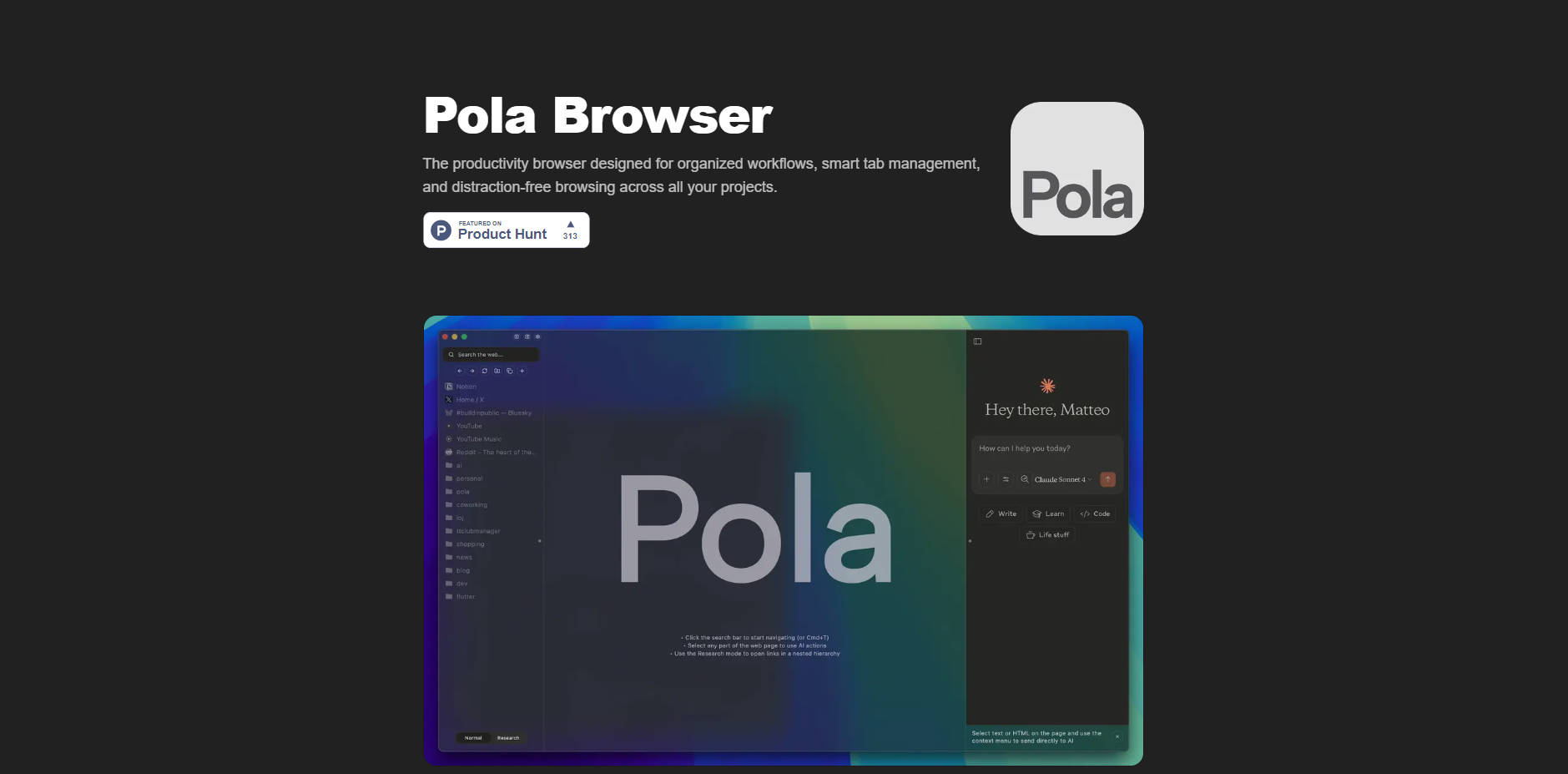
Pola Browser is the productivity-focused browser engineered specifically for macOS users who manage complex, multi-project workflows. It solves the endemic problem of tab overload and disruptive context switching by providing robust organizational tools and intelligent resource management. If your work demands deep focus, structured research, and the ability to seamlessly transition between distinct projects, Pola Browser is built to maintain your clarity and momentum.
Key Features
Pola focuses on delivering features that help you manage complexity without sacrificing performance or privacy.
📁 Persistent Tab Folders and Sidebar Organization
Unlike standard browsers where tabs vanish when the window closes, Pola allows you to create persistent tab folders and custom sidebar organizations. This feature ensures that all resources related to a specific client, project, or task remain exactly where you left them, allowing you to instantly resume work without searching or recreating your session.
🧠 Research Mode and Visual Workflow Tree
For deep dives and complex research, the unique Research Mode automatically builds a visual tree of your browsing journey. This capability helps you track connections between pages and maintain context across extensive exploration sessions, allowing you to quickly understand how you arrived at a specific piece of information and preventing the loss of crucial context.
💼 Project Profiles for Context Switching
Stop mixing your personal tabs, client documents, and development resources. Project Profiles allow you to switch between entirely separate work contexts with a single click. You can maintain distinct, isolated profiles for each client or area of focus, eliminating mental clutter and ensuring you only see the resources relevant to the current task.
⚡ Intelligent Memory Management
Complex projects often require dozens of tabs, leading to performance degradation. Pola’s intelligent memory control allows you to keep extensive workflows open without slowing down your Mac. You can manually or automatically unload tabs and side panels to free up RAM, ensuring a fast, responsive browsing experience even under heavy load.
🛡️ Distraction-Free Browsing and Privacy First
Pola includes built-in ad blocking to clean up web pages and promote deep focus on your content. Crucially, Pola operates with a strict Privacy First mandate: it features zero tracking, zero analytics, and zero data collection, guaranteeing that your browsing activity remains entirely private and your data stays yours.
Use Cases
Pola Browser is designed to transform common workflow pain points into streamlined processes, delivering tangible results for professionals and researchers.
1. Managing Complex Client Workflows
A consultant working for three different clients can dedicate a specific Project Profile to each. When switching from "Client A Strategy" to "Client B Budget Review," the browser instantly loads the relevant tab folders, documentation links, and communication tools, eliminating the time wasted searching for the correct window or session.
2. Streamlining Academic Research
A student or academic conducting research can use Research Mode to track their source material exploration. As they click through citations and related articles, the visual tree maps the connections, making it simple to return to the original source or understand the contextual link between dozens of papers without relying solely on history logs.
3. Enhancing AI-Driven Productivity
Users with paid AI service subscriptions can integrate these tools directly into their workflow using the Productivity AI tools feature. This allows for quick, context-aware actions—such as summarizing a long article or analyzing data on a webpage—without needing to copy and paste content into a separate application or open new windows, maintaining flow and efficiency.
Why Choose Pola Browser?
Pola is engineered to address the specific shortcomings of general-purpose browsers when tackling professional, high-volume workloads.
| Feature Area | Pola Browser Advantage | Comparative Insight |
|---|---|---|
| Performance | Superior resource efficiency and intelligent memory management. | Offers better performance and memory management compared to Arc Browser, allowing extensive workflows without slowdown. |
| Organization | Dedicated Project Profiles, persistent Tab Folders, and Research Mode. | Provides significantly more productivity and organization features than standard browsers like Safari. |
| Privacy | Zero tracking, zero analytics, zero data collection. | Offers enhanced privacy and superior resource efficiency compared to Chrome, minimizing digital footprint. |
| AI Integration | Connects seamlessly with your already-paid AI services (no duplicate subscriptions needed). | Focuses on integrating existing professional tools rather than forcing new subscriptions. |
Choosing Pola means choosing a browsing environment built for the way you actually work—organized, focused, and efficient.
Conclusion
Pola Browser transforms your browsing experience from a source of distraction and clutter into a structured, high-performance workspace. By providing powerful organization tools, ensuring maximum privacy, and intelligently managing system resources, Pola helps you maintain deep focus and effortlessly manage the complexity of modern professional life.
More information on Pola Browser
Launched
2025-08
Pricing Model
Free Trial
Starting Price
Global Rank
9886367
Follow
Month Visit
<5k
Tech used
Top 5 Countries
83.53%
13.14%
3.33%
United States
India
Japan
Traffic Sources
0.7%
0.12%
0.01%
39.13%
47.12%
12.86%
social
paidReferrals
mail
referrals
search
direct
Source: Similarweb (Nov 8, 2025)
Pola Browser was manually vetted by our editorial team and was first featured on 2025-11-08.