

What is ChatGPT for Excel?
Transform your Microsoft Excel workflow with GPT for Excel, the AI-powered add-in designed to automate tasks, accelerate data analysis, and simplify complex operations directly within your spreadsheets. It helps you save significant time and gain deeper insights, enabling smarter decisions faster.
Key Features
Discover how GPT for Excel puts powerful AI capabilities at your fingertips:
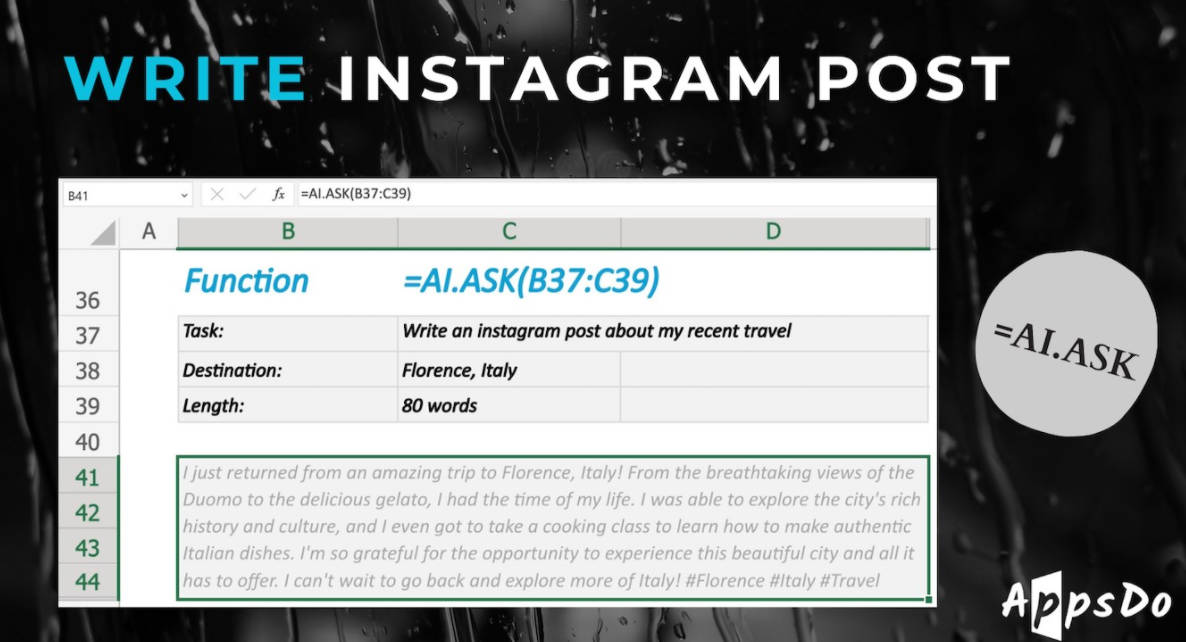
✨ AI.ASK: Get instant AI assistance within a cell. Use it to answer questions about your data, generate text content, draft emails based on spreadsheet information, or brainstorm ideas without leaving Excel.
📊 AI.TABLE: Quickly generate structured tables from simple prompts. Define the type of data you need (e.g., a list of countries and their capitals, a table of marketing channel ideas), and AI.TABLE delivers it directly into your sheet, ready for use.
🌐 AI.TRANSLATE: Effortlessly translate text content in any cell or range into dozens of languages. This is invaluable for working with international data, localizing content, or communicating across language barriers directly within your spreadsheet environment.
🧹 AI.FILL: Clean and fill missing data points automatically. Provide examples of the desired format or content, and AI.FILL intelligently completes incomplete rows or columns, significantly reducing manual data preparation time.
🔍 AI.EXTRACT: Pull specific information from unstructured text. Extract names, dates, companies, sentiments, or any defined data points from large blocks of text within your cells, turning qualitative data into structured, actionable insights.
How GPT for Excel Solves Your Problems
GPT for Excel addresses common spreadsheet challenges by automating complex or repetitive tasks:
Streamline Data Preparation: Instead of manually cleaning and formatting inconsistent data, use AI.FILL and AI.FORMAT to apply rules and fill gaps intelligently, preparing your data for analysis in seconds.
Accelerate Content Creation & Translation: Generate product descriptions, marketing copy, or email drafts using AI.ASK, and then translate them instantly for global audiences with AI.TRANSLATE, all within your existing workflows.
Turn Unstructured Data into Insights: Analyze customer feedback, survey responses, or notes by using AI.EXTRACT to pull out key themes and sentiments, then organize them into structured tables with AI.TABLE for easy reporting and decision-making.
Why Choose GPT for Excel?
GPT for Excel offers distinct advantages for serious data users:
Powerful Model Access: Access a wide range of leading AI models, including GPT-4o, GPT-4 Turbo, GPT-3.5 Turbo, and significantly, the Claude 3 family (Haiku, Sonnet, Opus).
Process More Data: Leverage the extensive 200K context window available with Claude models. This unique capability allows you to process and analyze much larger datasets or longer texts within a single AI operation compared to models with smaller context limits, enabling deeper analysis and more comprehensive results directly in Excel.
Conclusion
GPT for Excel is your essential partner for bringing the efficiency and intelligence of AI into your daily spreadsheet tasks. It empowers you to work smarter, not harder, freeing up valuable time for more strategic work. Explore our flexible plans – including options where we cover AI costs or integrate with your own AI accounts – to find the perfect fit for your individual or team needs.
More information on ChatGPT for Excel
Launched
1991-05
Pricing Model
Freemium
Starting Price
Global Rank
Follow
Month Visit
<5k
Tech used
Microsoft Clarity,Express,Microsoft Azure,HSTS
Top 5 Countries
19.04%
5.19%
5.13%
4.21%
3.63%
United States
United Kingdom
India
Germany
Brazil
Traffic Sources
49.04%
28%
21.07%
0.92%
0.69%
0.28%
Direct
Referrals
Search
Paid Referrals
Social
Mail
Source: Similarweb (Nov 17, 2023)
ChatGPT for Excel was manually vetted by our editorial team and was first featured on 2023-08-23.
Related Searches
ChatGPT for Excel Alternatives
Load more Alternatives-
-
Discover the power of GPT For Work, an AI tool that integrates with Google Sheets, Docs, and Excel. Clean lists, generate tags, and create compelling marketing content easily.
-

-

-