

What is Cleft Notes?
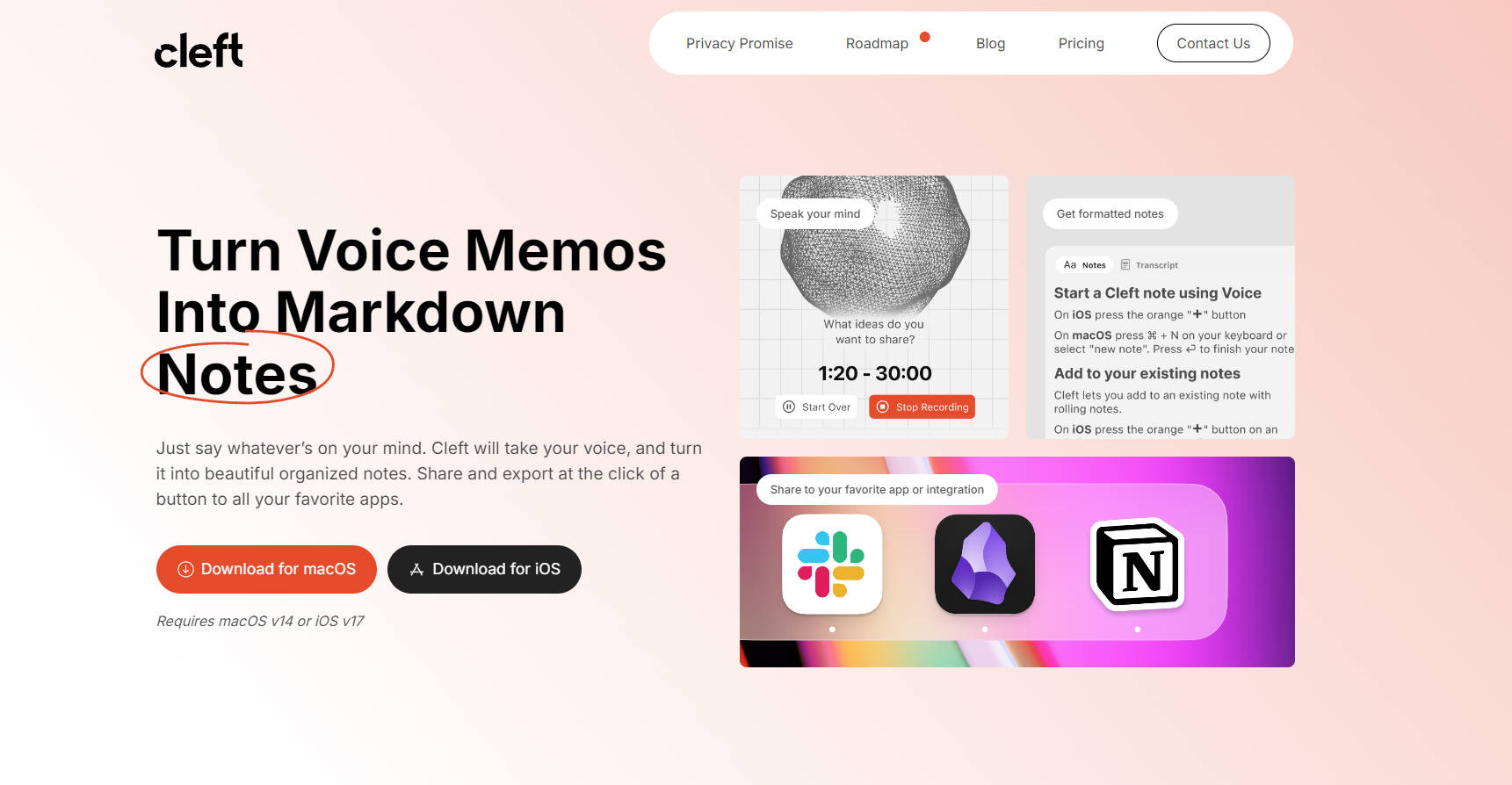
Cleft reinvents note-taking by turning spoken words into beautifully formatted, editable text—streamlining your thoughts into coherent, shareable notes, powered by AI. With native macOS and iOS apps, Cleft transcribes your ideas, meetings, and reminders into organized notes, leveraging on-device transcription for privacy and precision. Seamlessly integrate your notes into daily workflows through compatible apps and platforms, enhancing productivity and creativity.
Key Features
AI-Powered Transcription: Captures and transcribes spoken ideas, meetings summaries, and more, instantly turning them into beautifully formatted and organized notes.
Visual Editing and Attachment: Offers a visual editor for editing notes in Markdown format, allowing you to attach files and images directly.
Inter-app Accessibility: Generates shareable links and enables notes to be copied to various applications, including popular tools via Zapier integration.
Privacy by Design: Features on-device transcription, encrypted cloud sync, adherence to privacy laws like CCPA and GDPR, guaranteeing your data remains private and secure.
Uncomplicated User Interface: Minimalist design focusing on voice-to-text conversion, ensuring an intuitive and distraction-free note-taking experience.
Use Cases
A busy executive records meeting summaries on the go, instantly accessing well-structured notes upon arrival at their office.
A student captures their lecture notes via voice, later editing the transcribed text with ease to review for exams.
A creative professional uses Cleft to record and organize ideas while traveling, sharing them seamlessly with colleagues via a public link.
Conclusion
Cleft delivers an intuitive and powerful tool for modern notetaking, enabling users to capture thoughts effortlessly in high-quality notes while ensuring their privacy is intact. Whether you're a student, a professional, or a creative mind, it's time to amplify your productivity and unleash the potential of your voice. Download Cleft today for macOS or iOS and transform how you manage and share your ideas.
FAQs
How does Cleft maintain my privacy?Cleft utilizes on-device transcription and encrypted cloud sync along with compliance with CCPA and GDPR to ensure that your notes remain secure and private at all times.
Can Cleft be used on multiple devices?Yes, Cleft can be downloaded for macOS and iOS devices, allowing you to record and manage notes across different platforms using your account.
What are the benefits of upgrading from the Basic to the Plus plan?Upgrading to Plus unlocks longer recording limits, advanced AI instructions, document and image attachment capabilities, and integrations with third-party apps like Zapier and Obsidian, enriching the note-taking experience with enhanced customization and functionality.
More information on Cleft Notes
Launched
2023-12
Pricing Model
Freemium
Starting Price
$9/month
Global Rank
12079737
Follow
Month Visit
<5k
Tech used
Fathom Analytics,Webflow,Amazon AWS CloudFront,Google Fonts,jQuery,Gzip,OpenGraph,HSTS
Top 5 Countries
100%
United States
Traffic Sources
17.32%
1.12%
0.04%
6.91%
27.43%
47.17%
social
paidReferrals
mail
referrals
search
direct
Source: Similarweb (Sep 24, 2025)
Cleft Notes was manually vetted by our editorial team and was first featured on 2024-09-01.
Related Searches
Cleft Notes Alternatives
Load more Alternatives-

Mumble Note is an AI note-taker designed to be the fastest way to capture your scattered thoughts, and turn them into organized notes. You can speak, type or do them both. AI will combine your inputs together and generate structured, actionable and easy-to-retrieve notes for you.
-
AudioNotes.ai is an app that turns your spoken words into organized text summaries using smart AI, making activities like note-taking, brainstorming, and content creation much easier!
-
-
-

Turn voice notes & meetings into searchable knowledge with Voicenotes AI. Accurate transcription, instant recall & summaries. Your private AI second brain.