

Click outside to close
What is Dora?
Finding the right file when you need it shouldn't be a scavenger hunt. We all have digital lives packed with documents, photos, and projects, often buried deep within countless folders. Traditional file explorers can feel rigid, forcing you to remember exact names and locations. What if your computer could understand what you're looking for, even if you don't remember where you put it?
Dora is the smart file explorer designed to lift that burden. By bringing the power of AI directly to your files, Dora makes organizing and finding anything on your computer remarkably easier, saving you time and frustration.
Key Features
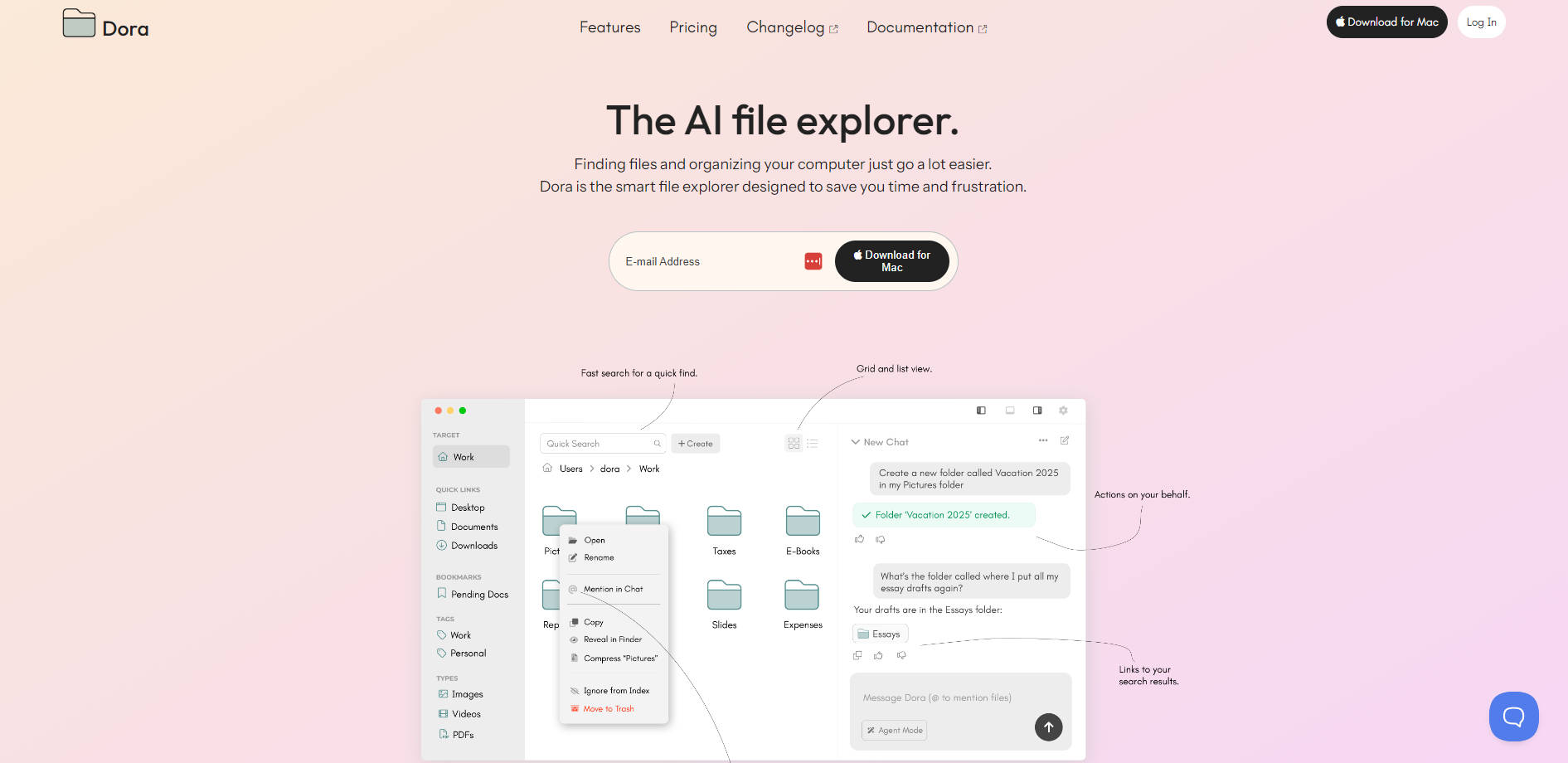
🔎 Deep Search: Effortlessly locate any file or folder using natural language, even if it's hidden within complex directory structures. Simply describe what you're looking for, and Dora understands.
🤖 Agent Mode: Organize your digital space directly from a chat interface. Create new folders, move files, or generate new files with simple conversational commands.
📁 Familiar Explorer: Access all the standard file management capabilities you rely on daily, such as copy/paste, drag and drop, and traditional folder creation, seamlessly integrated.
💬 File Mentions: Easily reference files within the chat interface to allow Dora to access their contents for quick analysis, deeper discovery, or summarization without needing to open them manually.
📝 Code Output: Automatically parse and display code from files within a dedicated code editor view, making it easier to review and work with code snippets.
✨ Auto File: Streamline your organization by instructing Dora to file and arrange files for you simply by chatting, turning chaotic folders into tidy ones.
🌙 Dark Mode: Supports system theme detection for a comfortable viewing experience in low-light environments.
Use Cases
Locating the Elusive Document: Imagine you need to find a specific project proposal you worked on last year, but you only remember a key phrase from its content, not its file name or location. Instead of manually searching through folders, you can ask Dora, "Find the proposal about the new marketing strategy from last year," and Dora will use its deep search capabilities to surface the relevant document based on its content and metadata.
Organizing a Cluttered Downloads Folder: Your downloads folder is a mess of random files. Using Agent Mode, you can instruct Dora, "Move all PDF files from my Downloads folder into a new folder called 'Documents to Review'" or "Organize files downloaded last week by file type." Dora handles the busywork, tidying up your files with simple chat commands.
Getting a Quick File Before opening a large report, you need a quick overview of its contents. Mention the file in the chat interface – for example, "@Annual Report 2023" – and ask Dora to "Summarize this document," getting a concise overview of its key points without leaving Dora.
Conclusion
Dora transforms file management from a chore into an intuitive conversation. By combining the power of AI with the familiarity of a standard file explorer, it offers a smarter, faster way to find and organize your digital life. Spend less time searching and more time working or creating.
More information on Dora
Launched
2025-04
Pricing Model
Freemium
Starting Price
$20/mo
Global Rank
Follow
Month Visit
<5k
Tech used
Top 5 Countries
81.53%
18.47%
United States (81.53%)
Belgium (18.47%)
Traffic Sources
8.81%
12.79%
35.51%
40.33%
social (8.81%)
paidReferrals (1.35%)
mail (0.2%)
referrals (12.79%)
search (35.51%)
direct (40.33%)
Source: Similarweb (Sep 25, 2025)
Dora was manually vetted by our editorial team and was first featured on 2025-05-26.
Dora Alternatives
Dora Alternatives-

Stop wasting time on file management! Sortio uses AI to organize your files automatically. Get more done!
-

Stop searching! Dynbox AI file organizer automatically tidies files, lets you search by meaning, and keeps you in control. Organize & save hours.
-

Revolutionize the way you store, organize, and interact with your files. Effortless organization, semantic search, and document chat all in one place.
-

Stop file chaos! Filecentral's AI search finds anything instantly. Secure storage + intelligent search for teams. Access info in seconds!
-
Transform your documents with AI Drive. Summarize, chat & organize files using advanced AI models. Get fast, deep insights from any PDF or folder.