
What is ScanRelief?
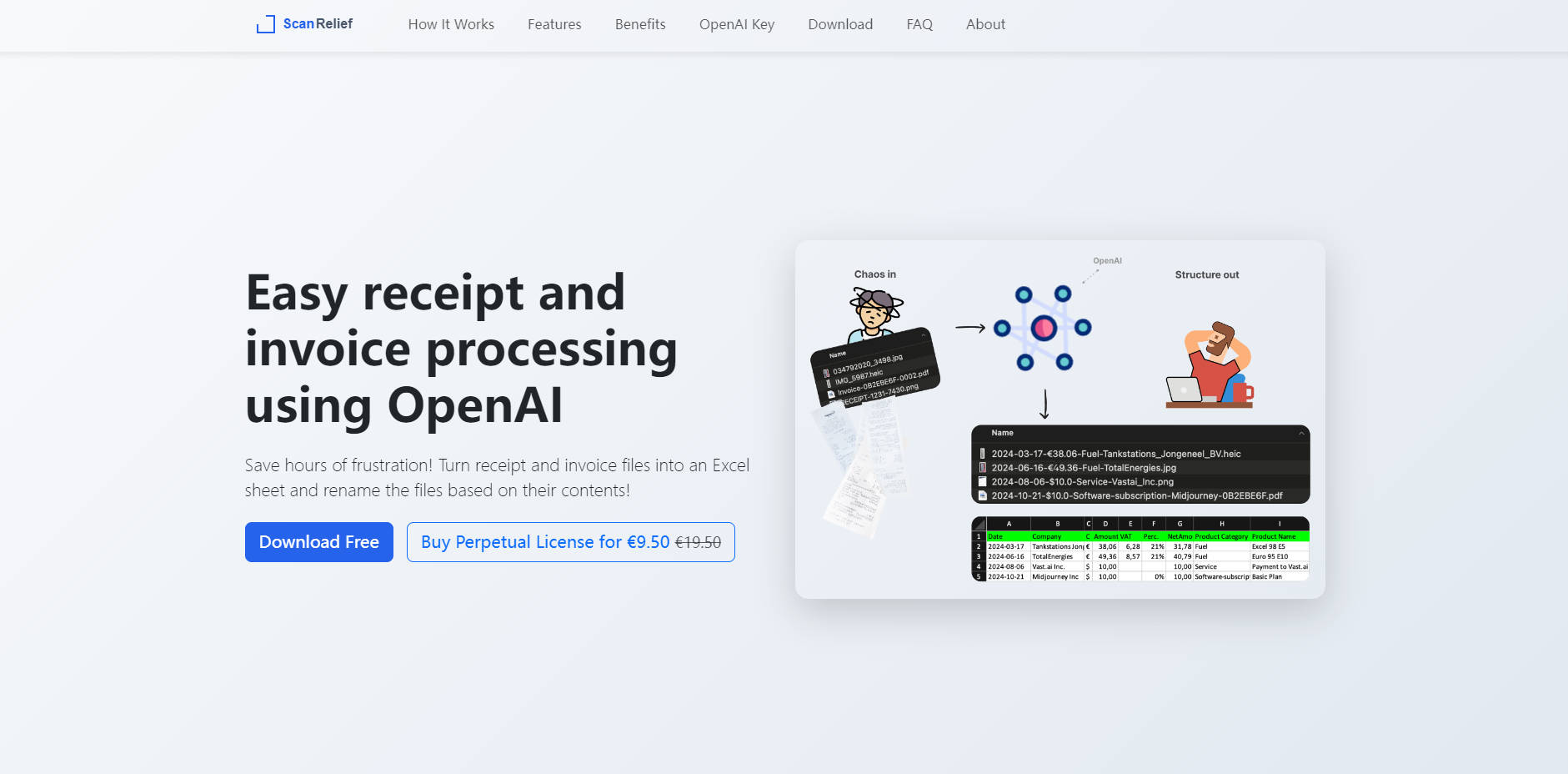
ScanRelief is the essential desktop tool for Windows and Mac users designed to eliminate the frustration of manual receipt and invoice management. Leveraging the power of OpenAI, it automatically converts disorganized receipt files stored on your local drive into a structured, centralized Excel report while simultaneously renaming the original files for perfect chronological sorting. This solution delivers immediate efficiency gains for small business owners, freelancers, and individuals requiring accurate, effortless expense tracking and tax preparation.
Key Features
ScanRelief provides powerful, automated features that transform how you manage financial documents, turning hours of sorting into minutes of processing.
📄 AI-Powered File Renaming
ScanRelief analyzes receipt images using advanced AI to extract critical details—including the date, total amount, product type, and vendor name. It then renames the files to a standardized format: [Date]-[Amount]-[Product Type]-[Company]. This ensures your entire receipt archive is instantly and perfectly chronologically sortable within Windows Explorer or Mac Finder, eliminating manual data entry and frustrating searches.
📊 Structured Excel Report Generation
Generate a comprehensive, detailed Excel spreadsheet consolidating all processed receipt data. This report provides a single source of truth for your expenses, including key information and categorization, default ordered by date. This structured output drastically simplifies accounting reconciliation and preparation for tax filing.
🚀 High-Efficiency Local Batch Processing
Process entire folders of receipts and invoices at once directly on your local hard drive. ScanRelief supports all common formats, including JPEG, PNG, and HEIC, as well as both image-based and text-based PDFs. The application handles large volumes quickly, saving significant time and effort.
💰 Optimized Pay-Per-Use Cost Model
Unlike high-cost, fixed-fee web services, ScanRelief utilizes a direct pay-per-use model for the necessary OpenAI API access. To maximize efficiency and minimize cost, the system automatically downsizes images to the maximum compatible size (768x2048 pixels) before transfer, resulting in extremely low operational costs—approximately $0.005 per receipt.
Use Cases
ScanRelief is built to deliver tangible value across common financial management challenges.
Streamline Tax Preparation and Auditing
Instead of sifting through hundreds of poorly named files and manually transcribing data, you gain a ready-made, chronologically organized folder of receipts and a corresponding Excel sheet. This consolidated, structured data simplifies expense categorization and makes matching receipts to bank transactions instantaneous, drastically reducing the time spent preparing for quarterly or annual tax submissions.
Enhance Financial Search and Reconciliation
Quickly locate any receipt or invoice using simple file searches. Because files are renamed with the vendor name and amount, you can instantly find a specific transaction—such as all expenses from "Staples" or any receipt over "$200"—directly within your operating system's file browser, making bank statement reconciliation fast and accurate.
Maintain Organized Digital Archives
For users who need to keep digital copies for compliance or personal record-keeping, ScanRelief enforces a rigorous, consistent naming convention. This ensures that even years later, your receipt archive remains clean, searchable, and instantly understandable, providing confidence in your record-keeping practices.
ScanRelief offers compelling advantages over traditional receipt management systems, focusing on cost control, data autonomy, and superior file organization.
- Perpetual Licensing, Not Subscriptions: You purchase a perpetual license for the ScanRelief software, meaning there are no recurring monthly subscription fees. This provides long-term cost predictability and eliminates vendor lock-in.
- Control Over Your Data: Receipts are processed from a folder on your local hard drive (Windows or Mac). You are not required to upload sensitive financial documents to a proprietary web service, enhancing security and data control.
- True Pay-for-What-You-Use AI: By utilizing your own OpenAI API key, you benefit from transparent, low-cost processing. You only pay for the exact resources consumed by the AI, which is optimized by the software to be highly efficient.
Conclusion
ScanRelief delivers professional-grade receipt management efficiency without the burden of monthly subscriptions or complicated cloud interfaces. By combining intelligent file renaming with structured Excel reporting, it provides a clear, cost-effective path to perfect financial organization.
Explore how ScanRelief can save you hours of administrative frustration and bring immediate clarity to your expense management.
More information on ScanRelief
Launched
Pricing Model
Paid
Starting Price
€9.50
Global Rank
Follow
Month Visit
<5k
Tech used
ScanRelief was manually vetted by our editorial team and was first featured on 2025-12-15.
ScanRelief 대체품
더보기 대체품-

Receipt-AI로 비용 관리를 자동화하세요. SMS/이메일을 통해 영수증을 즉시 캡처하고, Xero/QuickBooks와 간편하게 연동하여 정산할 수 있습니다. 무려 97%의 시간을 절약해 드립니다!
-
영수증 찾느라 이메일 뒤적거리지 마세요. Receiptor AI가 이메일/WhatsApp에서 자동으로 정보를 추출해 드립니다. AI로 경비 처리와 세금 신고를 간소화하세요.
-
Renamed.to automatically renames & organizes your PDFs, invoices, and receipts with AI. Instantly find any document. Zero manual filing.
-
수많은 이메일을 뒤져서 영수증을 찾느라 시간을 너무 많이 허비하고 있나요? 그렇다면, 저희의 AI 기반 플랫폼이 몇 초면 같은 작업을 완료하는 데 도움을 드릴 수 있습니다.
-
ReceiptsAI로 영수증 관리를 혁신하세요. 수고롭지 않게 데이터를 추출하고 오류를 제거하며 정보에 입각한 결정을 내리기 위한 귀중한 통찰력을 확보하세요.