

What is Kreuzberg?
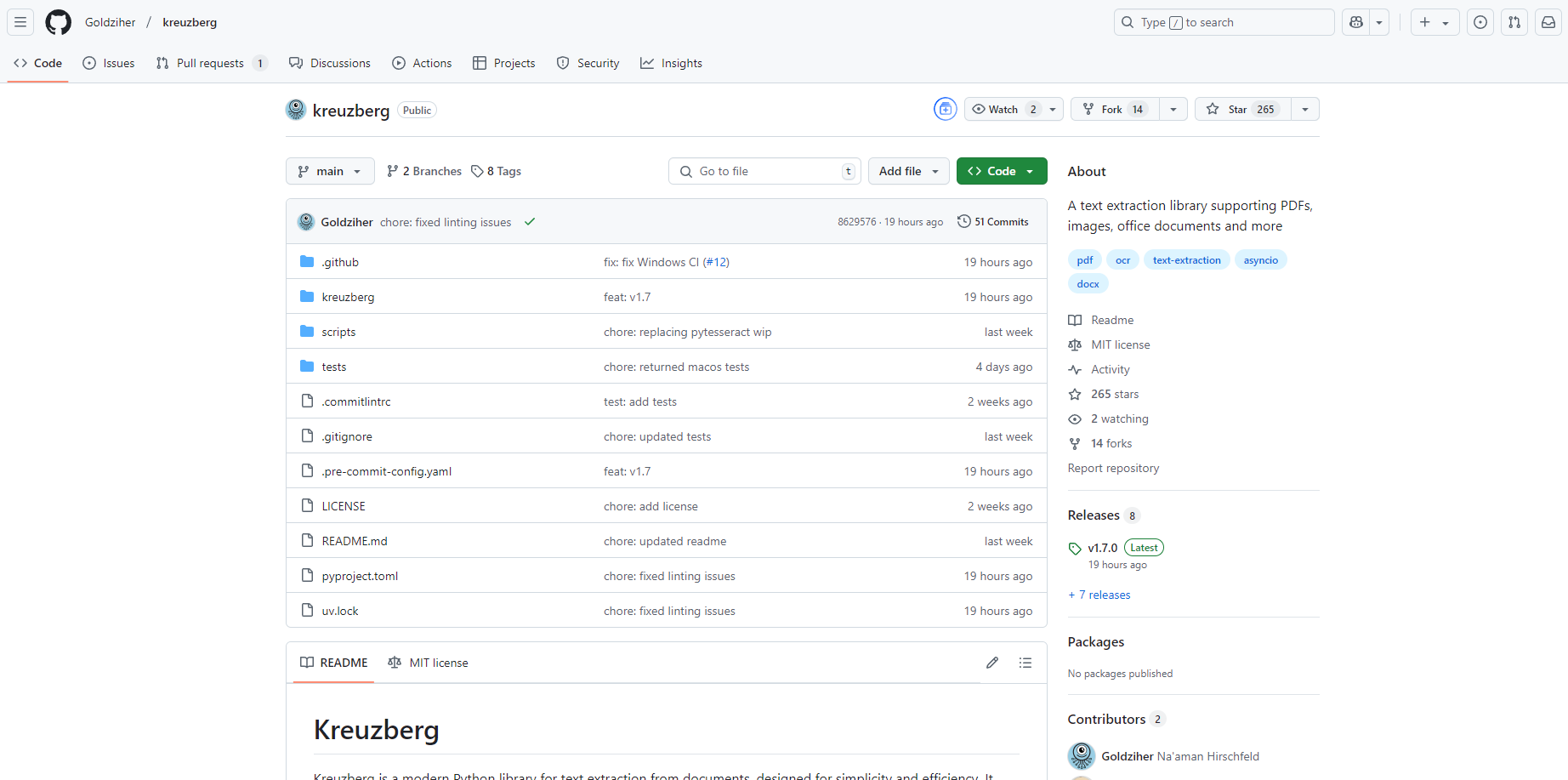
Kreuzberg is a Python library that simplifies text extraction from PDFs, images, office documents, and more. Whether you're building a Retrieval Augmented Generation (RAG) system, analyzing data, or automating document workflows, Kreuzberg eliminates the hassle of dealing with multiple tools and APIs. It’s designed to work locally, saving you time and resources while maintaining full control over your data.
Key Features
✨ Universal Text Extraction
Extract text from PDFs (searchable and scanned), images, and office documents with a single, unified interface. No need to juggle different tools for different formats.
🚀 Smart Processing
Automatically detect encoding for text files and apply OCR to scanned documents, ensuring accurate results without manual intervention.
💻 Local Processing
Process files on your machine without relying on external APIs or cloud services. This keeps your data secure and reduces latency.
📦 Resource Efficient
Lightweight and optimized, Kreuzberg runs smoothly without requiring GPUs or heavy system resources.
🐍 Modern Python Design
Built with async/await and comprehensive type hints, Kreuzberg integrates seamlessly into modern Python applications. Detailed error handling and debugging support make it production-ready.
Use Cases
1. Building RAG Applications
If you're developing Retrieval Augmented Generation systems, Kreuzberg simplifies the process of extracting text from diverse document formats, enabling you to focus on semantic search and AI integration.
2. Data Analysis and Research
Extract structured data from Excel spreadsheets, Jupyter Notebooks, or BibTeX files for analysis or visualization. Kreuzberg handles formats like CSV, JSON, and more, saving you time on data preparation.
3. Document Automation
Automate text extraction from invoices, contracts, or reports in formats like PDF, Word, or PowerPoint. Kreuzberg’s local processing ensures compliance with data privacy regulations.
Why Kreuzberg Stands Out
Unlike many commercial solutions that require API calls or complex setups, Kreuzberg is open-source, lightweight, and designed for developers who value simplicity and efficiency. It integrates trusted tools like Tesseract OCR and Pandoc under a modern Python API, making it a reliable choice for any text extraction task.
Getting Started
Install the Python Package
pip install kreuzberg
Install System Dependencies
Pandoc for document format conversion.
Tesseract OCR for image and PDF OCR.
Supported Formats
Kreuzberg supports a wide range of formats, including:
Documents: PDF, Word, PowerPoint, OpenDocument, EPUB, LaTeX.
Text and Markup: HTML, Markdown, plain text, reStructuredText, Org-mode.
Data: Excel, CSV, Jupyter Notebooks, BibTeX, EndNote XML.
Images: JPEG, PNG, TIFF, BMP, WebP, and more.
Conclusion
Kreuzberg is the developer-friendly solution for extracting text from any document format. Its local processing, comprehensive format support, and modern Python design make it an indispensable tool for RAG applications, data analysis, and document automation.
FAQ
Q: Does Kreuzberg require an internet connection?
A: No, Kreuzberg processes files locally, so no internet connection is needed.
Q: Can I use Kreuzberg for scanned PDFs?
A: Yes, Kreuzberg automatically applies OCR to extract text from scanned PDFs and images.
Q: Is Kreuzberg suitable for large-scale processing?
A: Absolutely. Kreuzberg is memory-efficient and designed for production use, handling large volumes of files with ease.
Q: What Python versions are supported?
A: Kreuzberg supports Python 3.8 and above, aligning with modern Python best practices.
With Kreuzberg, text extraction is no longer a bottleneck—it’s a seamless part of your workflow. Try it today and experience the difference!
More information on Kreuzberg
Launched
Pricing Model
Free
Starting Price
Global Rank
Follow
Month Visit
<5k
Tech used
Kreuzberg was manually vetted by our editorial team and was first featured on 2025-02-15.
Related Searches
Kreuzberg Alternatives
Load more Alternatives-

-
-
Tesseract OCR: Open-source, high-accuracy engine for developers. Extract text from images with advanced LSTM, 100+ languages & flexible APIs.
-

Unlock document data with Mistral OCR! Fast, accurate API extracts text, tables, equations & more. Multilingual support.
-

AskYourPDF: AI chat for documents. Instantly summarize PDFs, get precise answers, & extract key insights for research, study, and work. Save hours.