
What is Nextcloud Assistant?
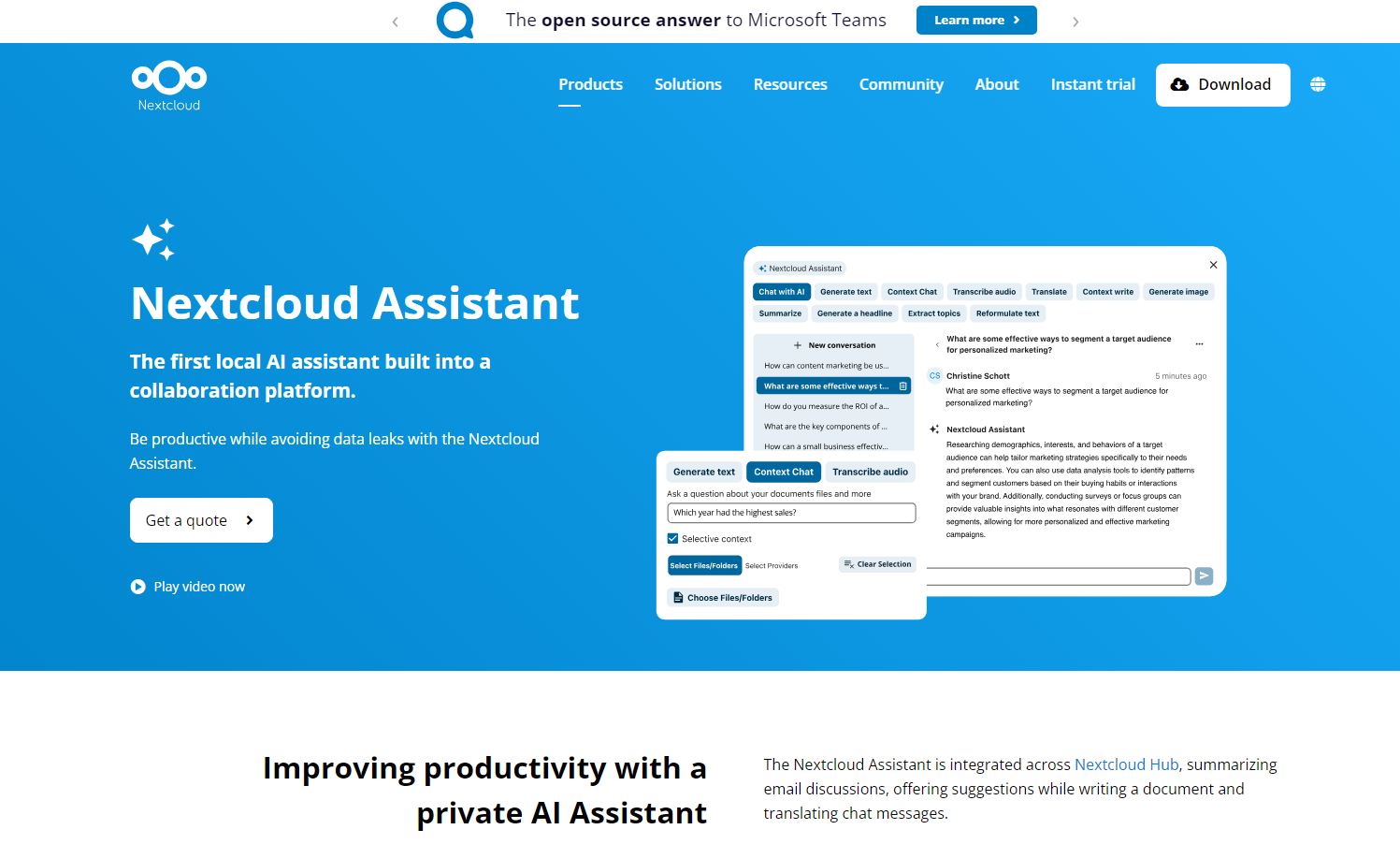
Imagine having a personal assistant right within your workflow, ready to help you conquer your daily tasks without compromising your data privacy. That's what you get with the Nextcloud Assistant, the first locally hosted AI assistant built into a collaboration platform. Now you can enjoy the power of AI while keeping your sensitive information secure. It seamlessly integrates across the Nextcloud Hub, streamlining your work and boosting your productivity.
Key Features:
Chat with AI:💬 Engage in natural, flowing conversations with the Assistant. It remembers previous interactions, making your requests and responses feel more human and personalized. With your data secure on your server, you can ask anything without worrying about leaks.
Generate Text:✍️ Need help drafting an email or creating content? The Assistant's Context Write feature can turn your notes into polished text based on your instructions.
Transcribe Audio:🎙️ Effortlessly convert audio recordings into text, saving you valuable time on note-taking and documentation.
Access Easily:🖱️ Summon the Assistant with a single click from anywhere in the Nextcloud Hub, making it readily available whenever you need it.
Execute Pre-defined Operations:⚙️ Quickly perform common tasks like summarizing documents or generating headlines with just a few clicks.
Utilize Open Source and Self-Hosted:🛡️ Leverage the power of various local large language models (LLMs) without worrying about data breaches. Your information stays on your server, ensuring complete privacy.
Explore Integrated AI Features:👁️ Discover a suite of AI-powered tools, including face and object detection in Photos, recommended files, text dictation, general translations, and document classification. These tools make it easier to organize, analyze and find what you need in your documents.
Use Cases:
Let's see how the Nextcloud Assistant can make a difference in your daily workflow:
Education:Picture this: You're a teacher preparing for a lecture. The Assistant can quickly transcribe your recordings, create summaries of key concepts, and even generate unique assignments for your students. Later, it can help grade homework and answer basic student questions, freeing you up to focus on teaching.
Public Sector:Imagine you're a government employee dealing with a mountain of policy documents. The Assistant can summarize lengthy reports, craft new policy briefs from your notes, and answer your questions about project statuses. You can even use it to generate meeting notes for public dissemination or translate documents for multilingual audiences, ensuring transparency and accessibility.
Enterprise:You're a business professional preparing for a crucial meeting. The Assistant can help you quickly process information from various sources, take and share meeting notes, draft responses to clients, transcribe video calls, and summarize lengthy chat discussions. This keeps your team informed and efficient, allowing you to act on new information faster.
Conclusion:
The Nextcloud Assistant isn't just another AI tool. It's your trusted partner for a more efficient and secure workflow. It's about empowering you with the benefits of AI while ensuring your data remains private and under your control. Whether you're in education, the public sector, or a business environment, the Nextcloud Assistant offers a powerful, secure, and versatile solution to enhance your productivity.
FAQ:
How does Nextcloud ensure my data stays private when using the Assistant?
Nextcloud Assistant can be configured to use local, on-premise large language models (LLMs). This means all processing happens on your server, and your data never leaves your control. It is not used to train other AI models.
Can I use the Assistant with cloud-based LLMs?
Yes, Nextcloud offers trusted Software as a Service (SaaS) options through partnerships with European tech companies like OVHcloud, IONOS, and Plusserver. These providers adhere to strict EU privacy regulations, ensuring your data is handled responsibly.
What if I don't have the infrastructure to run AI workloads locally?
Nextcloud's partnerships with trusted SaaS providers offer a solution for those not ready to manage AI workloads on their own infrastructure. These services provide the benefits of AI while complying with European data protection standards.
How can I get access to the Nextcloud AI Assistant?
The Nextcloud AI Assistant is available through the Ultimate subscription.
Does the AI remember my conversations?
Yes, the Chat with AI feature remembers your conversations, enabling more natural and smooth interactions over time.
More information on Nextcloud Assistant
Launched
2005-02
Pricing Model
Contact for Pricing
Starting Price
Global Rank
34153
Follow
Month Visit
1.5M
Tech used
Font Awesome,Bootstrap,jQuery,Gzip,JSON Schema,OpenGraph,RSS,HSTS,reCaptcha,Apache
Top 5 Countries
18.41%
10.63%
5.87%
5.77%
4.28%
Germany
United States
France
Russia
Switzerland
Traffic Sources
1.07%
0.42%
0.05%
6.08%
55.34%
37.05%
social
paidReferrals
mail
referrals
search
direct
Source: Similarweb (Sep 25, 2025)
Nextcloud Assistant was manually vetted by our editorial team and was first featured on 2025-01-20.
Nextcloud Assistant Alternatives
Load more Alternatives-
Save time on research, documents management, and content generation. AI Assistant remembering your preferences and uses that knowledge to give you superpowers.
-

-
-

Highlight AI: Instant AI answers for your screen. Understand text, images & audio. Boost productivity with voice control. Free desktop assistant.
-