

What is Yoink AI?
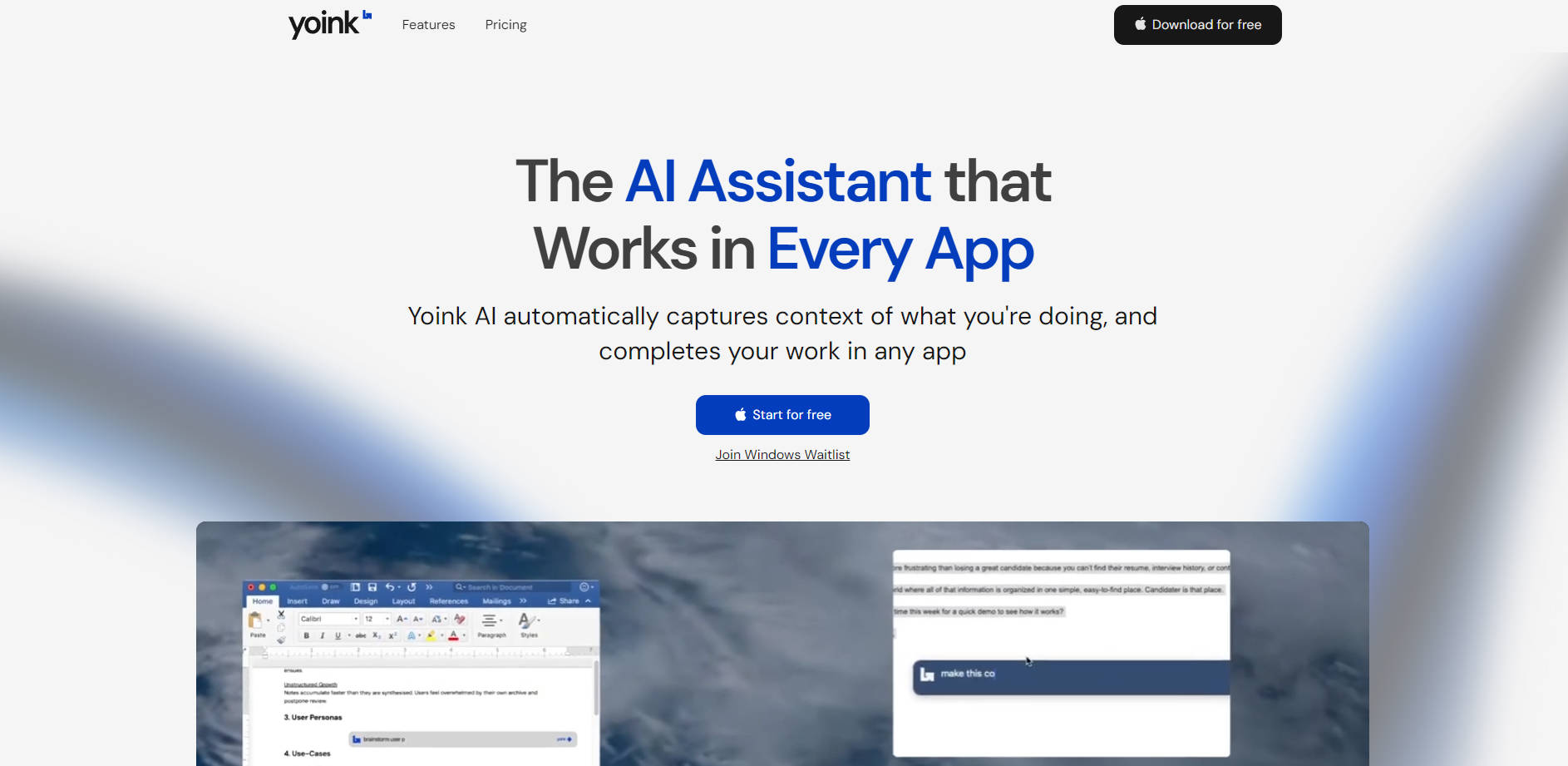
Stop breaking your focus by switching tabs and copy-pasting context into a separate AI chat window. Yoink AI is a powerful assistant built for macOS that works directly inside any application you use. It intelligently understands what you're working on—from text to visuals—to provide instant, relevant assistance without disrupting your workflow.
Key Features
🧠 Intelligent Context Awareness Yoink AI automatically reads the text and analyzes the visuals (like charts or designs) in your active window. This eliminates the need to copy-paste, providing the AI with the full picture to deliver more accurate and relevant results, faster.
✍️ Direct In-App Writing & Editing Unlike a chatbot, Yoink AI acts as your co-writer. Place your cursor and let it complete your thoughts, rewrite a paragraph, or fix grammar on the spot. It delivers the final output directly in your document, not a set of instructions.
⌨️ Universal Access in Any App With a single, consistent shortcut (⌘+Shift+Y), you can summon Yoink AI wherever you work. Because it’s a native macOS tool, it functions seamlessly across all your applications, from Notion and Slack to your code editor.
🗣️ Personalized Writing Voices Train Yoink AI with examples of your writing to create custom "voices." You can then instantly apply your unique style—whether formal, casual, or technical—to any generated text, ensuring your output always sounds authentic.
How Yoink AI Solves Your Problems:
Yoink AI is designed for practical, everyday tasks, turning complex steps into a single command.
Turn Research into Reports, Instantly: Have a research paper open in one window and your report draft in another. Instead of manually summarizing and transferring key points, simply prompt Yoink AI to draft a summary of the source material directly into your document. It sees both windows, understands the context, and does the work for you.
Analyze Visual Data without Leaving Your Workflow: You're reviewing a presentation with complex charts. Activate Yoink AI to analyze the on-screen graph and ask it to describe the key trends in bullet points. It captures the visual, understands your request, and provides a text-based analysis you can immediately use.
Draft Professional Emails in Seconds: When you receive a detailed customer inquiry in your inbox, use Yoink AI to draft a comprehensive and well-structured reply. It reads the original email for context, understands the key questions, and generates a polished draft that you can quickly review and send.
Conclusion:
Yoink AI fundamentally changes how you interact with artificial intelligence by bringing it directly into your workflow. It's designed for professionals who value focus and efficiency, eliminating friction so you can get better results, faster. Explore how Yoink AI can become your silent, powerful co-writer in every app you use!
Frequently Asked Questions (FAQ)
1. How is Yoink AI different from a standard AI chatbot? The key difference is action versus conversation. A chatbot provides answers in a separate chat interface, which you then have to copy and apply. Yoink AI is a "co-writer" that performs the action—like writing a paragraph, fixing grammar, or summarizing text—directly inside your document or text field, creating a zero-friction workflow.
2. What applications does Yoink AI work with? As a native macOS application, Yoink AI is designed to work universally across your system. If you can type in an application—whether it's a word processor like Google Docs, a messaging app like Slack, a design tool like Miro, or your email client—Yoink AI can work there.
3. Is Yoink AI available for Windows? Currently, Yoink AI is a native macOS application. However, a waitlist is available for Windows users who are interested in being notified of future availability.
More information on Yoink AI
Launched
2025-06
Pricing Model
Freemium
Starting Price
$20 /month
Global Rank
2582269
Follow
Month Visit
8.2K
Tech used
Top 5 Countries
40.24%
19.42%
18.26%
11.29%
3.63%
United States
Russia
Vietnam
Taiwan
Ukraine
Traffic Sources
1.18%
0.21%
0.04%
20.44%
22.67%
55.23%
social
paidReferrals
mail
referrals
search
direct
Source: Similarweb (Sep 25, 2025)
Yoink AI was manually vetted by our editorial team and was first featured on 2025-07-29.
Related Searches
Yoink AI Alternatives
Load more Alternatives-

Enhance your writing tasks on macOS with Writers Brew, the versatile AI tool that works across all platforms. Get well-crafted replies and more!
-
-

Get instant AI prompts with ClipboardAI! Use keyboard shortcuts to transform text directly in any app. Boost productivity & eliminate app switching.
-
QuestionAI: Solve problems & understand anything instantly. Your AI browser copilot for screenshots, writing, summaries & academic help.
-
