

What is Captioner?
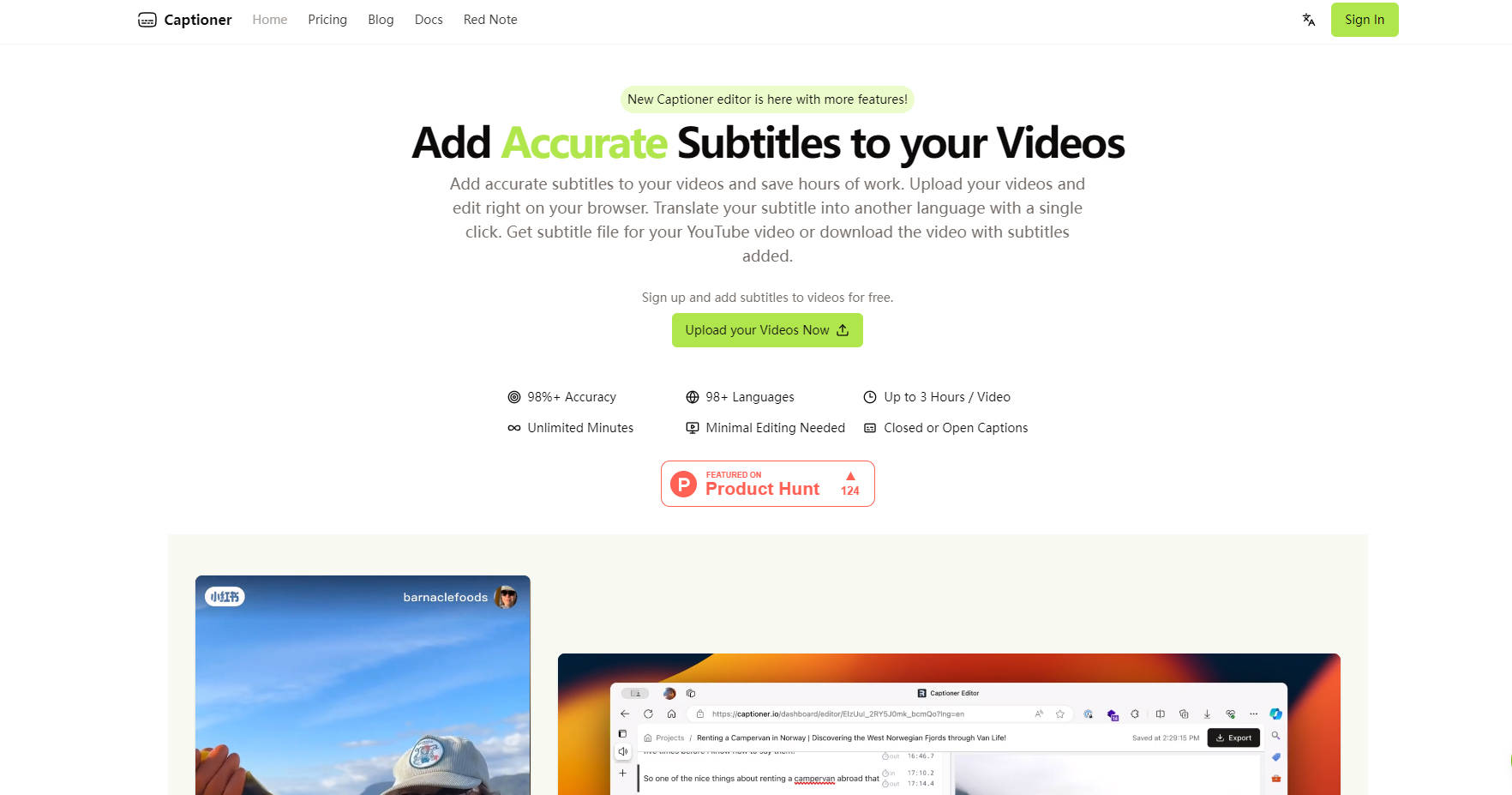
Creating video content often involves the time-consuming task of adding subtitles. You need accuracy for accessibility and engagement, but manual transcription or wrestling with clunky tools can drain hours from your workflow. Captioner is designed to give you back that time, providing highly accurate, AI-powered subtitles directly within your browser. Upload your video, and let Captioner handle the heavy lifting of transcription and timing, so you can focus on your message.
Key Features
🎯 Achieve High Accuracy Transcription: Captioner utilizes an optimized version of the Whisper AI model, focusing specifically on transcription quality for video. This means fewer errors to correct, saving you significant editing time. It supports transcription in over 98 languages.
⏱️ Get Precise Timestamps: Forget subtitles that appear too early or late. Captioner employs extra processing to ensure timestamps align closely with the speech in your video, even offering word-level timestamps for fine-grained adjustments when needed.
✍️ Enjoy a Smooth Editing Experience: Built by content creators, the Captioner editor is designed for intuitive use. Make corrections, adjust timing, and refine your subtitles directly in your browser without complex software.
📥 Import and Align Existing Transcripts: Already have a script or transcript? Upload it to Captioner, and the tool will automatically synchronize the text with your video's audio, similar to YouTube's auto-sync feature but with enhanced precision.
🌐 Export in Multiple Formats or Burn-in: Download your subtitles in popular formats like SRT, VTT, or SBV, ready for upload to platforms like YouTube or use in editing software. Alternatively, choose a font style and export a new video file with the subtitles directly burned in.
🗣️ Translate Subtitles Easily: Reach a broader audience by translating your subtitles. Currently, translation from English to Mandarin Chinese is available with a single click on the Express plan, with more languages planned.
Use Cases
For the Busy YouTuber: You've just finished editing your latest video. Instead of spending hours typing out subtitles, you upload the video to Captioner. Within minutes, you receive an accurate transcription with precise timing. After a quick review in the editor, you export the SRT file and upload it directly to YouTube, making your content accessible and searchable faster.
For the Online Course Creator: You need clear, readable captions for your educational videos to ensure accessibility for all learners. Using Captioner, you generate subtitles, make minor adjustments for clarity in the browser editor, select a clean font style, and export the video with subtitles burned in, ensuring a consistent viewing experience across all platforms.
For the Marketing Team: Your company is launching a new product video targeting international markets. You use Captioner to generate accurate English subtitles first. Then, using the translation feature (currently English to Mandarin Chinese on Express), you create a version for another key market, expanding your reach with minimal extra effort.
Conclusion
Captioner is built to remove the friction from video subtitling. By prioritizing accuracy, providing precise timing, and offering a user-friendly editing experience, it allows you to produce accessible, professional-looking videos more efficiently. Whether you need standard subtitle files or videos with burned-in captions, Captioner provides the flexibility and quality to enhance your content creation process, letting you dedicate more time to what you do best: creating engaging videos.
Frequently Asked Questions
What exactly is Captioner? Captioner is an online tool specialized in using AI to transcribe speech in videos into text, creating accurate subtitles. It supports over 98 languages and focuses on aligning the subtitles precisely with the video's audio.
How accurate is the transcription? Captioner uses a high-quality AI model (an optimized version of Whisper) focused on accuracy to minimize editing time. Accuracy can vary slightly depending on the audio quality and language, with English and Chinese (including Cantonese) being particularly well-supported. We encourage you to try it with your own content.
What makes Captioner different from general transcription tools? While based on powerful AI transcription, Captioner includes specific optimizations for video subtitles, such as extra processing for precise timestamp alignment (including word-level) and an integrated, user-friendly subtitle editor designed for content creators.
What subtitle formats can I export? You can export your subtitles as SBV, SRT, and VTT files, which are compatible with most video platforms and editing software. You also have the option to export a video file with the subtitles burned directly into the picture.
Can I edit the generated subtitles? Yes, the Unlimited plan provides full access to the browser-based editor where you can modify text, adjust timing, and add or remove subtitle segments. Simpler editing options for other plans are in development.
More information on Captioner
Launched
2024-04
Pricing Model
Freemium
Starting Price
$10 / month
Global Rank
541347
Follow
Month Visit
<5k
Tech used
Cloudflare Analytics,Google Tag Manager,Cloudflare CDN,Astro,Gzip,HTTP/3,RSS
Captioner was manually vetted by our editorial team and was first featured on 2025-03-29.
Related Searches
Captioner Alternatives
Load more Alternatives-

SubtitleMe's AI instantly generates 99%+ accurate, perfectly synced subtitles & searchable transcripts for any video or audio. Maximize reach & SEO.
-
Boost your online presence with accurate video subtitles. Generate hours of subtitles in under 5 minutes! Try it now and enhance your SEO rankings.
-

-

VideoCaptioner is an intelligent video captioning software. No high-end GPU needed. It simplifies captioning with features like speech recognition, caption segmentation & multilingual translation. Ideal for creators, educators & corporate trainers.
-
Lightning-fast, private AI subtitles for video. FlyCut Caption generates 95%+ accurate captions instantly with local processing & precision visual editing. Free.