

What is Kaiboard?
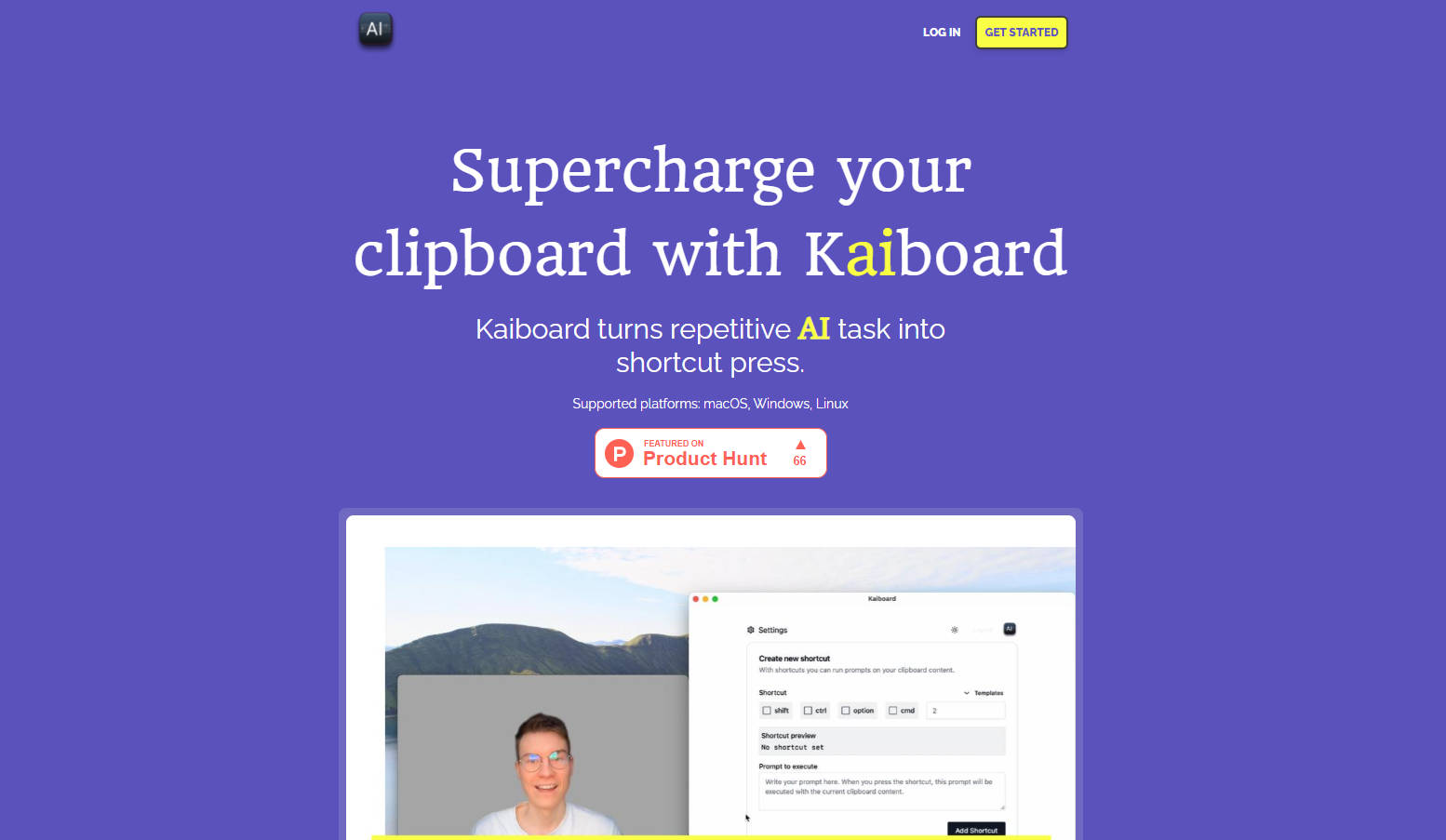
Do you find yourself frequently copying text, switching to an AI chat window, pasting, typing a prompt, and then copying the result back? Kaiboard streamlines this entire process. It lets you connect the power of Large Language Models (LLMs) directly to your clipboard, transforming those multi-step AI tasks into simple keyboard shortcuts. If you use AI daily for tasks like drafting emails, checking grammar, or translating text, Kaiboard integrates these actions seamlessly into your existing workflow.
How Kaiboard Works
Getting started is straightforward:
Download and install the Kaiboard desktop app.
Define a keyboard shortcut and pair it with an AI prompt you often use (e.g., "Check this text for grammar errors" or "Translate this text to Spanish").
Copy any text to your clipboard.
Press the shortcut you defined.
Kaiboard sends the copied text and your prompt to the LLM.
After a brief moment, paste the AI-generated result wherever you need it.
Key Features
⌨️ Bind Prompts to Shortcuts: Assign your frequently used AI instructions (prompts) to specific keyboard combinations. This gives you instant access to tasks like summarizing, rephrasing, or coding assistance without manually typing the prompt each time.
📋 Run AI Directly on Clipboard Text: When you press a defined shortcut, Kaiboard automatically takes the text currently on your clipboard and processes it using the associated prompt and the underlying AI model (like GPT-4o on the Personal plan).
⚡ Automate Common AI Interactions: Convert routine requests—like checking spelling, brainstorming ideas based on selected text, or formatting code snippets—into single shortcut presses, significantly reducing clicks and context switching.
💻 Works Across Your Devices: Use Kaiboard consistently whether you're on macOS, Windows, or Linux, ensuring your productivity shortcuts are always available.
Use Cases
Faster Email Responses: Copy the text of an incoming email, press a shortcut linked to a "Draft a polite refusal" prompt, and paste the generated starting point directly into your reply draft. Finish it off with specifics and send.
Instant Language Translation: Working with multilingual content? Copy a paragraph in another language, hit your "Translate to English" shortcut, and paste the translation into your document or communication app seconds later. Marko from OCTAGO notes, "Kaiboard was immensely useful when we did translations to other languages. We setup shortcuts for that and got the job done quicker."
On-the-Fly Content Polishing: Before sending a message or publishing a post, copy your draft, use a "Proofread for grammar and clarity" shortcut, and paste the improved version back. Lucia from Plantitude shares, "I cannot imagine work day without Kaiboard. I use for grammar checks, emails and translations."
Why Consider Kaiboard?
Kaiboard bridges the gap between your everyday tasks and the capabilities of AI. Instead of treating AI as a separate tool you constantly switch to, Kaiboard integrates it directly into your workflow via familiar keyboard shortcuts. This saves time, reduces friction, and helps you leverage AI more efficiently for the repetitive tasks you perform throughout the day. If you're looking to enhance your productivity and make better use of AI tools, Kaiboard offers a practical way to do just that.
Frequently Asked Questions (FAQ)
Do you store my prompts and clipboard content? No, Kaiboard does not store your prompts or clipboard content. Requests are processed using OpenAI's models. You can review OpenAI's privacy policy for details on how they handle data.
Do you offer a free trial? Yes, the Personal plan includes a 3-day free trial for you to test out the features.
What does "1M tokens / month" mean? Tokens are pieces of words used by the AI model. When you use a shortcut, the text you copied and your prompt are sent to the AI, consuming tokens. Longer text uses more tokens. For context, the 68-token example poem provided on the website illustrates how text length relates to token usage. The 1 million token limit provides a substantial amount for typical daily use cases like email drafting, grammar checks, and translations.
More information on Kaiboard
Launched
2024-10
Pricing Model
Free Trial
Starting Price
2.99 € / month
Global Rank
Follow
Month Visit
<5k
Tech used
Cloudflare CDN,Bunny Fonts,Gzip,HTTP/3,OpenGraph
Top 5 Countries
100%
United States
Traffic Sources
100%
referrals
Source: Similarweb (Sep 25, 2025)
Kaiboard was manually vetted by our editorial team and was first featured on 2025-03-26.
Related Searches
Kaiboard Alternatives
Load more Alternatives-

Get instant AI prompts with ClipboardAI! Use keyboard shortcuts to transform text directly in any app. Boost productivity & eliminate app switching.
-

PromptBoard revolutionizes AI interactions by offering seamless prompt management across devices. Save, discover, and manage AI prompts with ease.
-
RewriteBar: Your AI writing assistant for macOS. Get instant, system-wide help in any app. Eliminate context switching & write smarter, faster.
-

PromptBook is the ultimate notebook for prompt engineering with functions like documenting prompts, sharing notes, running prompts, and enhancing workflow and productivity, suitable for various users.
-